Music HUD
🟡 Updated this year🖼️ Gallery (12 images)




🔍 Analysis
- 👍 0.0% endorsement rate
- 🏆 #161 of 1560 bukkit mods in this game by downloads
📋 About This Mod
!( https://cdn.modrinth.com/data/7Rnb6oJr/images/20ba5cbcaf71e2ab70436963776e5f801fea44a7.png) !(https://cdn-alt.modrinth.com/data/7Rnb6oJr/images/1df1c89491d051b3ac5bb90f95d4d4b054c0af57.png) (Shot on 1.3.0 alpha 2, see more in (https://modrinth.com/plugin/music-hud/gallery)) #### A GUI-based, all situations (singleplayer/multiplayers) music mod/plugin designed with zero modifications to game mechanics > Due to service scope provided by NetEase, this mod might not work well outside China ## Related Links (https://github.com/Shiroiame-Kusu/MusicHud-Bukkit) (1.0.5 stable -) (https://github.com/MOPELotus/MusicHud-Paper) (1.1.4 hotfix +, now partly merged into main repository) ## Prerequisites - ModernUI (only client, using mVUS fork on 1.21.9-11, (https://github.com/Chino081/ModernUI-MC/releases/tag/26.2) on 26.2) - Forge Config API Port (only Fabric) - Fabric API (only Fabric) - ~~Architectury API~~ (Fabric / NeoForge, required by MusicHUD 1.2.0 and below) ## Features - With graceful GUI, providing an in-game operation interface and a easily configurable HUD. - Can read NetEase Cloud Music account playlists for convenient song requests. - The server does not retain user data; it is only temporarily stored during session. - Streamed playback with no redundant client-side caching. - Staggered lyrics auto scroll inspired by Apple Music - HUD dynamic fluid background - Windows SMTC / Linux MPRIS (have not fully tested yet) support (Powered by slightly modified (https://github.com/Selemba1000/JavaMediaTransportControls)) - High quality audio support, with optimized pipeline based on OpenAL - Connected mode: Synchronized server-wide play queue and progress. - Isolated mode: Do all works on client, enjoy music yourself. - Sharing same playback model between connected mode and isolated mode, easy to use - Low network bandwidth / performance required for server side, audio stream downloading and processing is done on client side ## Functions - Search for musics, playlists, albums and artists. - Favorite/Unfavorite musics, subscribe/unsubscribe playlists, albums and artists. (1.3.0 alpha +) - Vote for skipping current music - Log in to NetEase Cloud Music account via QR code or SMS code to explore subscribed playlists, albums and artists. - Configure idle playback sources for automatic random song switching when music player is idle. - Display lyrics, requesting player (or avatar) in the HUD and user interface. ## Compatibility - Mute Reactive Music when MusicHUD is playing - Connected mode compatible with ViaVersion (1.3.0 alpha +) - Adapted to Sound Physics Perfected, disabled its reverb applied to MusicHUD audio pipeline to improve audio quality (1.3.0 alpha 2+) ## TO-DO List - Customizable HUD layout - More music platform support (QQ Music, Kugou Music or more) ## Usage ### Client First of all, place the prerequisite mods and the MusicHud jar file into the mods folder. #### Single-player or LAN Multi-player Host All you need is to configure or deploy an API server. #### Multiplayer (join Server or LAN Multi-player) ##### Connected mode You don't need to configure or deploy an API server, but the server or LAN multiplayer host needs to configure or deploy MusicHUD and API server. ##### Isolated mode All you need is to configure or deploy an API server. ### Server All you need is to configure or deploy an API server. ### How to Deploy an API Server There are 2 methods to deploy. #### Deploy bound with mod (recommend for client) > This method allows MusicHUD to manage lifecycle of api server. > > Due to some limitations, API Server may not be auto-closed when game exit abnormal (e.g., due to a crash) ##### Auto Deploy You can find "Download API..." button in setting page, which will open a download guide, and download NetEase Cloud Music Enhanced from (https://github.com/MOPELotus/api-enhanced) which automatically releases artifact powered by GitHub Actions to bypass login restrictions of accessing artifacts from GitHub Actions, with optional GH Proxy speedup ##### Manual Deploy 1. **Login to GitHub (Important, otherwise can NOT download artifacts)** and go to https://github.com/NeteaseCloudMusicApiEnhanced/api-enhanced/actions/workflows/build-dev.yml 2. Click latest action runs in type "Build Artifacts" and download platform binary artifacts matches to your pc/server platform 3. Uncompress the binary executable file from ZIP file to ... - Mod edition: `{corepath}/music-hud/` and rename it to `api` (`api.exe` on Windows) - Plugin edition: `{corepath}/plugins/MusicHud/` and rename it to `api` (`api.exe` on Windows) - Or place it anywhere and modify config in game or option `serverApiBinaryExecutablePath` (absolute or relative path) in config file `/config/music_hud-common.toml`. #### Deploy separately (recommend fo
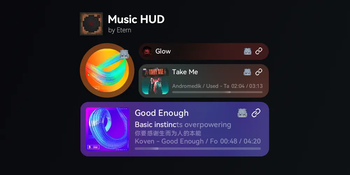
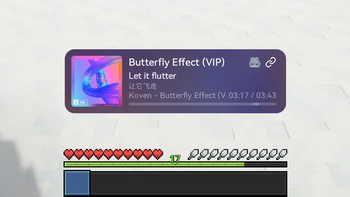
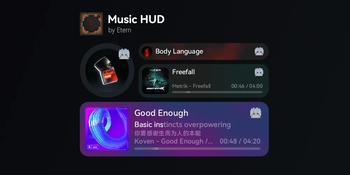
!( https://cdn.modrinth.com/data/7Rnb6oJr/images/20ba5cbcaf71e2ab70436963776e5f801fea44a7.png) !(https://cdn-alt.modrinth.com/data/7Rnb6oJr/images/1df1c89491d051b3ac5bb90f95d4d4b054c0af57.png) (Shot on 1. 3. 0 alpha 2, see more in (https://modrinth.com/plugin/music-hud/gallery))
#### A GUI-based, all situations (singleplayer/multiplayers) music mod/plugin designed with zero modifications to game mechanics
> Due to service scope provided by NetEase, this mod might not work well outside China
## Related Links
(https://github.com/Shiroiame-Kusu/MusicHud-Bukkit) (1. 0. 5 stable -)
(https://github.com/MOPELotus/MusicHud-Paper) (1. 1. 4 hotfix +, now partly merged into main repository)
## Prerequisites - ModernUI (only client, using mVUS fork on 1. 21. 9-11, (https://github.com/Chino081/ModernUI-MC/releases/tag/26. 2) on 26. 2) - Forge Config API Port (only Fabric) - Fabric API (only Fabric) - ~~Architectury API~~ (Fabric / NeoForge, required by MusicHUD 1. 2. 0 and below)
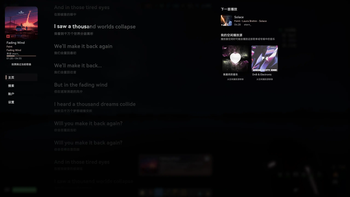
## Features - With graceful GUI, providing an in-game operation interface and a easily configurable HUD. - Can read NetEase Cloud Music account playlists for convenient song requests. - The server does not retain user data; it is only temporarily stored during session. - Streamed playback with no redundant client-side caching. - Staggered lyrics auto scroll inspired by Apple Music - HUD dynamic fluid background - Windows SMTC / Linux MPRIS (have not fully tested yet) support (Powered by slightly modified (https://github.com/Selemba1000/JavaMediaTransportControls)) - High quality audio support, with optimized pipeline based on OpenAL - Connected mode: Synchronized server-wide play queue and progress. - Isolated mode: Do all works on client, enjoy music yourself. - Sharing same playback model between connected mode and isolated mode, easy to use - Low network bandwidth / performance required for server side, audio stream downloading and processing is done on client side
## Functions - Search for musics, playlists, albums and artists. - Favorite/Unfavorite musics, subscribe/unsubscribe playlists, albums and artists. (1. 3. 0 alpha +) - Vote for skipping current music - Log in to NetEase Cloud Music account via QR code or SMS code to explore subscribed playlists, albums and artists. - Configure idle playback sources for automatic random song switching when music player is idle. - Display lyrics, requesting player (or avatar) in the HUD and user interface.
## Compatibility - Mute Reactive Music when MusicHUD is playing - Connected mode compatible with ViaVersion (1. 3. 0 alpha +) - Adapted to Sound Physics Perfected, disabled its reverb applied to MusicHUD audio pipeline to improve audio quality (1. 3. 0 alpha 2+)
## TO-DO List - Customizable HUD layout - More music platform support (QQ Music, Kugou Music or more)
### Client First of all, place the prerequisite mods and the MusicHud jar file into the mods folder.
#### Single-player or LAN Multi-player Host All you need is to configure or deploy an API server.
#### Multiplayer (join Server or LAN Multi-player) ##### Connected mode You don't need to configure or deploy an API server, but the server or LAN multiplayer host needs to configure or deploy MusicHUD and API server.
##### Isolated mode All you need is to configure or deploy an API server.
### Server All you need is to configure or deploy an API server.
### How to Deploy an API Server There are 2 methods to deploy. #### Deploy bound with mod (recommend for client) > This method allows MusicHUD to manage lifecycle of api server. > > Due to some limitations, API Server may not be auto-closed when game exit abnormal (e.g., due to a crash)
##### Auto Deploy You can find "Download API..." button in setting page, which will open a download guide, and download NetEase Cloud Music Enhanced from (https://github.com/MOPELotus/api-enhanced) which automatically releases artifact powered by GitHub Actions to bypass login restrictions of accessing artifacts from GitHub Actions, with optional GH Proxy speedup
##### Manual Deploy 1. Login to GitHub (Important, otherwise can NOT download artifacts) and go to https://github.com/NeteaseCloudMusicApiEnhanced/api-enhanced/actions/workflows/build-dev.yml 2. Click latest action runs in type "Build Artifacts" and download platform binary artifacts matches to your pc/server platform 3. Uncompress the binary executable file from ZIP file to ... - Mod edition: `{corepath}/music-hud/` and rename it to `api` (`api.exe` on Windows) - Plugin edition: `{corepath}/plugins/MusicHud/` and rename it to `api` (`api.exe` on Windows) - Or place it anywhere and modify config in game or option `serverApiBinaryExecutablePath` (absolute or relative path) in config file `/config/music_hud-common.toml`.
#### Deploy separately (recommend fo
📊 Mod Details
- Game
- Minecraft Plugins
- Author
- Etern
- Version
- 1.3.0-alpha-2
- Downloads
- 34,187
- Endorsements
- 13
- Category
- bukkit
- Created
- 1/18/2026
- Updated
- 8/22/2026
- Game Versions
- 1.21.1, 1.21.6, 1.21.7, 1.21.8, 1.21.9
- Tags
- social, utility
🔧 How to Install Minecraft Plugins Mods
Download from Modrinth. Use Prism Launcher or drop into your mods folder.
📖 Full step-by-step install guide for Minecraft Plugins →
Visit the official mod page for specific installation instructions for this mod.
🎮 Need cheat codes or console commands? Check ur gaming wiki for Minecraft Plugins commands, item IDs, and more.
❓ Frequently Asked Questions
Which Minecraft Plugins versions does Music HUD support?
The author lists 1.21.1, 1.21.6, 1.21.7, 1.21.8, 1.21.9, 1.21.10. Other versions may work but are untested by the author.
What is the latest version of Music HUD?
Version 1.3.0-alpha-2, published 2026-08-22 with 34,187 downloads recorded at the source.
Keep browsing — more Minecraft Plugins mods await