MineGames
🟡 Updated this year🖼️ Gallery (4 images)


🔍 Analysis
- 🏆 #1192 of 1452 bukkit mods in this game by downloads
📋 About This Mod
# MineGames !(https://i.imgur.com/NO1MpCA.png) MineGames is a Paper `1.21+` casino plugin with four game types: 1. **MineGame**: reveal safe blocks, avoid mines, cash out at your chosen point. !(https://i.imgur.com/DTNVhJG.png) !(https://i.imgur.com/NGqeNLs.png) 2. **Roulette**: perpetual rounds where players bet on red/black/green. !(https://i.imgur.com/0mcRZ5v.png) !(https://i.imgur.com/1oyUPr8.png) 3. **Slots**: lever-driven reels with configurable widths, rows, frames, and payouts. !(https://i.imgur.com/cj5fCTH.png) 4. **Fights**: wager on randomly equipped mobs battling inside a protected arena. !(https://i.imgur.com/31TJ2ly.png) All games use Vault economy, support per-station cosmetics, holograms, and casino frame animations. ## Requirements - Java 21 - Paper 1.21+ - Vault (for example (https://modrinth.com/plugin/vaultunlocked)) - A Vault-compatible economy plugin (for example (https://modrinth.com/plugin/economyprovider-by-ilius)) ## Install 1. Place `minegames-1.x.x.jar` in `plugins/`. 2. Ensure Vault + economy plugin are installed. 3. Start/restart server. 4. Edit `plugins/MineGames/config.yml` as needed. 5. Create stations: 1. MineGame station: stand on your station block and run `/minegameadmin create` 2. Roulette station: stand at board center and run `/rouletteadmin create` 3. Slots station: stand where you want the machine and run `/slotsadmin create ` 4. Fights station: stand at the arena origin and run `/fightadmin create ` ## Casino Settings GUI Operators can open the inventory-based settings menu with: ```text /casinogui ``` The GUI includes MineGame, Roulette, Slots, and Fights. Select a game to edit global settings, browse its stations, and edit supported per-station overrides. Global changes override existing station settings. Previous/Next navigate settings pages, and Back/Stations provide navigation. ## Gameplay ### Mines 1. Stand on a MineGame station block. 2. Start a game: `/minegame <mines> <wager>` 3. Break/click tiles to reveal safe blocks. 4. Cash out with `/minegame cashout` or by breaking a frame block. 5. Lose by hitting a mine or timeout, win by clearing all safe tiles. ### Roulette 1. Stand near a Roulette station. 2. Place bet: `/roulette <red|black|green> <amount>` 3. Bets close when countdown ends, then spin/result phase resolves. 4. Payouts apply automatically for winning color bets. 5. Round resets and repeats continuously. ### Slots 1. Stand near a Slots station. 2. Pull the lever to spin and pay the configured wager. 3. Reels animate for a few seconds and then stop from left to right. 4. Matching the winning block pays out based on how many appear or which payline lands. 5. The station can be customized with outer frame, inner frame, winning block, row count, and lever-side frame animation. ### Fights 1. Stand near a Fights station. 2. Place a bet: `/fighter <fighter-number> <amount>`. 3. The first accepted bet opens the countdown; fighters spawn only when betting closes. 4. Two fighters run as a duel. Three or more fighters run as a free-for-all. 5. Fighters receive random weapons, armor, enchantments, colors, and supported variants, then fight until one remains. The pool includes zombie, husk, drowned, zombie villager, skeleton, stray, bogged, wither skeleton, pillager, piglin, piglin brute, and zombified piglin fighters. Winning bets pay automatically, losing bettors are notified, and the winner is celebrated with fireworks. 6. Set `fights.show-bettor-name-on-fighter` to show the bettor in the mob nameplate. Set `fights.fireworks-for-winning-bettors` to `true` (the default) to add fireworks from all four arena corners for winning bets. 7. All rolled weapons, including tridents, use armor- and enchantment-aware damage calculations. ## Winner Math & RNG 1. **MineGame** - Mine positions are generated once when the round starts with `Math.random()`, using `generateMines(mines, gridSize * gridSize)`. - Mines are placed uniformly without replacement, so the same cell cannot become a mine twice. - The player wins by revealing enough safe tiles before hitting a mine or timing out. - Payout is based on revealed safe tiles. If `minegame.game.max-multiplier` is set above `0`, the multiplier scales linearly from `1x` up to the configured max. Otherwise, it uses the inverse of the survival probability with a house-edge factor applied. - The survival math uses combinations: `surviveProbability = C(safe, revealed) / C(total, revealed)`. 2. **Roulette** - Each round builds a full board pattern from the configured color percentages: `roulette.red-percent`, `roulette.black-percent`, and `roulette.green-percent`. - The counts are normalized to the board size, then green cells are assigned randomly and the remaining cells are shuffled with Java `Random`. - When the spin resolves, the selector lands on a random board index and the colo
# MineGames
!(https://i.imgur.com/NO1MpCA.png)
MineGames is a Paper `1. 21+` casino plugin with four game types:
1. MineGame: reveal safe blocks, avoid mines, cash out at your chosen point.
!(https://i.imgur.com/DTNVhJG.png) !(https://i.imgur.com/NGqeNLs.png)
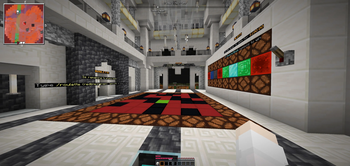
2. Roulette: perpetual rounds where players bet on red/black/green.
!(https://i.imgur.com/0mcRZ5v.png) !(https://i.imgur.com/1oyUPr8.png)
3. Slots: lever-driven reels with configurable widths, rows, frames, and payouts.
!(https://i.imgur.com/cj5fCTH.png)
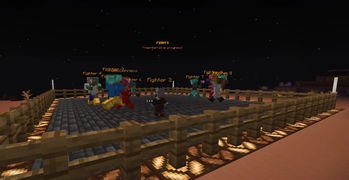
4. Fights: wager on randomly equipped mobs battling inside a protected arena.
!(https://i.imgur.com/31TJ2ly.png)
All games use Vault economy, support per-station cosmetics, holograms, and casino frame animations.
## Requirements
- Java 21
- Paper 1. 21+
- Vault (for example (https://modrinth.com/plugin/vaultunlocked))
- A Vault-compatible economy plugin (for example (https://modrinth.com/plugin/economyprovider-by-ilius))
1. Place `minegames-1.x.x.jar` in `plugins/`. 2. Ensure Vault + economy plugin are installed. 3. Start/restart server. 4. Edit `plugins/MineGames/config.yml` as needed. 5. Create stations: 1. MineGame station: stand on your station block and run `/minegameadmin create` 2. Roulette station: stand at board center and run `/rouletteadmin create` 3. Slots station: stand where you want the machine and run `/slotsadmin create ` 4. Fights station: stand at the arena origin and run `/fightadmin create `
## Casino Settings GUI
Operators can open the inventory-based settings menu with:
```text /casinogui ```
The GUI includes MineGame, Roulette, Slots, and Fights. Select a game to edit global settings, browse its stations, and edit supported per-station overrides. Global changes override existing station settings. Previous/Next navigate settings pages, and Back/Stations provide navigation.
## Gameplay
1. Stand on a MineGame station block.
2. Start a game: `/minegame
### Roulette
1. Stand near a Roulette station.
2. Place bet: `/roulette
1. Stand near a Slots station. 2. Pull the lever to spin and pay the configured wager. 3. Reels animate for a few seconds and then stop from left to right. 4. Matching the winning block pays out based on how many appear or which payline lands. 5. The station can be customized with outer frame, inner frame, winning block, row count, and lever-side frame animation.
1. Stand near a Fights station.
2. Place a bet: `/fighter
## Winner Math & RNG
1. MineGame - Mine positions are generated once when the round starts with `Math.random()`, using `generateMines(mines, gridSize * gridSize)`. - Mines are placed uniformly without replacement, so the same cell cannot become a mine twice. - The player wins by revealing enough safe tiles before hitting a mine or timing out. - Payout is based on revealed safe tiles. If `minegame.game.max-multiplier` is set above `0`, the multiplier scales linearly from `1x` up to the configured max. Otherwise, it uses the inverse of the survival probability with a house-edge factor applied. - The survival math uses combinations: `surviveProbability = C(safe, revealed) / C(total, revealed)`.
2. Roulette - Each round builds a full board pattern from the configured color percentages: `roulette.red-percent`, `roulette.black-percent`, and `roulette.green-percent`. - The counts are normalized to the board size, then green cells are assigned randomly and the remaining cells are shuffled with Java `Random`. - When the spin resolves, the selector lands on a random board index and the colo
📊 Mod Details
- Game
- Minecraft Plugins
- Author
- cev-api
- Version
- 1.0.5
- Downloads
- 422
- Endorsements
- 4
- Category
- bukkit
- Created
- 4/1/2026
- Updated
- 8/23/2026
- Game Versions
- 1.21, 1.21.1, 1.21.2, 1.21.3, 1.21.4
- Tags
- minigame
🔧 How to Install Minecraft Plugins Mods
Download from Modrinth. Use Prism Launcher or drop into your mods folder.
📖 Full step-by-step install guide for Minecraft Plugins →
Visit the official mod page for specific installation instructions for this mod.
🎮 Need cheat codes or console commands? Check ur gaming wiki for Minecraft Plugins commands, item IDs, and more.
❓ Frequently Asked Questions
Which Minecraft Plugins versions does MineGames support?
The author lists 1.21, 1.21.1, 1.21.2, 1.21.3, 1.21.4, 1.21.5. Other versions may work but are untested by the author.
What is the latest version of MineGames?
Version 1.0.5, published 2026-08-23 with 422 downloads recorded at the source.
Keep browsing — more Minecraft Plugins mods await