MineCord Link
⚪ Last updated 2024🖼️ Gallery (1 images)
🔍 Analysis
- 🏆 #1118 of 1452 bukkit mods in this game by downloads
📋 About This Mod
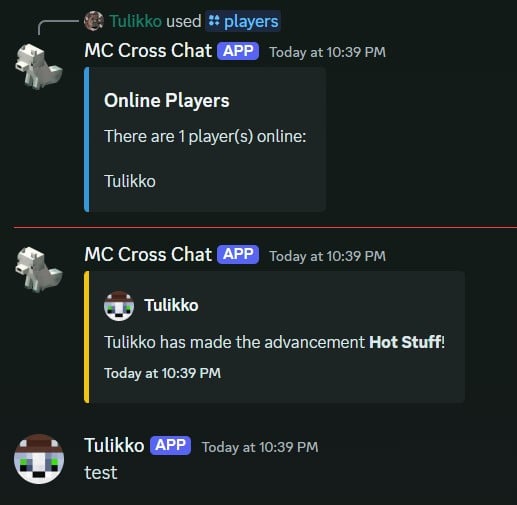
# MineCord Link MineCord Link is a Minecraft plugin that links your Minecraft server to Discord, enabling seamless communication between the two platforms. ## Features - Connect your Minecraft server chat with a Discord channel - Send Minecraft server events to Discord: - Player join/leave notifications - Player death messages - Player advancement achievements - Execute Minecraft commands from Discord - Share player coordinates between Minecraft and Discord - Automatic plugin updates - Cross-chat toggle to enable/disable chat synchronization - Display online players list in Discord - Server start/stop notifications in Discord - Customizable bot activity status - Link Minecraft and Discord accounts ## Commands ### Minecraft Commands - `/mcl reload` - Reloads the plugin configuration (requires `minecordlink.reload` permission) - `/mclcoords ` - Share your current coordinates in the game and Discord - `/mcllinkdiscord ` - Generate or enter a code to link your Minecraft account to Discord - `/mcltogglelistener <listener> <on|off>` - Toggle individual listeners on or off (requires `minecordlink.togglelistener` permission) ### Discord Commands - `/ping` - Responds with "Pong!" to check if the bot is active - `/admin <command>` - Executes a Minecraft server command (only for authorized users) - `/setup` - Sets up the bot for the current server and channel (requires Discord Administrator permission) - `/players` - Displays a list of online players - `/crosschat` - Toggles the crosschat feature on or off (only for authorized users) - `/linkminecraft ` - Link your Discord account to your Minecraft account or generate a link code
# MineCord Link
MineCord Link is a Minecraft plugin that links your Minecraft server to Discord, enabling seamless communication between the two platforms.
## Features
- Connect your Minecraft server chat with a Discord channel
- Send Minecraft server events to Discord:
- - Player join/leave notifications
- - Player death messages
- - Player advancement achievements
- Execute Minecraft commands from Discord
- Share player coordinates between Minecraft and Discord
- Automatic plugin updates
- Cross-chat toggle to enable/disable chat synchronization
- Display online players list in Discord
- Server start/stop notifications in Discord
- Customizable bot activity status
- Link Minecraft and Discord accounts
## Commands
### Minecraft Commands
- `/mcl reload` - Reloads the plugin configuration (requires `minecordlink.reload` permission)
- `/mclcoords ` - Share your current coordinates in the game and Discord
- `/mcllinkdiscord ` - Generate or enter a code to link your Minecraft account to Discord
- `/mcltogglelistener
### Discord Commands
- `/ping` - Responds with "Pong!" to check if the bot is active
- `/admin
📊 Mod Details
- Game
- Minecraft Plugins
- Author
- tulikkovulpus
- Version
- 1.1.0
- Downloads
- 443
- Endorsements
- 0
- Category
- bukkit
- Created
- 8/10/2024
- Updated
- 9/4/2024
- Game Versions
- 1.13, 1.13.1, 1.13.2, 1.14, 1.14.1
- Tags
- management, social, utility
🔧 How to Install Minecraft Plugins Mods
Download from Modrinth. Use Prism Launcher or drop into your mods folder.
📖 Full step-by-step install guide for Minecraft Plugins →
Visit the official mod page for specific installation instructions for this mod.
🎮 Need cheat codes or console commands? Check ur gaming wiki for Minecraft Plugins commands, item IDs, and more.
❓ Frequently Asked Questions
Which Minecraft Plugins versions does MineCord Link support?
The author lists 1.13, 1.13.1, 1.13.2, 1.14, 1.14.1, 1.14.2. Other versions may work but are untested by the author.
What is the latest version of MineCord Link?
Version 1.1.0, published 2024-09-04 with 443 downloads recorded at the source.
Keep browsing — more Minecraft Plugins mods await