Image Emojis: Emojis in chat
🟡 Updated this year🖼️ Gallery (7 images)
🔍 Analysis
- 👍 0.7% endorsement rate
- 🏆 #22 of 82 paper mods in this game by downloads
📋 About This Mod
**ImageEmojis** is a **Paper (1.19.4+)** plugin that allows you to add your **custom emojis** on your server.<br> **** The <u>max resolution</u> of an emoji is **256x256px**! Emojis should be stored in the **'.png'** format. **** Image names **should be lowercase** and **shouldn't contain any special symbols** like: `(`, `)`, ``, `&`, `^`, etc. If you have any issues/bugs, you may leave them (https://github.com/MrQuackDuck/ImageEmojis/issues). ### 👀 Screenshots <img height=300 src="https://github.com/user-attachments/assets/df778e85-07ec-4daa-aec3-fa097e7973a7" /> <img height=300 src="https://github.com/user-attachments/assets/73008596-6bdc-4cdf-8d7a-3075358df7f7" /> <img width=620 src="https://github.com/user-attachments/assets/f9edf474-8836-40c5-8bc2-cd19150704ac" /> <img width=620 src="https://github.com/user-attachments/assets/351a9dcb-2b0a-47e6-ad2b-ee8e2af52cbe" /><br/> <img width=620 src="https://github.com/user-attachments/assets/66b510f0-7b09-46c0-ad28-98ea3e2511d7" /> <img width=620 src="https://github.com/user-attachments/assets/a9138765-f220-4194-a447-b52f9c0f961c" /> <img width=620 src="https://github.com/user-attachments/assets/f78ec57a-aaa7-46bd-a312-db1058e156cf" /> <img width=620 src="https://github.com/user-attachments/assets/7b0d5d8d-85ed-453f-99db-bbdc8dda5e41" /> ### 💻 Commands - `/emojis list` — opens a book with all currently added emojis. - `/emojis update` — fetches the latest version of the emojis resource pack from the server. Intended to be used in case when the admin updated emojis and reloaded the plugin while you were playing. _(Alternatively, you can just rejoin and not use this command)_. - `/emojis reload` — reloads the plugin. Generates the resource pack based on the `./plugins/ImageEmojis/emojis/` directory. Aliases: `/ie`, `/imageemojis`. ### 🔞 Permissions - `imageemojis.admin` _(for **operators** by default)_ — Allows to use `/emojis reload`. - `imageemojis.use` _(**true** by default)_ — Allows to use emojis as well as the `/emojis` command. - `imageemojis.update` _(**true** by default)_ — Allows to use `/emojis update`. - `imageemojis.list` _(**true** by default)_ — Allows to use `/emojis list`. ### 🌠 Key features - **Automated resource pack generation** — the resource pack is generated every time the plugin starts or gets reloaded. The only thing you need to do is to provide your server IP in the configuration and open the TCP port on the host machine _(**5000** by default)_. - **Chat suggestions** - emoji suggestions when a player types a message in chat. You can choose from four suggestion modes: - `NONE` - disable chat suggestions. - `TEMPLATES` _(set by default)_ - suggest templates of emojis when typing (e.g., **\:clueless:**). - `ACTUAL` - suggest actual emojis (their UTF-8 symbols) when typing. (e.g., <img width=16 src="https://cdn.modrinth.com/data/cLBscQQD/76d73ccb8727dd91127b6a5c8095d722bfb74dd8_96.webp" />). - `BOTH` - A combination of "TEMPLATES" and "ACTUAL" modes. - Ability to **merge** emojis with your **server resource pack**: you can set the `mergeWithServerResourcePack` field to `true` in the `config.yml` and put your resource pack into the `../ImageEmojis/` directory with the `serverResourcePack.zip` filename _(the filename can be configured as well)_. - **Sign replacement** — you can enable/disable replacement of emoji templates on signs. - **Anvil replacement** — you can enable/disable replacement of emoji templates when renaming an item in the anvil. - **Command replacement** — you can enable/disable replacement of emoji templates when sending commands. By default, the plugin automatically preprocesses all commands sent by players and changes emoji templates to actual emojis. - **Discord integration** - if you have the **(https://modrinth.com/plugin/discordsrv)** plugin installed and set up, emoji templates will be translated into appropriate UTF-8 emoji symbols, and UTF-8 symbols will be preprocessed to be displayed correctly in Discord as emojis. This will work with emojis that have the same name both in the game and on the Discord server. ### 📄 Default config **** **Don't forget** to put your **public IP** into the `serverIp` field.<br> Also, you should **open the TCP port** on your machine for the plugin to work. <i>Port **5000** by default</i>.<br/> **Otherwise, nothing will work.** ```yaml # Your server public IP goes here. serverIp: "127.0.0.1" # The port the resource pack will be hosted on. When the plugin launches, an HTTP server starts on that port. # It should be opened on the machine so that players can download the resource pack. webServerPort: 5000 # Resource pack enforcement policies: # NONE - The resource pack won't be loaded on join. This option can fit servers where players prefer to download the resource pack manually. # OPTIONAL - Players can decline the resource pack from loading on join. # REQUIRED - Players are forced to play with the resource
ImageEmojis is a Paper (1. 19. 4+) plugin that allows you to add your custom emojis on your server.
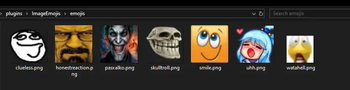
The max resolution of an emoji is 256x256px! Emojis should be stored in the '.png' format. Image names should be lowercase and shouldn't contain any special symbols like: `(`, `)`, `[`, `]`, `&`, `^`, etc.
If you have any issues/bugs, you may leave them (https://github.com/MrQuackDuck/ImageEmojis/issues).
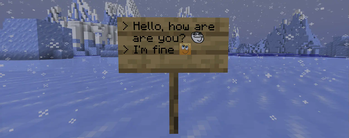
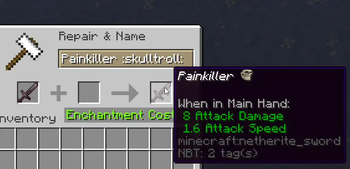
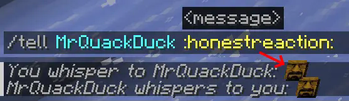
### 👀 Screenshots
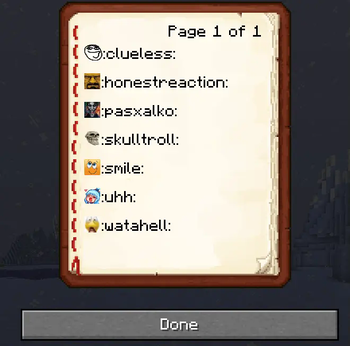
### 💻 Commands - `/emojis list` — opens a book with all currently added emojis. - `/emojis update` — fetches the latest version of the emojis resource pack from the server. Intended to be used in case when the admin updated emojis and reloaded the plugin while you were playing. _(Alternatively, you can just rejoin and not use this command)_. - `/emojis reload` — reloads the plugin. Generates the resource pack based on the `./plugins/ImageEmojis/emojis/` directory.
Aliases: `/ie`, `/imageemojis`.
### 🔞 Permissions - `imageemojis.admin` _(for operators by default)_ — Allows to use `/emojis reload`. - `imageemojis.use` _(true by default)_ — Allows to use emojis as well as the `/emojis` command. - `imageemojis.update` _(true by default)_ — Allows to use `/emojis update`. - `imageemojis.list` _(true by default)_ — Allows to use `/emojis list`.
### 🌠 Key features
- Automated resource pack generation — the resource pack is generated every time the plugin starts or gets reloaded. The only thing you need to do is to provide your server IP in the configuration and open the TCP port on the host machine _(5000 by default)_.
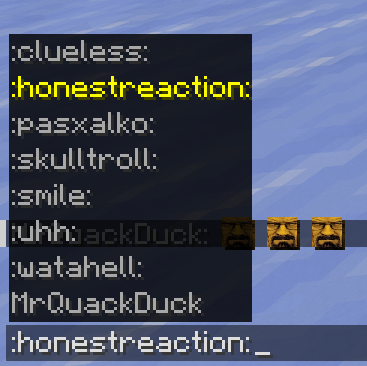
- Chat suggestions - emoji suggestions when a player types a message in chat. You can choose from four suggestion modes:
- - `NONE` - disable chat suggestions.
- - `TEMPLATES` _(set by default)_ - suggest templates of emojis when typing (e.g., \:clueless:).
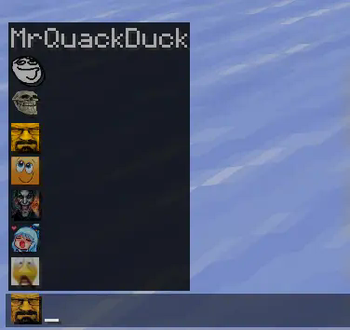
- - `ACTUAL` - suggest actual emojis (their UTF-8 symbols) when typing. (e.g.,
 ).
). - - `BOTH` - A combination of "TEMPLATES" and "ACTUAL" modes.
- Ability to merge emojis with your server resource pack: you can set the `mergeWithServerResourcePack` field to `true` in the `config.yml` and put your resource pack into the `../ImageEmojis/` directory with the `serverResourcePack.zip` filename _(the filename can be configured as well)_.
- Sign replacement — you can enable/disable replacement of emoji templates on signs.
- Anvil replacement — you can enable/disable replacement of emoji templates when renaming an item in the anvil.
- Command replacement — you can enable/disable replacement of emoji templates when sending commands. By default, the plugin automatically preprocesses all commands sent by players and changes emoji templates to actual emojis.
- Discord integration - if you have the (https://modrinth.com/plugin/discordsrv)** plugin installed and set up, emoji templates will be translated into appropriate UTF-8 emoji symbols, and UTF-8 symbols will be preprocessed to be displayed correctly in Discord as emojis. This will work with emojis that have the same name both in the game and on the Discord server.
### 📄 Default config Don't forget to put your public IP into the `serverIp` field.
Also, you should open the TCP port on your machine for the plugin to work. Port 5000 by default.
Otherwise, nothing will work.**
```yaml # Your server public IP goes here. serverIp: "127. 0. 0. 1"
# The port the resource pack will be hosted on. When the plugin launches, an HTTP server starts on that port. # It should be opened on the machine so that players can download the resource pack. webServerPort: 5000
# Resource pack enforcement policies: # NONE - The resource pack won't be loaded on join. This option can fit servers where players prefer to download the resource pack manually. # OPTIONAL - Players can decline the resource pack from loading on join. # REQUIRED - Players are forced to play with the resource
📊 Mod Details
- Game
- Minecraft Plugins
- Author
- MrQuackDuck
- Version
- 1.7.2
- Downloads
- 4,758
- Endorsements
- 31
- Category
- paper
- Created
- 2/3/2025
- Updated
- 8/11/2026
- Game Versions
- 1.19.4, 1.20, 1.20.1, 1.20.2, 1.20.3
- Tags
- social, storage, utility
🔧 How to Install Minecraft Plugins Mods
Download from Modrinth. Use Prism Launcher or drop into your mods folder.
📖 Full step-by-step install guide for Minecraft Plugins →
Visit the official mod page for specific installation instructions for this mod.
🎮 Need cheat codes or console commands? Check ur gaming wiki for Minecraft Plugins commands, item IDs, and more.
❓ Frequently Asked Questions
Which Minecraft Plugins versions does Image Emojis: Emojis in chat support?
The author lists 1.19.4, 1.20, 1.20.1, 1.20.2, 1.20.3, 1.20.4. Other versions may work but are untested by the author.
What is the latest version of Image Emojis: Emojis in chat?
Version 1.7.2, published 2026-08-11 with 4,758 downloads recorded at the source.
Keep browsing — more Minecraft Plugins mods await