Holoshops
🟡 Updated this year🖼️ Gallery (1 images)
🔍 Analysis
- 🏆 #65 of 129 economy mods in this game by downloads
📋 About This Mod
!(https://cdn.modrinth.com/data/cached_images/c2982449568aaeebd98ab737bb5946f278d3f5e3_0.webp)
_Requirements:_ TNE/VaultUnlocked & GriefPrevention
HoloShops
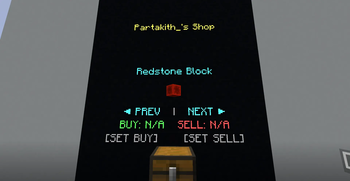
Player-owned chest shops with floating 3D holographic displays — built on display entities, Vault economy, and GriefPrevention claim protection. No GUIs, no signs, no clutter.
Each shop spawns a floating item, title, price panel, and clickable interaction zones above the chest using display entities. A single chest can sell multiple item types. Players cycle through slots with the PREV / NEXT buttons directly on the hologram. Shop creation is restricted to GriefPrevention claim owners. Container trust is verified before any shop command runs. Hooks into VaultUnlocked (Vault2 API) with automatic fallback to legacy Vault. Works with any compatible economy plugin. Shop data is saved to YAML. Display entities use scoreboard tags so stale entities are always cleaned up on reload. Each item slot has an independent buy price (customer → shop) and sell price (shop → customer). Either can be disabled.Features
Fill your chest with at least one item type and stand facing it. Run Right-click or on the hologram and type a price into chat. Use Customers walk up and right-click BUY or SELL on the display — no commands needed on their end.How it works
/shop create — the plugin reads your chest contents and creates a slot for each unique item type.-1 to disable that direction.
Commands
Command Description
/shop createCreates a shop on the chest you are looking at. You must be in your own GriefPrevention claim and the chest must contain at least one item.
/shop removeRemoves the shop on the chest you are looking at and despawns its hologram. Requires ownership or the admin permission.
/shop refreshManually respawns the hologram display for the shop you are looking at. Useful if the display becomes desynced.
Download from Modrinth. Use Prism Launcher or drop into your mods folder. 📖 Full step-by-step install guide for Minecraft Plugins → Visit the official mod page for specific installation instructions for this mod. 🎮 Need cheat codes or console commands? Check ur gaming wiki for Minecraft Plugins commands, item IDs, and more. The author lists 1.21.4, 1.21.5, 1.21.6, 1.21.7, 1.21.8, 1.21.9. Other versions may work but are untested by the author. Version 6.6.1, published 2026-05-25 with 52 downloads recorded at the source. Keep browsing — more Minecraft Plugins mods awaitPermissions
Node Description Default
holo.shop.admin
Allows removing any shop regardless of ownership, and setting prices on shops owned by other players.
op
holo.shop.use
Allows using of the holoshop player commands.
tr 📊 Mod Details
🔧 How to Install Minecraft Plugins Mods
❓ Frequently Asked Questions
Which Minecraft Plugins versions does Holoshops support?
What is the latest version of Holoshops?