EliteHolographics
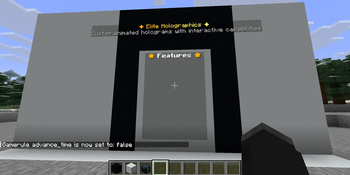
🟡 Updated this year🖼️ Gallery (1 images)
🔍 Analysis
- 🏆 #42 of 55 decoration mods in this game by downloads
📋 About This Mod
!(https://imgur.com/L7yfyGp.png) **EliteHolographics** is a modern, high-performance Minecraft server plugin built using the Spigot/Paper API. Unlike legacy hologram plugins that rely on invisible armor stands and packet manipulation, this plugin utilizes native `TextDisplay` and `Interaction` entities (introduced in Minecraft 1.19.4). ### Architectural Highlights * **Native Rendering:** By leveraging `TextDisplay` entities, the plugin shifts the rendering overhead entirely to the client. This dramatically reduces server-side entity ticking and lag. * **Modern Text Engine:** Fully integrates the Kyori Adventure API and MiniMessage. This allows server administrators to use advanced formatting, including RGB gradients, hex colors, hover events, and clean font styles. * **Smart Chunk & World Management:** Listens to chunk and world loading events to dynamically manage entity lifecycles. It automatically cleans up or respawns displays when chunks unload/load, preventing "ghost entities" or duplicated holograms. * **Asynchronous-Friendly Tasks:** Animation scaling and placeholder parsing are handled via scheduled Bukkit tasks, preventing main-thread stalling. --- ### Requirements To run this plugin successfully, your server environment must meet the following criteria: * **Server Platform:** Paper *(Paper recommended as they natively bundle the Kyori Adventure libraries used in this code).* * **Minecraft Version:** Minecraft 1.21 or newer (Required for `TextDisplay` and `Interaction` entity support). * **Java Version:** Java 21 or higher. #### Optional Dependencies * **PlaceholderAPI (PAPI):** If present, the plugin automatically hooks into it to allow live-updating server placeholders. > ⚠️ **Technical Note on PAPI:** The plugin passes a null player object when parsing placeholders (`PlaceholderAPI.setPlaceholders(null, text)`). This means **only global placeholders** (e.g., `%server_tps%`, `%server_online%`) will display properly. Player-specific placeholders (e.g., `%player_name%`) are not supported on the hologram text itself, though `{player}` is supported inside interactive click actions. --- ### Core Features #### 1. Advanced Text Formatting (MiniMessage) No more awkward `&c` or `§e` color codes. The plugin natively interprets MiniMessage. For example, setting a line to: `"<gradient:gold:yellow>✦ Welcome to the Server ✦</gradient>"` will render a smooth color transition. #### 2. Live Animations The plugin includes an AnimationManager that reads custom configurations from the `plugins/EliteHolographics/animations/` folder. * Animations are configured frame-by-frame via YAML files. * You can define a custom tick interval (e.g., `interval: 10` for twice per second). * The plugin cycles through these frames smoothly in-place without needing to completely recreate the entity. #### 3. Interactivity & Click Actions When a hologram is toggled to interactive, the plugin calculates its exact physical boundary box (`lines * 0.28f + 0.15f`) and overlays an invisible `Interaction` entity. When a player right-clicks this space, it triggers a chain of actions with a 500ms anti-spam cooldown. Supported actions: * `COMMAND`: Forces the player to run a command. * `CONSOLE`: Executes a command via the server console. * `MESSAGE`: Sends a private, formatted MiniMessage to the clicking player. * `BROADCAST`: Sends a formatted MiniMessage to everyone on the server. #### 4. Layout Customization * **Billboard Mode (Default):** The hologram automatically rotates to face the player flawlessly from any direction (`Billboard.CENTER`). * **Static Mode:** Locks the panel to a fixed direction (`north`, `south`, `east`, `west`) making it look like a flat wall display or sign. * **Custom Backgrounds:** Background boxes can be toggled on/off completely or tinted using hexadecimal codes (e.g., `#FF6600`). --- ### Command Reference & Permissions All operations run through the base command `/holo`. #### Management Commands | Command | Description | Permission | | :--- | :--- | :--- | | `/holo list` | Lists all created holograms on the server. | `elite.holo.use` | | `/holo info <name>` | Previews a hologram's lines and internal data properties. | `elite.holo.use` | | `/holo near ` | Locates all holograms within a specific radius. | `elite.holo.use` | | `/holo create <name> ` | Spawns a new hologram at your current coordinates. | `elite.holo.create` | | `/holo delete <name>` | Permanently removes a hologram and its entry from the file. | `elite.holo.delete` | | `/holo reload` | Clears all active tasks, reloads files, and re-spawns entities. | `elite.holo.reload` | #### Modification Commands | Command | Description | Permission | | :--- | :--- | :--- | | `/holo addline <name> <text>` | Appends a brand new line to the bottom of the hologram. | `elite.holo.edit` | | `/holo edit <name> <line#> <text>` | Replaces the text of an existing line number. | `elite.holo.edit` | | `/holo removeline <name> <line
!(https://imgur.com/L7yfyGp.png) EliteHolographics is a modern, high-performance Minecraft server plugin built using the Spigot/Paper API. Unlike legacy hologram plugins that rely on invisible armor stands and packet manipulation, this plugin utilizes native `TextDisplay` and `Interaction` entities (introduced in Minecraft 1. 19. 4).
### Architectural Highlights Native Rendering: By leveraging `TextDisplay` entities, the plugin shifts the rendering overhead entirely to the client. This dramatically reduces server-side entity ticking and lag. Modern Text Engine: Fully integrates the Kyori Adventure API and MiniMessage. This allows server administrators to use advanced formatting, including RGB gradients, hex colors, hover events, and clean font styles. Smart Chunk & World Management: Listens to chunk and world loading events to dynamically manage entity lifecycles. It automatically cleans up or respawns displays when chunks unload/load, preventing "ghost entities" or duplicated holograms. Asynchronous-Friendly Tasks: Animation scaling and placeholder parsing are handled via scheduled Bukkit tasks, preventing main-thread stalling.
### Requirements To run this plugin successfully, your server environment must meet the following criteria: Server Platform: Paper (Paper recommended as they natively bundle the Kyori Adventure libraries used in this code). Minecraft Version: Minecraft 1. 21 or newer (Required for `TextDisplay` and `Interaction` entity support). Java Version: Java 21 or higher.
#### Optional Dependencies PlaceholderAPI (PAPI): If present, the plugin automatically hooks into it to allow live-updating server placeholders.
> ⚠️ Technical Note on PAPI: The plugin passes a null player object when parsing placeholders (`PlaceholderAPI.setPlaceholders(null, text)`). This means only global placeholders (e.g., `%server_tps%`, `%server_online%`) will display properly. Player-specific placeholders (e.g., `%player_name%`) are not supported on the hologram text itself, though `{player}` is supported inside interactive click actions.
### Core Features
#### 1. Advanced Text Formatting (MiniMessage)
No more awkward `&c` or `§e` color codes. The plugin natively interprets MiniMessage. For example, setting a line to:
`"
#### 2. Live Animations The plugin includes an AnimationManager that reads custom configurations from the `plugins/EliteHolographics/animations/` folder. Animations are configured frame-by-frame via YAML files. You can define a custom tick interval (e.g., `interval: 10` for twice per second). The plugin cycles through these frames smoothly in-place without needing to completely recreate the entity.
#### 3. Interactivity & Click Actions When a hologram is toggled to interactive, the plugin calculates its exact physical boundary box (`lines 0. 28f + 0. 15f`) and overlays an invisible `Interaction` entity. When a player right-clicks this space, it triggers a chain of actions with a 500ms anti-spam cooldown. Supported actions: `COMMAND`: Forces the player to run a command. `CONSOLE`: Executes a command via the server console. `MESSAGE`: Sends a private, formatted MiniMessage to the clicking player. `BROADCAST`: Sends a formatted MiniMessage to everyone on the server.
#### 4. Layout Customization Billboard Mode (Default): The hologram automatically rotates to face the player flawlessly from any direction (`Billboard. CENTER`). Static Mode: Locks the panel to a fixed direction (`north`, `south`, `east`, `west`) making it look like a flat wall display or sign. * Custom Backgrounds: Background boxes can be toggled on/off completely or tinted using hexadecimal codes (e.g., `#FF6600`).
### Command Reference & Permissions All operations run through the base command `/holo`.
#### Management Commands
| Command | Description | Permission |
| :--- | :--- | :--- |
| `/holo list` | Lists all created holograms on the server. | `elite.holo.use` |
| `/holo info
#### Modification Commands
| Command | Description | Permission |
| :--- | :--- | :--- |
| `/holo addline
📊 Mod Details
- Game
- Minecraft Plugins
- Author
- Partakithware
- Version
- 1.1.0
- Downloads
- 41
- Endorsements
- 0
- Category
- decoration
- Created
- 6/1/2026
- Updated
- 5/25/2026
- Game Versions
- 1.21, 1.21.1, 1.21.2, 1.21.3, 1.21.4
- Tags
- decoration, game-mechanics, utility
🔧 How to Install Minecraft Plugins Mods
Download from Modrinth. Use Prism Launcher or drop into your mods folder.
📖 Full step-by-step install guide for Minecraft Plugins →
Visit the official mod page for specific installation instructions for this mod.
🎮 Need cheat codes or console commands? Check ur gaming wiki for Minecraft Plugins commands, item IDs, and more.
❓ Frequently Asked Questions
Which Minecraft Plugins versions does EliteHolographics support?
The author lists 1.21, 1.21.1, 1.21.2, 1.21.3, 1.21.4, 1.21.5. Other versions may work but are untested by the author.
What is the latest version of EliteHolographics?
Version 1.1.0, published 2026-05-25 with 41 downloads recorded at the source.
Keep browsing — more Minecraft Plugins mods await