HexaForms
🟡 Updated this year🖼️ Gallery (2 images)
🔍 Analysis
- 👍 0.3% endorsement rate
- 🏆 #548 of 1452 bukkit mods in this game by downloads
📋 About This Mod
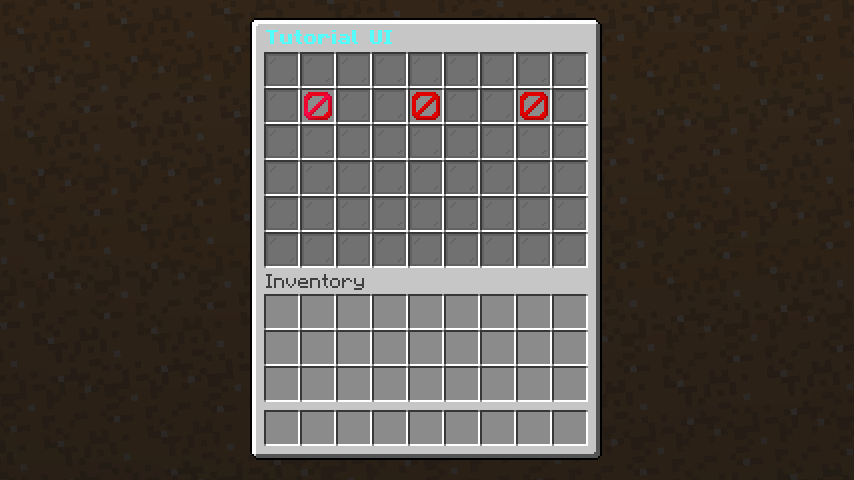
# HexaForms An advanced menu system for Minecraft servers with PlaceholderAPI integration, Bedrock form support, and DeluxeMenus conversion. ## Features - **Java & Bedrock Support**: Automatic detection of Bedrock players and display of native forms - **Dropdown Menus**: Interactive dropdown menus for Bedrock players with custom options - **Multi-Dropdown Forms**: Advanced 3-dropdown forms for complex selections (ban commands, etc.) - **DeluxeMenus Converter**: Convert DeluxeMenus configurations to HexaForms format automatically - **PlaceholderAPI Integration**: Full support for all PlaceholderAPI placeholders - **Flexible Configuration**: Simple YAML-based menu configuration - **Condition Checking**: Advanced condition checking for menu items - **Action System**: 30+ actions including commands, messages, sounds, dropdowns, and more - **Enchantment Support**: Support for enchantments and glow effects - **Economy & Permissions**: Vault integration for economy and permission management ## Installation 1. Make sure you have the following plugins installed: - **PlaceholderAPI** (required) - **Floodgate** (optional, for Bedrock support) - **Geyser** (optional, for Bedrock support) - **Vault** (optional, for economy/permission actions) 2. Download the HexaForms.jar to your plugins folder 3. Restart the server 4. Configure the menus in the `plugins/HexaForms/menus/` folder ## Quick Start ### Convert DeluxeMenus (New!) If you're migrating from DeluxeMenus: 1. Place your DeluxeMenus `.yml` files in `plugins/HexaForms/dmconvert/` 2. Run `/hexaconvert deluxemenus all` (or `/hexaconvert deluxemenus <filename>`) 3. Converted menus appear in `plugins/HexaForms/menus/` See (CONVERTER_README.md) for detailed conversion guide. ### Create a Menu Create a YAML file in `plugins/HexaForms/menus/`: ```yaml title: "&6&lShop Menu" size: 27 bedrock_form: title: "&6&lShop Menu" content: "&7Purchase items and equipment" buttons: - text: "&a&lWeapons" actions: - " shop weapons" - " ENTITY_PLAYER_LEVELUP 1 1.5" items: weapons_button: slot: 10 material: DIAMOND_SWORD display-name: "&a&lWeapons" lore: - "&7Click to browse weapons" glowing: true actions: - " shop weapons" ``` ## Configuration ### Main Configuration (config.yml) ```yaml messages: player-only: "&cThis command can only be used by players!" menu-not-found: "&cMenu '%menu%' not found!" no-permission: "&cYou don't have permission!" condition-denied: "&cYou don't meet the requirements for this!" reloaded: "&aPlugin reloaded successfully!" default-menu: "main_menu" auto-save: true debug-mode: false placeholders: enabled: true cache-time: 1000 bedrock: enabled: true fallback-to-java: true image-cache: true ``` ## Commands - `/menu ` - Opens a menu (default: main_menu) - `/menureload` - Reloads the configuration - `/hexaconvert <deluxemenus> <all|file_name>` - Converts DeluxeMenus to HexaForms (NEW!) ## Permissions - `hexaforms.menu.use` - Allows access to menus (default: true) - `hexaforms.reload` - Allows reloading the plugin configuration (default: op) - `hexaforms.admin` - Allows access to admin menus (default: op) - `hexaforms.convert` - Allows using the converter command (default: op) (NEW!) ## Actions ### Command Actions - ` <command>` - Executes a command as the player - ` <command>` - Executes a command from the console - ` <command>` - Executes an unregistered command as the player ### Message Actions - ` <text>` - Sends a message to the player - ` <text>` - Sends a message to everyone online - ` <text>` - Sends a message using MiniMessage format - ` <text>` - Broadcasts using MiniMessage format - ` <JSON-text>` - Sends a JSON message to the player - ` <JSON-text>` - Broadcasts a JSON message - ` <message>` - Sends a message in chat as the player ### Menu Control Actions - ` menu <menu-name>` - Opens another menu - `` - Closes the currently opened menu - `` - Refreshes items in the current menu view ### Network Actions - ` <server-name>` - Connects the player to a server on BungeeCord ### Sound Actions - ` <sound> <volume> <pitch>` - Plays a sound for the player - ` <sound> <volume> <pitch>` - Broadcasts a sound to all players - ` <sound> <volume> <pitch>` - Broadcasts a sound to all players in the world ### Economy Actions (Vault required) - ` <amount>` - Gives money to the player - ` <amount>` - Takes money from the player ### Experience Actions - ` <amount>L` - Gives exp levels (add L) or points to a player - ` <amount>L` - Takes exp levels or points from a player ### Permission Actions (Vault required) - ` <perm.node>` - Gives a per
# HexaForms
An advanced menu system for Minecraft servers with PlaceholderAPI integration, Bedrock form support, and DeluxeMenus conversion.
## Features
- Java & Bedrock Support: Automatic detection of Bedrock players and display of native forms
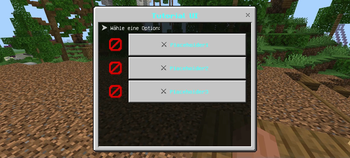
- Dropdown Menus: Interactive dropdown menus for Bedrock players with custom options
- Multi-Dropdown Forms: Advanced 3-dropdown forms for complex selections (ban commands, etc.)
- DeluxeMenus Converter: Convert DeluxeMenus configurations to HexaForms format automatically
- PlaceholderAPI Integration: Full support for all PlaceholderAPI placeholders
- Flexible Configuration: Simple YAML-based menu configuration
- Condition Checking: Advanced condition checking for menu items
- Action System: 30+ actions including commands, messages, sounds, dropdowns, and more
- Enchantment Support: Support for enchantments and glow effects
- Economy & Permissions: Vault integration for economy and permission management
## Installation
1. Make sure you have the following plugins installed: - PlaceholderAPI (required) - Floodgate (optional, for Bedrock support) - Geyser (optional, for Bedrock support) - Vault (optional, for economy/permission actions)
2. Download the HexaForms.jar to your plugins folder
3. Restart the server
4. Configure the menus in the `plugins/HexaForms/menus/` folder
## Quick Start
### Convert DeluxeMenus (New!)
If you're migrating from DeluxeMenus:
1. Place your DeluxeMenus `.yml` files in `plugins/HexaForms/dmconvert/`
2. Run `/hexaconvert deluxemenus all` (or `/hexaconvert deluxemenus
See (CONVERTER_README.md) for detailed conversion guide.
### Create a Menu
Create a YAML file in `plugins/HexaForms/menus/`:
```yaml title: "&6&lShop Menu" size: 27
bedrock_form: title: "&6&lShop Menu" content: "&7Purchase items and equipment" buttons: - text: "&a&lWeapons" actions: - " shop weapons" - " ENTITY_PLAYER_LEVELUP 1 1. 5"
items: weapons_button: slot: 10 material: DIAMOND_SWORD display-name: "&a&lWeapons" lore: - "&7Click to browse weapons" glowing: true actions: - " shop weapons" ```
## Configuration
### Main Configuration (config.yml)
```yaml messages: player-only: "&cThis command can only be used by players!" menu-not-found: "&cMenu '%menu%' not found!" no-permission: "&cYou don't have permission!" condition-denied: "&cYou don't meet the requirements for this!" reloaded: "&aPlugin reloaded successfully!"
default-menu: "main_menu" auto-save: true debug-mode: false
placeholders: enabled: true cache-time: 1000
bedrock: enabled: true fallback-to-java: true image-cache: true ```
## Commands
- `/menu ` - Opens a menu (default: main_menu)
- `/menureload` - Reloads the configuration
- `/hexaconvert
## Permissions
- `hexaforms.menu.use` - Allows access to menus (default: true)
- `hexaforms.reload` - Allows reloading the plugin configuration (default: op)
- `hexaforms.admin` - Allows access to admin menus (default: op)
- `hexaforms.convert` - Allows using the converter command (default: op) (NEW!)
### Command Actions
- `
` - Executes a command as the player - `
` - Executes a command from the console - `
` - Executes an unregistered command as the player
### Message Actions
- `
` - Sends a message to the player - `
` - Sends a message to everyone online - `
` - Sends a message using MiniMessage format - `
` - Broadcasts using MiniMessage format - `
` - Sends a JSON message to the player - `
` - Broadcasts a JSON message - `
` - Sends a message in chat as the player
### Menu Control Actions
- ` menu
` - Opens another menu - `` - Closes the currently opened menu
- `` - Refreshes items in the current menu view
### Network Actions
- `
### Sound Actions
- `
` - Plays a sound for the player - `
` - Broadcasts a sound to all players - `
` - Broadcasts a sound to all players in the world
### Economy Actions (Vault required)
- `
` - Gives money to the player - `
` - Takes money from the player
### Experience Actions
- `
L` - Gives exp levels (add L) or points to a player - `
L` - Takes exp levels or points from a player
### Permission Actions (Vault required)
- `
📊 Mod Details
- Game
- Minecraft Plugins
- Author
- einfxchwolf
- Version
- 1.1.3
- Downloads
- 680
- Endorsements
- 2
- Category
- bukkit
- Created
- 8/11/2025
- Updated
- 4/27/2026
- Game Versions
- 1.16, 1.16.1, 1.16.2, 1.16.3, 1.16.4
- Tags
- economy, management
🔧 How to Install Minecraft Plugins Mods
Download from Modrinth. Use Prism Launcher or drop into your mods folder.
📖 Full step-by-step install guide for Minecraft Plugins →
Visit the official mod page for specific installation instructions for this mod.
🎮 Need cheat codes or console commands? Check ur gaming wiki for Minecraft Plugins commands, item IDs, and more.
❓ Frequently Asked Questions
Which Minecraft Plugins versions does HexaForms support?
The author lists 1.16, 1.16.1, 1.16.2, 1.16.3, 1.16.4, 1.16.5. Other versions may work but are untested by the author.
What is the latest version of HexaForms?
Version 1.1.3, published 2026-04-27 with 680 downloads recorded at the source.
Keep browsing — more Minecraft Plugins mods await