HereDed
🟡 Updated this year🖼️ Gallery (2 images)
🔍 Analysis
- 🏆 #706 of 1080 bukkit mods in this game by downloads
📋 About This Mod
# HereDed 💀 A feature-rich (https://papermc.io) Minecraft plugin that tracks player deaths as **tributes**, broadcasts Hunger Games-style announcements with custom sounds, and provides powerful, configurable death modes with an interactive Admin GUI. ## Features - 📣 **Hunger Games Tributes** — Plays a dramatic cannon explosion sound to all online players and broadcasts a bold announcement when a player dies: *"A tribute has fallen: "*. - ⚙️ **Dynamic Death Modes** — Configure how player deaths are managed server-wide. Choose between: - **`NORMAL`** (Vanilla behavior): Standard vanilla death where items and levels drop on the ground. - **`TOMBSTONE`**: Saves all inventory, armor, and offhand items into a grave chest block at the death location. - Tells the player the exact coordinates and world name of their grave. - Configurable ownership lock (`tombstone.lock-to-owner` in `config.yml`) to prevent other players from looting graves. - Fully protected from explosions, piston movements, and hopper extractions. - **`INFINITE`**: Keep inventory and level upon death with no penalties. - **`HARDCORE`**: Automatic, instant resurrection but clears the inventory and resets levels to `1`. - 🖥️ **Admin GUI** — Switch death modes in real-time using an intuitive, interactive inventory-based GUI. - 📜 **Join MOTD & Death Lists** — Displays a welcome message (configurable in `motd.txt`) and broadcasts a list of all tributes that have fallen in the last 24 hours to joining players. - 💾 **Persistent Storage** — Saves death history to `deaths.json` (auto-pruned after 24 hours) and active graves to `tombstones.yml` so they persist through server reboots. --- ## Requirements - **Server:** Paper 1.21+ - **Java:** Java 21+ --- ## Installation 1. Download the latest `HereDed-*.jar` from the (../../releases). 2. Place the JAR file into your server's `plugins/` directory. 3. Restart or start your server to generate config files. 4. Customize settings in `plugins/HereDed/config.yml` and `plugins/HereDed/motd.txt` as needed. --- ## Commands & Permissions ### Commands | Command | Alias | Description | Permission | | :--- | :--- | :--- | :--- | | `/hereded gui` | `/hd gui` | Opens the Admin GUI to change the death mode. | `hereded.admin` | | `/hereded admin` | `/hd admin` | Opens the Admin GUI to change the death mode. | `hereded.admin` | | `/hereded status` | `/hd status` | Checks the active death mode, count of active graves, and recent deaths. | `hereded.use` | | `/hereded reload` | `/hd reload` | Reloads the configuration, `motd.txt`, and active tombstones. | `hereded.admin` | ### Permissions - **`hereded.use`** *(Default: true)* — Allows basic command usage (`/hereded status`). - **`hereded.admin`** *(Default: op)* — Allows opening the Admin GUI and reloading the plugin configuration. --- ## Configuration Files All configuration files are located in the `plugins/HereDed/` folder: | File | Description | | :--- | :--- | | `config.yml` | Main configuration file. Set the default death mode (`death-mode: NORMAL`) and toggle grave ownership lock (`tombstone.lock-to-owner: false`). | | `motd.txt` | Custom welcome message shown to players on join. Supports the `{player}` placeholder. | | `deaths.json` | Auto-generated file containing recent death records. Pruned automatically every 24 hours. *Do not edit manually.* | | `tombstones.yml` | Auto-generated registry of active tombstones. *Do not edit manually.* | --- ## Building from Source To compile the plugin yourself: ```bash ./gradlew build ``` The compiled JAR will be located in the `build/libs/` directory. --- ## License This project is licensed under the (LICENSE).
# HereDed 💀
A feature-rich (https://papermc.io) Minecraft plugin that tracks player deaths as tributes, broadcasts Hunger Games-style announcements with custom sounds, and provides powerful, configurable death modes with an interactive Admin GUI.
## Features
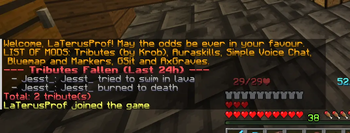
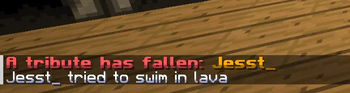
- 📣 Hunger Games Tributes — Plays a dramatic cannon explosion sound to all online players and broadcasts a bold announcement when a player dies: "A tribute has fallen: ".
- ⚙️ Dynamic Death Modes — Configure how player deaths are managed server-wide. Choose between:
- - `NORMAL` (Vanilla behavior): Standard vanilla death where items and levels drop on the ground.
- - `TOMBSTONE`: Saves all inventory, armor, and offhand items into a grave chest block at the death location.
- - Tells the player the exact coordinates and world name of their grave.
- - Configurable ownership lock (`tombstone.lock-to-owner` in `config.yml`) to prevent other players from looting graves.
- - Fully protected from explosions, piston movements, and hopper extractions.
- - `INFINITE`: Keep inventory and level upon death with no penalties.
- - `HARDCORE`: Automatic, instant resurrection but clears the inventory and resets levels to `1`.
- 🖥️ Admin GUI — Switch death modes in real-time using an intuitive, interactive inventory-based GUI.
- 📜 Join MOTD & Death Lists — Displays a welcome message (configurable in `motd.txt`) and broadcasts a list of all tributes that have fallen in the last 24 hours to joining players.
- 💾 Persistent Storage — Saves death history to `deaths.json` (auto-pruned after 24 hours) and active graves to `tombstones.yml` so they persist through server reboots.
## Requirements
- Server: Paper 1. 21+
- Java: Java 21+
## Installation
1. Download the latest `HereDed-.jar` from the (../../releases). 2. Place the JAR file into your server's `plugins/` directory. 3. Restart or start your server to generate config files. 4. Customize settings in `plugins/HereDed/config.yml` and `plugins/HereDed/motd.txt` as needed.
## Commands & Permissions
### Commands
| Command | Alias | Description | Permission | | :--- | :--- | :--- | :--- | | `/hereded gui` | `/hd gui` | Opens the Admin GUI to change the death mode. | `hereded.admin` | | `/hereded admin` | `/hd admin` | Opens the Admin GUI to change the death mode. | `hereded.admin` | | `/hereded status` | `/hd status` | Checks the active death mode, count of active graves, and recent deaths. | `hereded.use` | | `/hereded reload` | `/hd reload` | Reloads the configuration, `motd.txt`, and active tombstones. | `hereded.admin` |
### Permissions
- `hereded.use` (Default: true) — Allows basic command usage (`/hereded status`).
- `hereded.admin` (Default: op) — Allows opening the Admin GUI and reloading the plugin configuration.
## Configuration Files
All configuration files are located in the `plugins/HereDed/` folder:
| File | Description | | :--- | :--- | | `config.yml` | Main configuration file. Set the default death mode (`death-mode: NORMAL`) and toggle grave ownership lock (`tombstone.lock-to-owner: false`). | | `motd.txt` | Custom welcome message shown to players on join. Supports the `{player}` placeholder. | | `deaths.json` | Auto-generated file containing recent death records. Pruned automatically every 24 hours. Do not edit manually. | | `tombstones.yml` | Auto-generated registry of active tombstones. Do not edit manually.* |
## Building from Source
To compile the plugin yourself:
```bash ./gradlew build ```
The compiled JAR will be located in the `build/libs/` directory.
This project is licensed under the (LICENSE).
📊 Mod Details
- Game
- Minecraft Plugins
- Author
- Merlointhesky
- Version
- 1.0.2
- Downloads
- 48
- Endorsements
- 1
- Category
- bukkit
- Created
- 5/8/2026
- Updated
- 6/22/2026
- Game Versions
- 1.21, 1.21.1, 1.21.2, 1.21.3, 1.21.4
- Tags
- management, social, utility
🔧 How to Install Minecraft Plugins Mods
Download from Modrinth. Use Prism Launcher or drop into your mods folder.
📖 Full step-by-step install guide for Minecraft Plugins →
Visit the official mod page for specific installation instructions for this mod.
🎮 Need cheat codes or console commands? Check ur gaming wiki for Minecraft Plugins commands, item IDs, and more.
❓ Frequently Asked Questions
Which Minecraft Plugins versions does HereDed support?
The author lists 1.21, 1.21.1, 1.21.2, 1.21.3, 1.21.4, 1.21.5. Other versions may work but are untested by the author.
What is the latest version of HereDed?
Version 1.0.2, published 2026-06-22 with 48 downloads recorded at the source.
Keep browsing — more Minecraft Plugins mods await