FunTraps
🟡 Updated this year🖼️ Gallery (4 images)
🔍 Analysis
- 🏆 #1362 of 1452 bukkit mods in this game by downloads
📋 About This Mod
**Custom Cages, Traps & Plast Walls for Paper/Purpur 1.21+** FunTraps adds temporary tactical structures to Minecraft servers. Players can deploy custom cages, Traps and directional Plast walls using configurable activation items, structures, skins, potion effects, sounds and visual feedback. Create your own Trap and Plast designs with `.schem` or YAML structures, configure their behavior, assign skins, manage limited or unlimited uses, and control exactly where players can use them. FunTraps is designed for fast-paced combat mechanics without leaving permanent damage in the world. - Lifesteal - Survival - Factions - Practice - KitPvP - Prison - PvP Events - Minigames - Custom Battle Arenas --- ## Compatibility - **Server software:** Paper / Purpur 1.21+ - **Java:** Java 21 recommended - **Storage:** YAML, SQLite or MySQL - **Languages:** English, Spanish and Russian --- ## Dependencies and optional integrations FunTraps works without additional plugins for its core Trap, Plast, skin, storage and restoration systems. - **WorldEdit / FAWE:** Create, save and manage custom `.schem` structures. - **WorldGuard:** World and region restrictions, custom flags and protection rules. - **ProtectionStones:** Claim-based permissions for owners, members, administrators and visitors. - **PlaceholderAPI:** Placeholders inside menus, requirements, messages and custom item text. ### Skin shop requirements The included skin purchase menus are configured to use PlayerPoints. To use the default shop exactly as included, install: - **PlaceholderAPI** - **PlayerPoints** - PlaceholderAPI resolves `%playerpoints_points_formatted%` inside the menus. - PlayerPoints provides player balances and the `/points take <player> <amount>` charge command. - The default confirmation menu checks the player's balance before completing a purchase. - FunTraps still works without these plugins, but the included PlayerPoints shop must be reconfigured before use. --- ## Main features ### Custom Traps and cages - Create temporary cages using custom `.schem` or YAML structures. - Configure duration, cooldown, activation item, sounds, action bars and boss bars. - Apply configurable potion effects to the owner and trapped players. - Configure item cooldowns while players are inside active Traps. - Save Trap structures with automatic center calculation. - Configure per-player limits for active structures. - Use custom placement, removal and ambient sounds. ### Plast walls - Deploy temporary directional walls using a dedicated activation item. - Create separate Plast structures for every skin and direction. - Supports horizontal, diagonal and vertical wall variants. - Configure independent duration and cooldown settings. - Use separate tools, saving commands, skins and removal commands. **Available Plast directions:** ```text north northeast east southeast south southwest west northwest up down ``` Example: ```text /plast save cruel northeast ``` This saves the variant as: ```text cruel_northeast.yml ``` ### Skins and uses - Custom Trap and Plast skins. - Unlimited, limited and virtual skin uses. - Optional physical tokens that convert into virtual uses. - Built-in skin browser, purchase menus and confirmation menus. - Purchased skins can be granted directly as virtual uses. - Selected skin state and remaining uses displayed in menus. - Shift + right-click shortcut to open the skin menu from the activation item. - Per-skin permissions using `funtraps.skin.<skinId>`. ### Safe restoration and recovery - Temporary blocks restore automatically when structures expire or are removed. - Traps and Plast walls are removed when their owner dies or disconnects. - Original block information is stored before temporary blocks are replaced. - Recovery data can restore pending structures after an unexpected shutdown. - Containers, spawners and special block states are handled safely. - Administrators can inspect, verify and restore pending recovery data. --- ## Overlap and intersection system FunTraps supports intersections between: - Trap ↔ Trap - Trap ↔ Plast - Plast ↔ Plast - **self:** Rules for structures owned by the same player. - **others:** Rules for structures owned by different players. - **allow:** Allows or blocks intersections. - **SAFE:** Restores only the finished structure layer while preserving intersected structures. - **LEGACY:** Uses legacy restoration behavior. - **FORCE:** Restores shared blocks to their original state and may visually break the intersected structure. - **preserve-first-structure:** Controls which structure remains visible in shared block positions. ### Example overlap configuration ```yaml trap: overlap: preserve-first-structure: true self: allow: true restore-mode: FORCE others: allow: true restore-mode: FORCE ``` - The first placed Trap or Plast remains visible in shared positions. - Later structures remain active internally. - When one intersected struc
Custom Cages, Traps & Plast Walls for Paper/Purpur 1. 21+
FunTraps adds temporary tactical structures to Minecraft servers. Players can deploy custom cages, Traps and directional Plast walls using configurable activation items, structures, skins, potion effects, sounds and visual feedback.
Create your own Trap and Plast designs with `.schem` or YAML structures, configure their behavior, assign skins, manage limited or unlimited uses, and control exactly where players can use them.
FunTraps is designed for fast-paced combat mechanics without leaving permanent damage in the world.
- Lifesteal
- Survival
- Factions
- Practice
- KitPvP
- Prison
- PvP Events
- Minigames
- Custom Battle Arenas
## Compatibility
- Server software: Paper / Purpur 1. 21+
- Java: Java 21 recommended
- Storage: YAML, SQLite or MySQL
- Languages: English, Spanish and Russian
## Dependencies and optional integrations
FunTraps works without additional plugins for its core Trap, Plast, skin, storage and restoration systems.
- WorldEdit / FAWE: Create, save and manage custom `.schem` structures.
- WorldGuard: World and region restrictions, custom flags and protection rules.
- ProtectionStones: Claim-based permissions for owners, members, administrators and visitors.
- PlaceholderAPI: Placeholders inside menus, requirements, messages and custom item text.
### Skin shop requirements
The included skin purchase menus are configured to use PlayerPoints.
To use the default shop exactly as included, install:
- PlaceholderAPI
- PlayerPoints
- PlaceholderAPI resolves `%playerpoints_points_formatted%` inside the menus.
- PlayerPoints provides player balances and the `/points take
` charge command. - The default confirmation menu checks the player's balance before completing a purchase.
- FunTraps still works without these plugins, but the included PlayerPoints shop must be reconfigured before use.
## Main features
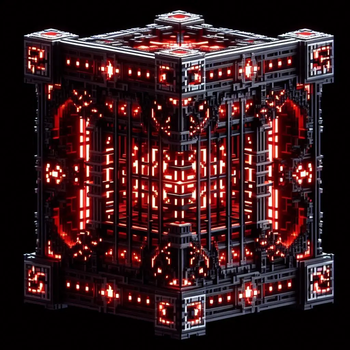
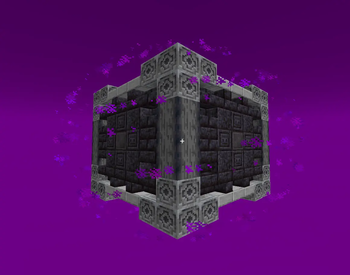
### Custom Traps and cages
- Create temporary cages using custom `.schem` or YAML structures.
- Configure duration, cooldown, activation item, sounds, action bars and boss bars.
- Apply configurable potion effects to the owner and trapped players.
- Configure item cooldowns while players are inside active Traps.
- Save Trap structures with automatic center calculation.
- Configure per-player limits for active structures.
- Use custom placement, removal and ambient sounds.
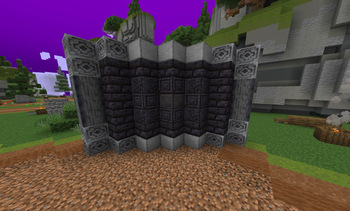
### Plast walls
- Deploy temporary directional walls using a dedicated activation item.
- Create separate Plast structures for every skin and direction.
- Supports horizontal, diagonal and vertical wall variants.
- Configure independent duration and cooldown settings.
- Use separate tools, saving commands, skins and removal commands.
Available Plast directions:
```text north northeast east southeast south southwest west northwest up down ```
```text /plast save cruel northeast ```
This saves the variant as:
```text cruel_northeast.yml ```
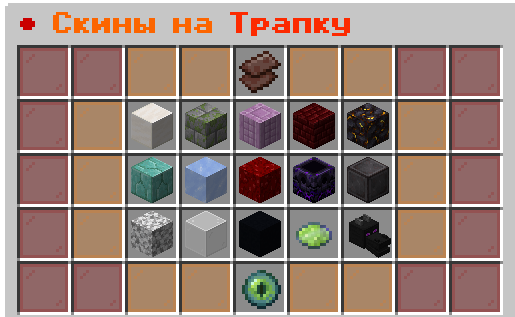
### Skins and uses
- Custom Trap and Plast skins.
- Unlimited, limited and virtual skin uses.
- Optional physical tokens that convert into virtual uses.
- Built-in skin browser, purchase menus and confirmation menus.
- Purchased skins can be granted directly as virtual uses.
- Selected skin state and remaining uses displayed in menus.
- Shift + right-click shortcut to open the skin menu from the activation item.
- Per-skin permissions using `funtraps.skin.
`.
### Safe restoration and recovery
- Temporary blocks restore automatically when structures expire or are removed.
- Traps and Plast walls are removed when their owner dies or disconnects.
- Original block information is stored before temporary blocks are replaced.
- Recovery data can restore pending structures after an unexpected shutdown.
- Containers, spawners and special block states are handled safely.
- Administrators can inspect, verify and restore pending recovery data.
## Overlap and intersection system
FunTraps supports intersections between:
- Trap ↔ Trap
- Trap ↔ Plast
- Plast ↔ Plast
- self: Rules for structures owned by the same player.
- others: Rules for structures owned by different players.
- allow: Allows or blocks intersections.
- SAFE: Restores only the finished structure layer while preserving intersected structures.
- LEGACY: Uses legacy restoration behavior.
- FORCE: Restores shared blocks to their original state and may visually break the intersected structure.
- preserve-first-structure: Controls which structure remains visible in shared block positions.
### Example overlap configuration
```yaml trap: overlap: preserve-first-structure: true self: allow: true restore-mode: FORCE others: allow: true restore-mode: FORCE ```
- The first placed Trap or Plast remains visible in shared positions.
- Later structures remain active internally.
- When one intersected struc
📊 Mod Details
- Game
- Minecraft Plugins
- Author
- Keraune
- Version
- 1.4.0
- Downloads
- 374
- Endorsements
- 1
- Category
- bukkit
- Created
- 1/13/2026
- Updated
- 8/1/2026
- Game Versions
- 1.21, 1.21.1, 1.21.2, 1.21.3, 1.21.4
- Tags
- equipment, magic, minigame
🔧 How to Install Minecraft Plugins Mods
Download from Modrinth. Use Prism Launcher or drop into your mods folder.
📖 Full step-by-step install guide for Minecraft Plugins →
Visit the official mod page for specific installation instructions for this mod.
🎮 Need cheat codes or console commands? Check ur gaming wiki for Minecraft Plugins commands, item IDs, and more.
❓ Frequently Asked Questions
Which Minecraft Plugins versions does FunTraps support?
The author lists 1.21, 1.21.1, 1.21.2, 1.21.3, 1.21.4, 1.21.5. Other versions may work but are untested by the author.
What is the latest version of FunTraps?
Version 1.4.0, published 2026-08-01 with 374 downloads recorded at the source.
Keep browsing — more Minecraft Plugins mods await