FoodAllergy
🟠 Updated over a year ago🖼️ Gallery (1 images)
🔍 Analysis
- 👍 1.0% endorsement rate — high engagement, a strong quality signal
- 🏆 #744 of 1452 bukkit mods in this game by downloads
📋 About This Mod
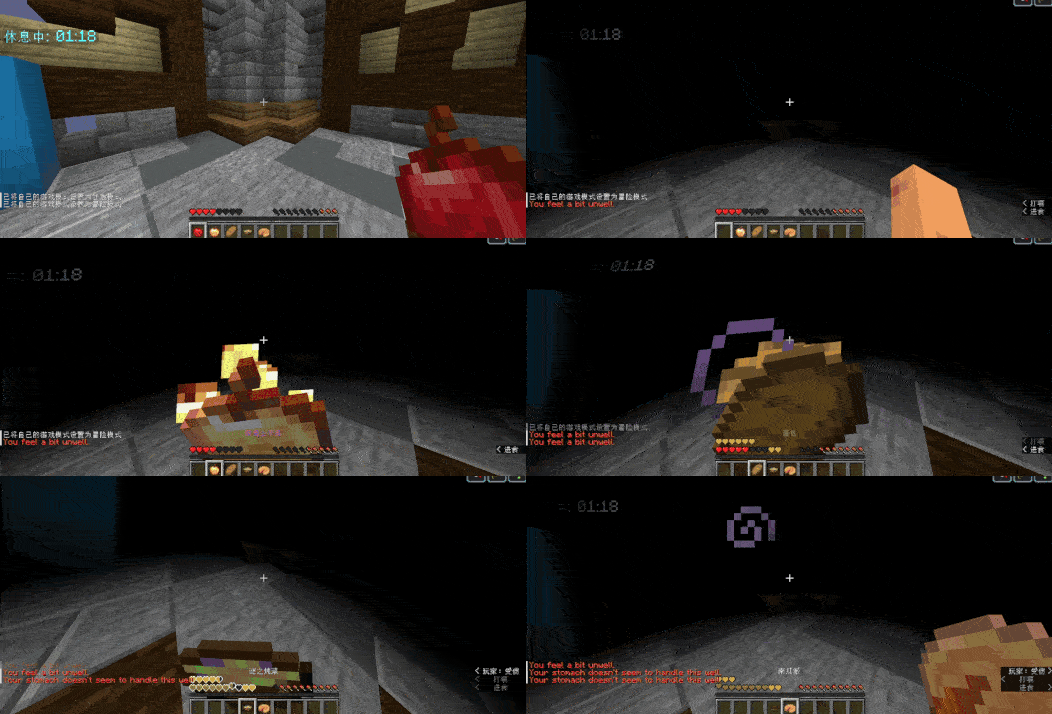
# FoodAllergy Plugin ## Overview The **FoodAllergy** plugin adds an exciting twist to your Minecraft gameplay by implementing a food allergy system. Each player create a unique allergy list upon their first join, determining their sensitivity to a variety of foods. Players will not know their allergies in advance, making the first consumption of an allergenic food a surprising and thrilling experience. This feature encourages players to experiment with diverse food options while managing their allergies, adding an extra layer of strategy and challenge !(https://cdn.modrinth.com/data/PLiZHf4S/images/44390fc16aaeb3e696a27b566827957af63bb9fa.gif) ## Features - **Randomized Allergy List**: Each player receives a unique list of allergies upon first joining the server, ensuring that no two experiences are the same. - **Diverse Food Consumption**: Players can explore a wide range of food items, but must be cautious of their allergies to avoid adverse effects. - **Allergy Levels**: Allergies are categorized into different levels, each triggering specific potion effects: - **Low Level**: Mild effects (e.g., nausea). - **Medium Level**: Moderate effects (e.g., poison). - **High Level**: Severe effects (e.g., wither). - **Customizable Messages**: Server admins can easily customize messages for different allergy levels via the configuration file. - **Configurable Allergy Amount**: Adjust the number of allergies a player can have for a tailored experience. ## Configuration The plugin includes a default `config.yml` file that can be modified to suit your server's needs. Players will not be informed of their allergies unless specified by the admin, adding to the challenge. ## Installation 1. Download the **FoodAllergy** plugin from (link-to-your-plugin). 2. Place the plugin in your server's `plugins` folder. 3. Restart the server to generate the configuration file. 4. Customize the `config.yml` as desired. --- For any issues or feature requests, feel free to open an issue on the plugin's repository.
# FoodAllergy Plugin ## Overview The FoodAllergy plugin adds an exciting twist to your Minecraft gameplay by implementing a food allergy system. Each player create a unique allergy list upon their first join, determining their sensitivity to a variety of foods. Players will not know their allergies in advance, making the first consumption of an allergenic food a surprising and thrilling experience. This feature encourages players to experiment with diverse food options while managing their allergies, adding an extra layer of strategy and challenge
!(https://cdn.modrinth.com/data/PLiZHf4S/images/44390fc16aaeb3e696a27b566827957af63bb9fa.gif) ## Features - Randomized Allergy List: Each player receives a unique list of allergies upon first joining the server, ensuring that no two experiences are the same. - Diverse Food Consumption: Players can explore a wide range of food items, but must be cautious of their allergies to avoid adverse effects. - Allergy Levels: Allergies are categorized into different levels, each triggering specific potion effects: - Low Level: Mild effects (e.g., nausea). - Medium Level: Moderate effects (e.g., poison). - High Level: Severe effects (e.g., wither). - Customizable Messages: Server admins can easily customize messages for different allergy levels via the configuration file. - Configurable Allergy Amount: Adjust the number of allergies a player can have for a tailored experience.
## Configuration The plugin includes a default `config.yml` file that can be modified to suit your server's needs. Players will not be informed of their allergies unless specified by the admin, adding to the challenge.
## Installation 1. Download the FoodAllergy plugin from (link-to-your-plugin). 2. Place the plugin in your server's `plugins` folder. 3. Restart the server to generate the configuration file. 4. Customize the `config.yml` as desired.
For any issues or feature requests, feel free to open an issue on the plugin's repository.
📊 Mod Details
- Game
- Minecraft Plugins
- Author
- silvervoid
- Version
- 1.3.1
- Downloads
- 579
- Endorsements
- 6
- Category
- bukkit
- Created
- 9/26/2024
- Updated
- 1/15/2025
- Game Versions
- 1.8.9, 1.9, 1.9.1, 1.9.2, 1.9.3
🔧 How to Install Minecraft Plugins Mods
Download from Modrinth. Use Prism Launcher or drop into your mods folder.
📖 Full step-by-step install guide for Minecraft Plugins →
Visit the official mod page for specific installation instructions for this mod.
🎮 Need cheat codes or console commands? Check ur gaming wiki for Minecraft Plugins commands, item IDs, and more.
❓ Frequently Asked Questions
Which Minecraft Plugins versions does FoodAllergy support?
The author lists 1.8.9, 1.9, 1.9.1, 1.9.2, 1.9.3, 1.9.4. Other versions may work but are untested by the author.
What is the latest version of FoodAllergy?
Version 1.3.1, published 2025-01-15 with 579 downloads recorded at the source.
Keep browsing — more Minecraft Plugins mods await