FancyNpcs Custom Models
🟡 Updated this year🖼️ Gallery (1 images)
🔍 Analysis
- 👍 0.4% endorsement rate
- 🏆 #7 of 173 folia mods in this game by downloads
📋 About This Mod
<div align="center"> !(https://fancyinnovations.com/logos-and-banners/fancynpcsmodel-banner.png) <br /> With this plugin, you can assign custom 3D models (from (https://modrinth.com/plugin/bettermodel)) to npcs. </div> ## How to use Requirements: - (https://modrinth.com/plugin/fancynpcs) or newer - (https://modrinth.com/plugin/bettermodel) or newer - FancyNpcsModel (this plugin) How to apply a custom model to an npc: 1. Install the required plugins 2. Import models to BetterModel (see (https://github.com/toxicity188/BetterModel/wiki) for that) 3. Make sure your npc is a player npc (`/npc type (npc) player`) 4. Set the custom model: `/npc custom_model (npc) (model name)` 5. Done! Your npc should now have the model you assigned to it Setting the custom model to `@none` will remove the model. Commands that won't work, when the npcs has a custom model: - `/npc displayname` - `/npc equipment` - `/npc glowing` - `/npc skin` - `/npc turn_to_player` (depends on model) ## Animations This plugin also adds two new actions (for npcs with custom models only) to play animations. Actions: - `play_animation_once`: plays the specified animation once - `play_animation_loop`: plays the specified animation in a loop How to add the action: `/npc action (npc) (trigger) add play_animation_once (animation name)` There is also a command to play an animation: `/npc play_animation (npc) (animation name) ` ## Data collection This plugin collects anonymous usage data to help us understand how the plugin is being used and to improve it. All collected data by all servers is aggregated, we don't store any IP addresses, server names, or any other information that could be used to identify a specific server or user. Read more about that topic (used platforms, how to opt-out, list of metrics ...) in the (https://fancyinnovations.com/docs/minecraft-plugins/data-collection).
!(https://fancyinnovations.com/logos-and-banners/fancynpcsmodel-banner.png)
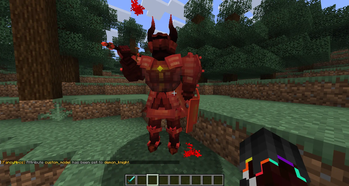
With this plugin, you can assign custom 3D models (from (https://modrinth.com/plugin/bettermodel)) to npcs.
## How to use
Requirements: - (https://modrinth.com/plugin/fancynpcs) or newer - (https://modrinth.com/plugin/bettermodel) or newer - FancyNpcsModel (this plugin)
How to apply a custom model to an npc:
1. Install the required plugins 2. Import models to BetterModel (see (https://github.com/toxicity188/BetterModel/wiki) for that) 3. Make sure your npc is a player npc (`/npc type (npc) player`) 4. Set the custom model: `/npc custom_model (npc) (model name)` 5. Done! Your npc should now have the model you assigned to it
Setting the custom model to `@none` will remove the model.
Commands that won't work, when the npcs has a custom model: - `/npc displayname` - `/npc equipment` - `/npc glowing` - `/npc skin` - `/npc turn_to_player` (depends on model)
## Animations
This plugin also adds two new actions (for npcs with custom models only) to play animations.
Actions: - `play_animation_once`: plays the specified animation once - `play_animation_loop`: plays the specified animation in a loop
How to add the action: `/npc action (npc) (trigger) add play_animation_once (animation name)`
There is also a command to play an animation: `/npc play_animation (npc) (animation name) [--loop]`
## Data collection
This plugin collects anonymous usage data to help us understand how the plugin is being used and to improve it. All collected data by all servers is aggregated, we don't store any IP addresses, server names, or any other information that could be used to identify a specific server or user. Read more about that topic (used platforms, how to opt-out, list of metrics ...) in the (https://fancyinnovations.com/docs/minecraft-plugins/data-collection).
📊 Mod Details
- Game
- Minecraft Plugins
- Author
- Oliver
- Version
- 1.1.0+10
- Downloads
- 1,042
- Endorsements
- 4
- Category
- folia
- Created
- 5/7/2026
- Updated
- 6/21/2026
- Game Versions
- 26.2
- Tags
- utility
🔧 How to Install Minecraft Plugins Mods
Download from Modrinth. Use Prism Launcher or drop into your mods folder.
📖 Full step-by-step install guide for Minecraft Plugins →
Visit the official mod page for specific installation instructions for this mod.
🎮 Need cheat codes or console commands? Check ur gaming wiki for Minecraft Plugins commands, item IDs, and more.
❓ Frequently Asked Questions
Which Minecraft Plugins versions does FancyNpcs Custom Models support?
The author lists 26.2. Other versions may work but are untested by the author.
What is the latest version of FancyNpcs Custom Models?
Version 1.1.0+10, published 2026-06-21 with 1,042 downloads recorded at the source.
Keep browsing — more Minecraft Plugins mods await