EZColors
🟠 Updated over a year ago🖼️ Gallery (1 images)
🔍 Analysis
- 👍 0.2% endorsement rate
- 🏆 #37 of 82 paper mods in this game by downloads
📋 About This Mod
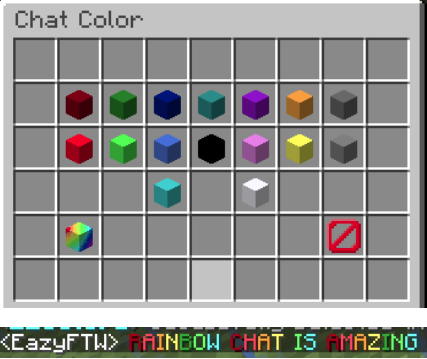
Tested in 1.15.2, 1.16.3, 1.16.4, 1.17.1, 1.18.1, 1.18.2, 1.19.x, and 1.20. Should work with ALL versions 1.8.8+. Please report ALL BUGS! v2.2.1 and v2.2.2 Require Java 17, All Others Versions Java 8+ # EZColors EZColors is a chat color plugin with a stunning GUI. Including 16 colors, and two rainbow colors to choose from. With more features coming soon. EZColors is an all-in-one Chat Color Plugin... FOR FREE! ## Commands /ezcolors - Opens chat Chat Color GUI. /ezcolors reload - Reloads the plugin & languages. /ezcolors languages - Open the Language GUI. /ezcolors <color> - Set a certain color (supports hex values 1.16+). Aliases: /color, /colors, /chatcolor, /chatcolors, /ezcolor, /colorchat ## Placeholders %ezcolors_color% - Returns the player's Chat Color. %ezcolors_color_msg_<msg>% - Returns the message formatted with the player's color. %ezcolors_color_set% - Returns True or False depending on if the player has a color set. ## Permissions ezcolors.color.darkred - Permission to set your color to Dark Red. ezcolors.color.green - Permission to set your color to Green. ezcolors.color.blue - Permission to set your color to Blue. ezcolors.color.cyan - Permission to set your color to Cyan. ezcolors.color.purple - Permission to set your color to Purple. ezcolors.color.gold - Permission to set your color to Gold. ezcolors.color.darkgray - Permission to set your color to Dark Gray. ezcolors.color.red - Permission to set your color to Red. ezcolors.color.lime - Permission to set your color to Lime. ezcolors.color.lightblue - Permission to set your color to Light Blue. ezcolors.color.black - Permission to set your color to Black. ezcolors.color.pink - Permission to set your color to Pink. ezcolors.color.yellow - Permission to set your color to Yellow. ezcolors.color.gray - Permission to set your color to Gray. ezcolors.color.aqua - Permission to set your color to Aqua. ezcolors.color.white - Permission to set your color to White. ezcolors.color.rainbow - Permission to set your color to Rainbow. ezcolors.color.reset - Permission to reset your color. ezcolors.color.hex- Permission to set your color to a hex value (1.16+). ezcolors.toggle - Use the toggle command to toggle your chat color. ezcolors.gui - Permission to Open the Chat Color GUI. ezcolors.color.* - Permission to set your color to Any Color. ezcolors.color.custom - Permissiont to set your color to a Custom Color. ezcolors.reload - Permission to reload the plugin. (Execute /color reload) ezcolors.languages - Permission to open the Languages GUI (Execute /color languages) ezcolors.showlanguage - Shows the languages item in the gui. ezcolors.showrainbow - Shows the rainbow item in the gui. ezcolors.* - Permission to everything.
Tested in 1. 15. 2, 1. 16. 3, 1. 16. 4, 1. 17. 1, 1. 18. 1, 1. 18. 2, 1. 19.x, and 1. 20. Should work with ALL versions 1. 8. 8+. Please report ALL BUGS!
v2. 2. 1 and v2. 2. 2 Require Java 17, All Others Versions Java 8+
# EZColors EZColors is a chat color plugin with a stunning GUI. Including 16 colors, and two rainbow colors to choose from. With more features coming soon. EZColors is an all-in-one Chat Color Plugin... FOR FREE!
## Commands
/ezcolors - Opens chat Chat Color GUI.
/ezcolors reload - Reloads the plugin & languages.
/ezcolors languages - Open the Language GUI.
/ezcolors
Aliases: /color, /colors, /chatcolor,
/chatcolors, /ezcolor, /colorchat
## Placeholders
%ezcolors_color% - Returns the player's Chat Color.
%ezcolors_color_msg_
%ezcolors_color_set% - Returns True or False depending on if the player has a color set.
## Permissions
ezcolors.color.darkred - Permission to set your color to Dark Red.
ezcolors.color.green - Permission to set your color to Green.
ezcolors.color.blue - Permission to set your color to Blue.
ezcolors.color.cyan - Permission to set your color to Cyan.
ezcolors.color.purple - Permission to set your color to Purple.
ezcolors.color.gold - Permission to set your color to Gold.
ezcolors.color.darkgray - Permission to set your color to Dark Gray.
ezcolors.color.red - Permission to set your color to Red.
ezcolors.color.lime - Permission to set your color to Lime.
ezcolors.color.lightblue - Permission to set your color to Light Blue.
ezcolors.color.black - Permission to set your color to Black.
ezcolors.color.pink - Permission to set your color to Pink.
ezcolors.color.yellow - Permission to set your color to Yellow.
ezcolors.color.gray - Permission to set your color to Gray.
ezcolors.color.aqua - Permission to set your color to Aqua.
ezcolors.color.white - Permission to set your color to White.
ezcolors.color.rainbow - Permission to set your color to Rainbow.
ezcolors.color.reset - Permission to reset your color.
ezcolors.color.hex- Permission to set your color to a hex value (1. 16+).
ezcolors.toggle - Use the toggle command to toggle your chat color.
ezcolors.gui - Permission to Open the Chat Color GUI.
ezcolors.color. - Permission to set your color to Any Color.
ezcolors.color.custom - Permissiont to set your color to a Custom Color.
ezcolors.reload - Permission to reload the plugin. (Execute /color reload)
ezcolors.languages - Permission to open the Languages GUI (Execute /color languages)
ezcolors.showlanguage - Shows the languages item in the gui.
ezcolors.showrainbow - Shows the rainbow item in the gui.
ezcolors. - Permission to everything.
📊 Mod Details
- Game
- Minecraft Plugins
- Author
- EazyFTW
- Version
- 2.2.6
- Downloads
- 3,092
- Endorsements
- 7
- Category
- paper
- Created
- 2/10/2023
- Updated
- 10/3/2024
- Game Versions
- 1.8.8, 1.8.9, 1.9, 1.9.1, 1.9.2
- Tags
- social, utility
🔧 How to Install Minecraft Plugins Mods
Download from Modrinth. Use Prism Launcher or drop into your mods folder.
📖 Full step-by-step install guide for Minecraft Plugins →
Visit the official mod page for specific installation instructions for this mod.
🎮 Need cheat codes or console commands? Check ur gaming wiki for Minecraft Plugins commands, item IDs, and more.
❓ Frequently Asked Questions
Which Minecraft Plugins versions does EZColors support?
The author lists 1.8.8, 1.8.9, 1.9, 1.9.1, 1.9.2, 1.9.3. Other versions may work but are untested by the author.
What is the latest version of EZColors?
Version 2.2.6, published 2024-10-03 with 3,092 downloads recorded at the source.
Keep browsing — more Minecraft Plugins mods await