DiscordAuth
⚪ Last updated 2024🖼️ Gallery (4 images)



🔍 Analysis
- 👍 1.4% endorsement rate — high engagement, a strong quality signal
- 🏆 #12 of 171 management mods in this game by downloads
📋 About This Mod
# DiscordAuth !(https://raw.githubusercontent.com/orewaee/DiscordAuth/main/pictures/banner.png) DiscordAuth is a plugin that allows you to quickly and easily set up Discord authorization for your Velocity proxy. At the moment the plugin is under development, so some parts of the plugin may be changed. If any issue occurs, please report it to (https://github.com/orewaee/DiscordAuth/issues). ## Installation To set up DiscordAuth, there are several steps you need to follow. First you need to set up a Velocity proxy. There must be at least two child servers, one of which will be a lobby. Its name must be specified in `config.toml`. It is also important to specify the Discord bot token and user ID, which will be able to use the commands of this very bot in `config.toml`. In general, these are all the necessary settings. The properties found in the `config.toml` and `messages.toml` files can be freely modified. Example of `config.toml` settings: ```toml # Path to the file where player accounts will be stored accounts_file_name = "plugins/DiscordAuth/accounts.json" # Lifetime in seconds of the key and session, respectively key_expiration_time = 60 session_expiration_time = 3600 # Server lobby name lobby_server_name = "lobby" # Discord bot token bot_token = "" # Discord admin discord_admin_id = "" ``` ## Commands ### Discord - `/add <name> <discord id>` - adds a new account. - `/remove <name> <discord id>` - deletes an existing account. ### Minecraft - `/discordauth reload config` - reloads the plugin config. - `/discordauth reload messages` - reloads the plugin messages. - `/discordauth reload all` - reloads the plugin config and messages. - `/account add <discord id> <name>` - adds a new account. - `/account remove <discord id> <name>` - deletes an existing account. - `/test` is a temporary command needed for debugging. ## Accounts Accounts are stored in JSON format. The schema is presented below: ```json ``` ## Gallery !(https://raw.githubusercontent.com/orewaee/DiscordAuth/main/pictures/key.png) !(https://raw.githubusercontent.com/orewaee/DiscordAuth/main/pictures/minecraft_success.png) !(https://raw.githubusercontent.com/orewaee/DiscordAuth/main/pictures/discord_success.png) !(https://raw.githubusercontent.com/orewaee/DiscordAuth/main/pictures/discord_add.png)
# DiscordAuth
!(https://raw.githubusercontent.com/orewaee/DiscordAuth/main/pictures/banner.png)
DiscordAuth is a plugin that allows you to quickly and easily set up Discord authorization for your Velocity proxy. At the moment the plugin is under development, so some parts of the plugin may be changed. If any issue occurs, please report it to [`issues`](https://github.com/orewaee/DiscordAuth/issues).
## Installation
To set up DiscordAuth, there are several steps you need to follow.
First you need to set up a Velocity proxy. There must be at least two child servers, one of which will be a lobby. Its name must be specified in `config.toml`.
It is also important to specify the Discord bot token and user ID, which will be able to use the commands of this very bot in `config.toml`.
In general, these are all the necessary settings.
The properties found in the `config.toml` and `messages.toml` files can be freely modified.
Example of `config.toml` settings:
```toml # Path to the file where player accounts will be stored accounts_file_name = "plugins/DiscordAuth/accounts.json"
# Lifetime in seconds of the key and session, respectively key_expiration_time = 60 session_expiration_time = 3600
# Server lobby name lobby_server_name = "lobby"
# Discord bot token bot_token = ""
# Discord admin discord_admin_id = "" ```
## Commands
### Discord
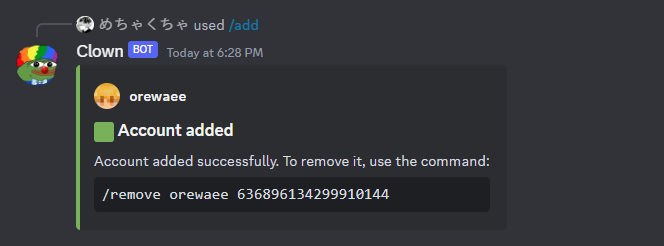
- `/add
` - adds a new account. - `/remove
` - deletes an existing account.
### Minecraft
- `/discordauth reload config` - reloads the plugin config.
- `/discordauth reload messages` - reloads the plugin messages.
- `/discordauth reload all` - reloads the plugin config and messages.
- `/account add
` - adds a new account. - `/account remove
` - deletes an existing account. - `/test` is a temporary command needed for debugging.
## Accounts
Accounts are stored in JSON format. The schema is presented below:
```json [ { "name": "", "discordId": "" }, ... { "name": "", "discordId": "" } ] ```
## Gallery 


📊 Mod Details
- Game
- Minecraft Plugins
- Author
- orewaee
- Version
- 0.4.1
- Downloads
- 1,034
- Endorsements
- 14
- Category
- management
- Created
- 10/29/2023
- Updated
- 8/20/2024
- Game Versions
- 1.20, 1.21
- Tags
- management, utility
🔧 How to Install Minecraft Plugins Mods
Download from Modrinth. Use Prism Launcher or drop into your mods folder.
📖 Full step-by-step install guide for Minecraft Plugins →
Visit the official mod page for specific installation instructions for this mod.
🎮 Need cheat codes or console commands? Check ur gaming wiki for Minecraft Plugins commands, item IDs, and more.
❓ Frequently Asked Questions
Which Minecraft Plugins versions does DiscordAuth support?
The author lists 1.20, 1.21. Other versions may work but are untested by the author.
What is the latest version of DiscordAuth?
Version 0.4.1, published 2024-08-20 with 1,034 downloads recorded at the source.
Keep browsing — more Minecraft Plugins mods await