Custom Borders
🟡 Updated this year🖼️ Gallery (3 images)
🔍 Analysis
- 🏆 #68 of 316 game-mechanics mods in this game by downloads
📋 About This Mod
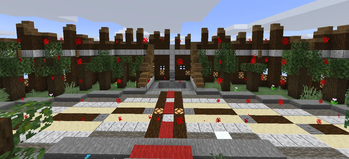
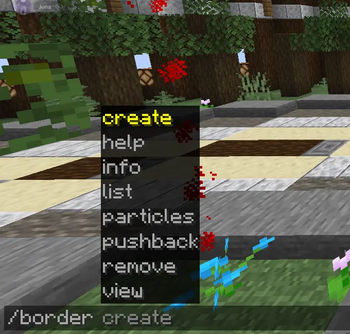
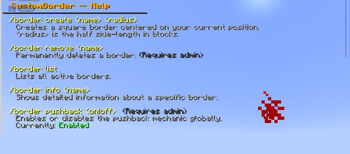
# CustomBorder **Custom square world borders — fully independent of the vanilla Minecraft border.** Define named, persistent borders anywhere in your world. Players are kept inside with particles, pushback, and instant enforcement. Admins get fine-grained control over bypass, visibility, and settings — all at runtime, no restart needed. --- ## ✨ Features - **Square borders** — defined by a center point and a radius (half side-length in blocks) - **Full build-height wall** — the border spans 10,000 blocks vertically, covering the entire playable range - **Red particle wall** — appears as players approach; each player can set their own visibility distance - **Pushback mechanic** — players are pushed back toward the center when too close to the wall; can be toggled and tuned at runtime - **Instant movement enforcement** — movement events are intercepted in real-time, preventing any crossing without rubberbanding - **Teleport-back safety net** — if a player ends up outside anyway, they are immediately moved back in - **Admin bypass** — admins can toggle border enforcement for themselves with `/borderop` - **Admin `/tp` support** — command-sourced teleports always cross borders freely, so admins can move players to either side - **Per-player particle toggle** — admins (even with bypass active) can hide the particle wall for themselves - **Multiple borders** — define as many named borders as needed across any world - **Persistent storage** — all borders are saved to `borders.yml` and survive server restarts - **Fully independent** — does not touch or interact with the vanilla world border in any way - **Tab completion** — all commands support full tab completion including border names and argument suggestions --- ## 🗂️ Commands ### Player Commands *(Default: OP only — configurable via permissions)* | Command | Description | |---|---| | `/border help` | Shows all commands with explanations and your current settings | | `/border list` | Lists all active borders with name, world, center, and radius | | `/border info <name>` | Shows detailed info about a specific border | | `/border view` | Shows your current and the server-default visibility distance | | `/border view <blocks>` | Sets how far away you see the red particle wall (1–256 blocks) | | `/border view reset` | Resets your visibility distance to the server default | ### Admin Commands *(Requires `customborder.admin`)* | Command | Description | |---|---| | `/border create <name> <radius>` | Creates a square border centered on your current position | | `/border remove <name>` | Permanently deletes a border | | `/border pushback` | Shows current pushback status (enabled, distance, strength) | | `/border pushback on` | Enables the pushback mechanic globally | | `/border pushback off` | Disables the pushback mechanic globally | | `/border pushback distance <blocks>` | Sets how close players must be before getting pushed back | | `/border pushback strength <value>` | Sets the velocity force of the pushback (default: `1.2`) | | `/border particles on` | Shows the particle wall for yourself again | | `/border particles off` | Hides the particle wall for yourself (bypass-independent) | | `/borderop on` | Enables border bypass — you can freely cross all borders | | `/borderop off` | Disables border bypass — borders are enforced for you again | > **Note:** `/tp` (and any command-sourced teleport) always crosses borders freely, allowing admins to move players to either side without needing bypass. --- ## 🔐 Permissions | Permission | Description | Default | |---|---|---| | `customborder.use` | Use basic commands: `help`, `list`, `info`, `view` | `op` | | `customborder.admin` | Full control: create/remove borders, pushback settings, particles, bypass | `op` | --- ## ⚙️ Configuration All settings in `plugins/CustomBorder/config.yml`: ```yaml # Distance (in blocks) at which red particles become visible (server-wide default). # Each player can override this individually with /border view. particle-visibility-distance: 10.0 # Whether the pushback mechanic is active. Toggleable at runtime with /border pushback on|off. pushback-enabled: true # Distance (in blocks) from the wall at which players start getting pushed back. pushback-distance: 3.0 # Velocity strength of the pushback toward the border center. pushback-strength: 1.2 # How often (in ticks) the proximity check runs. 20 ticks = 1 second. check-interval: 5 # Number of particle points rendered per visible wall per check. particle-count: 8 # Height of the border wall in blocks. 10000 covers the full build range. border-height: 10000 ``` All pushback settings can be changed **at runtime** via commands — no need to edit the file or restart the server. Changes are saved immediately. --- ## 📖 How It Works 1. Stand at the center of where you want the border, then run `/border create <name> <radius>`. - `radius` is the **half side-length**: a radius of `100` creates a **200 × 200** block area.
# CustomBorder
Custom square world borders — fully independent of the vanilla Minecraft border.
Define named, persistent borders anywhere in your world. Players are kept inside with particles, pushback, and instant enforcement. Admins get fine-grained control over bypass, visibility, and settings — all at runtime, no restart needed.
## ✨ Features
- Square borders — defined by a center point and a radius (half side-length in blocks)
- Full build-height wall — the border spans 10,000 blocks vertically, covering the entire playable range
- Red particle wall — appears as players approach; each player can set their own visibility distance
- Pushback mechanic — players are pushed back toward the center when too close to the wall; can be toggled and tuned at runtime
- Instant movement enforcement — movement events are intercepted in real-time, preventing any crossing without rubberbanding
- Teleport-back safety net — if a player ends up outside anyway, they are immediately moved back in
- Admin bypass — admins can toggle border enforcement for themselves with `/borderop`
- Admin `/tp` support — command-sourced teleports always cross borders freely, so admins can move players to either side
- Per-player particle toggle — admins (even with bypass active) can hide the particle wall for themselves
- Multiple borders — define as many named borders as needed across any world
- Persistent storage — all borders are saved to `borders.yml` and survive server restarts
- Fully independent — does not touch or interact with the vanilla world border in any way
- Tab completion — all commands support full tab completion including border names and argument suggestions
## 🗂️ Commands
### Player Commands (Default: OP only — configurable via permissions)
| Command | Description |
|---|---|
| `/border help` | Shows all commands with explanations and your current settings |
| `/border list` | Lists all active borders with name, world, center, and radius |
| `/border info
### Admin Commands (Requires `customborder.admin`)
| Command | Description |
|---|---|
| `/border create
> Note: `/tp` (and any command-sourced teleport) always crosses borders freely, allowing admins to move players to either side without needing bypass.
## 🔐 Permissions
| Permission | Description | Default | |---|---|---| | `customborder.use` | Use basic commands: `help`, `list`, `info`, `view` | `op` | | `customborder.admin` | Full control: create/remove borders, pushback settings, particles, bypass | `op` |
## ⚙️ Configuration
All settings in `plugins/CustomBorder/config.yml`:
```yaml # Distance (in blocks) at which red particles become visible (server-wide default). # Each player can override this individually with /border view. particle-visibility-distance: 10. 0
# Whether the pushback mechanic is active. Toggleable at runtime with /border pushback on|off. pushback-enabled: true
# Distance (in blocks) from the wall at which players start getting pushed back. pushback-distance: 3. 0
# Velocity strength of the pushback toward the border center. pushback-strength: 1. 2
# How often (in ticks) the proximity check runs. 20 ticks = 1 second. check-interval: 5
# Number of particle points rendered per visible wall per check. particle-count: 8
# Height of the border wall in blocks. 10000 covers the full build range. border-height: 10000 ```
All pushback settings can be changed at runtime via commands — no need to edit the file or restart the server. Changes are saved immediately.
## 📖 How It Works
1. Stand at the center of where you want the border, then run `/border create
📊 Mod Details
- Game
- Minecraft Plugins
- Author
- MiCodeStudios
- Version
- 6.0.0
- Downloads
- 143
- Endorsements
- 1
- Category
- game-mechanics
- Created
- 5/12/2026
- Updated
- 5/9/2026
- Game Versions
- 1.21, 1.21.1, 1.21.2, 1.21.3, 1.21.4
- Tags
- game-mechanics, management, minigame
🔧 How to Install Minecraft Plugins Mods
Download from Modrinth. Use Prism Launcher or drop into your mods folder.
📖 Full step-by-step install guide for Minecraft Plugins →
Visit the official mod page for specific installation instructions for this mod.
🎮 Need cheat codes or console commands? Check ur gaming wiki for Minecraft Plugins commands, item IDs, and more.
❓ Frequently Asked Questions
Which Minecraft Plugins versions does Custom Borders support?
The author lists 1.21, 1.21.1, 1.21.2, 1.21.3, 1.21.4, 1.21.5. Other versions may work but are untested by the author.
What is the latest version of Custom Borders?
Version 6.0.0, published 2026-05-09 with 143 downloads recorded at the source.
Keep browsing — more Minecraft Plugins mods await