CoreChatX
🟢 Updated this month🖼️ Gallery (1 images)
🔍 Analysis
- 👍 0.4% endorsement rate
- 🏆 #93 of 171 management mods in this game by downloads
📋 About This Mod
# CoreChatX Feature List
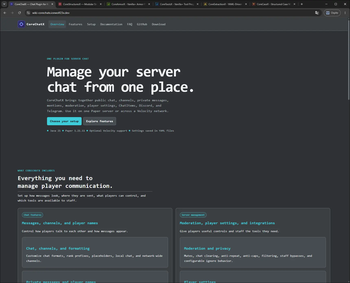
CoreChatX is a complete communication suite for Minecraft servers. It brings chat, private messages, persistent nicknames, channels, mentions, pings, chat item previews, chat bubbles, moderation, player settings, locales, and external bridges into one polished system.
The idea is simple: server chat should feel like one product, not a stack of separate plugins that each need their own configuration, commands, and maintenance.
This page is a commercial-style feature overview. Exact config keys, defaults, limits, and operational details are documented at https://wiki-corechatx.icewolf23x.dev/
Current release: `2026. 3. 0`
Before updating an existing installation, stop the affected servers and back up every file and subfolder inside their CoreChatX plugin folders. Keep the old JARs separately and also back up MySQL if it is already in use. Update the Velocity proxy and all participating Paper backends together.
## Why CoreChatX
Many servers end up installing one plugin for chat, another for private messages, another for nicknames, another for mentions, another for channels, another for Discord, another for Telegram, another for chat bubbles, another for item previews, and then one more just to keep the whole setup consistent.
That works, technically. It also turns chat into a maintenance hobby.
CoreChatX is built for server owners who want the whole communication experience to feel consistent:
- one visual language
- one permission model
- one player settings flow
- one network-aware chat layer
- one place to manage public chat, PMs, nicknames, channels, pings, bridges, moderation, and rich interactions
It is not trying to be "yet another chat plugin". It is trying to replace scattered chat-related plugin stacks with one clean, friendly, server-ready system.
[!(https://icewolf23x.github.io/CoreX-Badges/corechatx/paper-chart.svg)](https://bstats.org/plugin/bukkit/CoreChatX-paper)
[!(https://icewolf23x.github.io/CoreX-Badges/corechatx/velocity-chart.svg)](https://bstats.org/plugin/velocity/CoreChatX-velocity)
CoreChatX uses bStats for usage statistics, enabled by default. Reports include plugin/platform and Java versions, operating-system details, processor count, player count, online-mode status, a generated server identifier, and the configured backend count on Velocity. These metrics do not include chat messages or player names. bStats receives the reports; aggregate charts are publicly available.
You can opt out by setting `enabled: false` in Paper's `plugins/bStats/config.yml`, or `enabled=false` in Velocity's `plugins/bStats/config.txt`, then restarting the affected server/proxy. These settings are shared with other bStats integrations. See the (https://bstats.org/docs/server-owners) and (https://bstats.org/privacy-policy).
## Current State
CoreChatX currently:
- supports Paper `1. 21. 11 - 26. 2`
- targets Java `21`; use Java `21` for Paper `1. 21. 11` and Java `25` for Paper `26. 1/26. 2`, while Velocity must satisfy its own runtime requirement and CoreChatX's Java `21` minimum
- ships separate `corechatx-paper` and `corechatx-velocity` runtime jars
- uses `CoreChatX` as the Paper plugin name
- uses `corechatx` as the Velocity plugin id
- works on standalone Paper servers
- works on Velocity networks with one or more isolated CoreChatX proxy groups
- keeps YAML as the default and offers optional MySQL storage for standalone Paper or Velocity-owned network groups
- includes verified backups, YAML-to-MySQL migration, and current-data MySQL-to-YAML rollback through `/ccxstorage`
- lets each player choose persistent or non-persistent channel selection
- supports permanent or timed personal channel hiding
- checks Modrinth for stable releases and experimental alpha/beta builds, with console and Paper OP notifications
- supports group-local network chat, PMs, player settings, nicknames, runtime data, Discord links, and ChatItem snapshots
- supports Discord inbound and outbound messages
- supports Telegram inbound and outbound messages
- supports Telegram forum topic routing
- supports per-channel Discord and Telegram bridge format overrides
- supports source-specific mention gates for Minecraft, Discord, and Telegram text
- supports optional Discord-Minecraft account linking
- supports Discord required-link-to-play and required-role-to-play gates
- supports Discord nickname sync from Minecraft nicknames, with fallback to the real Minecraft player name
- supports Discord connection, death, advancement, and server-status embeds
- supports Discord console channels, player-list output, and channel description updates
- supports Discord ChatItem PNG previews and item inspection menus
- supports Discord custom emoji expansion from Minecraft messages
- supports Discord inbound attachments as clickable Minecraft file links
- supports legacy color and hex formatt
📊 Mod Details
- Game
- Minecraft Plugins
- Author
- IceWolf23X
- Version
- 26.2
- Downloads
- 536
- Endorsements
- 2
- Category
- management
- Created
- 5/8/2026
- Updated
- 9/9/2026
- Game Versions
- 1.21, 1.21.1, 1.21.2, 1.21.3, 1.21.4
- Tags
- management, social, utility
🔧 How to Install Minecraft Plugins Mods
Download from Modrinth. Use Prism Launcher or drop into your mods folder.
📖 Full step-by-step install guide for Minecraft Plugins →
Visit the official mod page for specific installation instructions for this mod.
🎮 Need cheat codes or console commands? Check ur gaming wiki for Minecraft Plugins commands, item IDs, and more.
❓ Frequently Asked Questions
Which Minecraft Plugins versions does CoreChatX support?
The author lists 1.21, 1.21.1, 1.21.2, 1.21.3, 1.21.4, 1.21.5. Other versions may work but are untested by the author.
What is the latest version of CoreChatX?
Version 26.2, published 2026-09-09 with 536 downloads recorded at the source.
Keep browsing — more Minecraft Plugins mods await