Chunks
⚪ Last updated 2023🖼️ Gallery (4 images)
🔍 Analysis
- 👍 1.6% endorsement rate — high engagement, a strong quality signal
- 🏆 #27 of 351 adventure mods in this game by downloads
📋 About This Mod
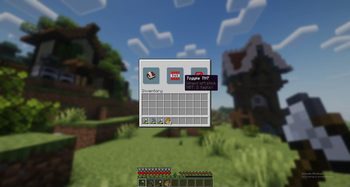
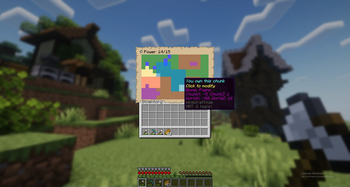
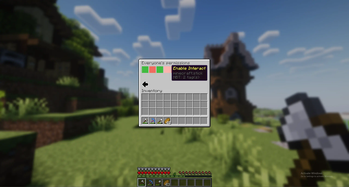
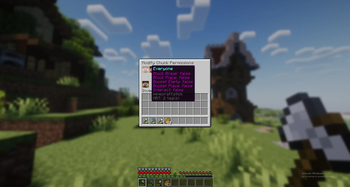
# Chunks A claim plugin based on FTB Chunks ## Features * A beautiful gui for easy navigation of the map without commands * Claim Chunks * Modify permissions of a chunk for a user * Modify permissions of a chunk for everyone * Enable explosions in a chunk * Unclaim chunks * Set claim chunk limit * Admin commands for overriding chunks and setting claim power for specific user * Per world claims ## Installation ## Database setup Keii's Chunks requires a mysql database running on the server computer because of it's code strucutre. A sqlite one that works out of the box is in the works but no promises on when it will be relased. ## Debian ### Install MariaDB Server ```bash $ sudo apt update && $ sudo apt install mariadb-server && $ sudo mysql_secure_installation ``` ### Configure a user for the mariadb server Enter the mariadb installation ```bash $ sudo mariadb ``` Create a database for keii's chunks ``` MariaDB > CREATE DATABASE <database_name>; ``` Create a new user and give it access to the database ``` MariaDB > CREATE USER '<user_name>'@'localhost' IDENTIFIED BY '<password>'; MariaDB > GRANT ALL PRIVILEGES ON `<database_name>`.* TO '<user_name>'@'localhost'; MariaDB > FLUSH PRIVILEGES; ``` ### Update config.yml In the server directory go to `plugins/KeiiChunks/config.yml`. Create the file if it doesn't exist and add/update this to the file. All of the entries in arrows '<>' are the same as the inputs you put in the above mariadb configuration. (If you installed the database on a machine that isn't the machine the server is running on you want to change the dbUrl to `jdbc:mysql://<machine_ip>:3306/`) ```yml dbUrl: jdbc:mysql://localhost:3306/ dbName: <database_name> dbUser: <user_name> dbPassword: <password> ``` ### Restart the server Now restart the server and the database should be setup. If you already have custom server resource packs on the server then you will want to merge that resource pack with (https://github.com/shykeiichi/plugin-resourcepack/blob/main/release.zip) using something like https://merge.elmakers.com/. ### If your database wasn't setup automatically If the database wasn't updated automatically then you will want to update the database manually by running. ```bash $ mysql -u <user_name> -p <database_name> < database.sql ``` database.sql is located in plugin/KeiiChunks.
A claim plugin based on FTB Chunks
## Features
A beautiful gui for easy navigation of the map without commands Claim Chunks Modify permissions of a chunk for a user Modify permissions of a chunk for everyone Enable explosions in a chunk Unclaim chunks Set claim chunk limit Admin commands for overriding chunks and setting claim power for specific user Per world claims
## Installation
## Database setup
Keii's Chunks requires a mysql database running on the server computer because of it's code strucutre. A sqlite one that works out of the box is in the works but no promises on when it will be relased.
### Install MariaDB Server ```bash $ sudo apt update && $ sudo apt install mariadb-server && $ sudo mysql_secure_installation ```
### Configure a user for the mariadb server
Enter the mariadb installation ```bash $ sudo mariadb ```
Create a database for keii's chunks
```
MariaDB [(none)]> CREATE DATABASE
Create a new user and give it access to the database
```
MariaDB [(none)]> CREATE USER '
### Update config.yml
In the server directory go to `plugins/KeiiChunks/config.yml`. Create the file if it doesn't exist and add/update this to the file.
All of the entries in arrows '<>' are the same as the inputs you put in the above mariadb configuration.
(If you installed the database on a machine that isn't the machine the server is running on you want to change the dbUrl to `jdbc:mysql://
### Restart the server
Now restart the server and the database should be setup. If you already have custom server resource packs on the server then you will want to merge that resource pack with (https://github.com/shykeiichi/plugin-resourcepack/blob/main/release.zip) using something like https://merge.elmakers.com/.
### If your database wasn't setup automatically
If the database wasn't updated automatically then you will want to update the database manually by running.
```bash
$ mysql -u
📊 Mod Details
- Game
- Minecraft Plugins
- Author
- keii
- Version
- 0.2
- Downloads
- 965
- Endorsements
- 15
- Category
- adventure
- Created
- 8/30/2023
- Updated
- 9/8/2023
- Game Versions
- 1.20, 1.20.1
- Tags
- adventure, social, utility
🔧 How to Install Minecraft Plugins Mods
Download from Modrinth. Use Prism Launcher or drop into your mods folder.
📖 Full step-by-step install guide for Minecraft Plugins →
Visit the official mod page for specific installation instructions for this mod.
🎮 Need cheat codes or console commands? Check ur gaming wiki for Minecraft Plugins commands, item IDs, and more.
❓ Frequently Asked Questions
Which Minecraft Plugins versions does Chunks support?
The author lists 1.20, 1.20.1. Other versions may work but are untested by the author.
What is the latest version of Chunks?
Version 0.2, published 2023-09-08 with 965 downloads recorded at the source.
Keep browsing — more Minecraft Plugins mods await