Chestify
🟠 Updated over a year ago🖼️ Gallery (1 images)
🔍 Analysis
- 🏆 #1007 of 1452 bukkit mods in this game by downloads
📋 About This Mod
# Chestify **Secure your treasures with PIN-protected chests!** ## Overview Chestify is a Minecraft plugin that introduces a new level of security for your valuable items by allowing players to create PIN-protected chests, known as **safes**. With Chestify, you can store your precious belongings in safes that require a 4-digit PIN code to access, ensuring that only authorized players can open them. This plugin is perfect for servers aiming to enhance player security without drastically changing the vanilla gameplay experience. ## Features - **PIN-Protected Safes**: Create chests that require a 4-digit PIN code to open. - **Graphical PIN Entry**: An intuitive GUI allows players to enter their PIN codes using digits from 0 to 9. - **Player Authorization**: Players who correctly enter the PIN code become authorized and can access the safe without re-entering the code. - **Configurable Crafting Recipe**: Customize the crafting recipe for safes or disable crafting entirely. - **Visual and Sound Effects**: Enjoy customizable visual and audio feedback upon successful or failed attempts to access a safe. - **Destruction Protection**: Safes cannot be destroyed by explosions, fire, or unauthorized players. - **Custom Messages and Settings**: All messages and plugin settings are configurable through `config.yml`. - **Damage on Incorrect PIN**: Optionally inflict damage on players who enter the wrong PIN code. ## Installation 1. **Download**: Get the `Chestify.jar` plugin file from (#). 2. **Install**: Place the `Chestify.jar` file into your server's `plugins` directory. 3. **Restart Server**: Restart your server to generate the default configuration files. 4. **Configure**: Edit the `config.yml` file located in `plugins/Chestify` to customize settings as needed. 5. **Reload Plugin**: Use `/chestify reload` to apply configuration changes without restarting the server. ## Configuration The `config.yml` file allows you to customize: - **Crafting Recipe**: Define or disable the crafting recipe for safes. - **Effects and Sounds**: Customize visual and sound effects for successful and failed safe interactions. - **Messages**: Edit all player-facing messages for localization or personalization. - **Damage Settings**: Configure damage inflicted on incorrect PIN entry. - **Crafting Toggle**: Enable or disable the ability to craft safes. ### Example `config.yml` ```yaml settings: enable_crafting: true safe_recipe: shape: - 'III' - 'ICI' - 'IBI' ingredients: I: 'IRON_BLOCK' C: 'CHEST' B: 'DIAMOND_BLOCK' damage_on_incorrect_pin: true damage_amount: 2.0 effects: success: sound: 'ENTITY_PLAYER_LEVELUP' sound_volume: 1.0 sound_pitch: 1.0 particle: 'VILLAGER_HAPPY' particle_count: 10 failure: sound: 'ENTITY_VILLAGER_NO' sound_volume: 1.0 sound_pitch: 1.0 particle: 'SMOKE_NORMAL' particle_count: 10 messages: safe_placed: '&aYou have placed a safe. Set your PIN code.' enter_pin: 'Enter your PIN code' pin_set_success: '&aPIN code set successfully!' pin_correct: '&aCorrect PIN. Safe unlocked.' pin_incorrect: '&cIncorrect PIN.' cannot_break_safe: '&cYou cannot break this safe.' safe_given: '&aYou have received a safe.' safe_given_to_other: '&aYou have given a safe to {player}.' no_permission: '&cYou do not have permission to use this command.' player_not_found: '&cPlayer not found.' specify_player: '&cPlease specify a player to give the safe to.' reload_success: '&aChestify configuration reloaded successfully.' set_your_pin: 'Set your PIN code' ``` ## Commands and Permissions - **Command**: `/givesafe ` - **Description**: Gives a safe to yourself or a specified player. - **Permission**: `chestify.give` - **Command**: `/chestify reload` - **Description**: Reloads the plugin configuration. - **Permission**: `chestify.reload` - **Permissions**: - `chestify.bypass.open` — Allows opening PIN-protected safes without entering the PIN code. - `chestify.bypass.break` — Allows breaking PIN-protected safes without authorization. ## How to Use ### 1. Obtain a Safe - **Crafting**: Create a safe using the customizable recipe defined in `config.yml` (if crafting is enabled). - **Command**: Use `/givesafe` to receive a safe (requires appropriate permissions). ### 2. Place the Safe - Place the safe in your desired location in the world. ### 3. Set Your PIN Code - Upon placing the safe, a GUI will prompt you to set a 4-digit PIN code using digits from 0 to 9. ### 4. Accessing the Safe - **Authorized Access**: Open the safe without entering the PIN if you are the owner or have previously entered the correct PIN. - **Unauthorized Access**: Other players must enter the correct PIN code to access the safe. ### 5. Sharing Access - Share your PIN code with trusted players to grant them access to your safe. ### 6. Breaking the Safe - Only the owner or authorized players can break the
Secure your treasures with PIN-protected chests!
## Overview
Chestify is a Minecraft plugin that introduces a new level of security for your valuable items by allowing players to create PIN-protected chests, known as safes. With Chestify, you can store your precious belongings in safes that require a 4-digit PIN code to access, ensuring that only authorized players can open them. This plugin is perfect for servers aiming to enhance player security without drastically changing the vanilla gameplay experience.
## Features
- PIN-Protected Safes: Create chests that require a 4-digit PIN code to open.
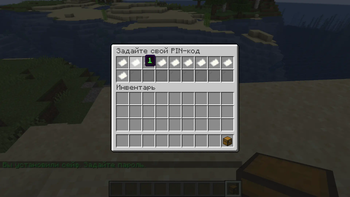
- Graphical PIN Entry: An intuitive GUI allows players to enter their PIN codes using digits from 0 to 9.
- Player Authorization: Players who correctly enter the PIN code become authorized and can access the safe without re-entering the code.
- Configurable Crafting Recipe: Customize the crafting recipe for safes or disable crafting entirely.
- Visual and Sound Effects: Enjoy customizable visual and audio feedback upon successful or failed attempts to access a safe.
- Destruction Protection: Safes cannot be destroyed by explosions, fire, or unauthorized players.
- Custom Messages and Settings: All messages and plugin settings are configurable through `config.yml`.
- Damage on Incorrect PIN: Optionally inflict damage on players who enter the wrong PIN code.
## Installation
1. Download: Get the `Chestify.jar` plugin file from (#). 2. Install: Place the `Chestify.jar` file into your server's `plugins` directory. 3. Restart Server: Restart your server to generate the default configuration files. 4. Configure: Edit the `config.yml` file located in `plugins/Chestify` to customize settings as needed. 5. Reload Plugin: Use `/chestify reload` to apply configuration changes without restarting the server.
## Configuration
The `config.yml` file allows you to customize:
- Crafting Recipe: Define or disable the crafting recipe for safes.
- Effects and Sounds: Customize visual and sound effects for successful and failed safe interactions.
- Messages: Edit all player-facing messages for localization or personalization.
- Damage Settings: Configure damage inflicted on incorrect PIN entry.
- Crafting Toggle: Enable or disable the ability to craft safes.
### Example `config.yml`
```yaml settings: enable_crafting: true safe_recipe: shape: - 'III' - 'ICI' - 'IBI' ingredients: I: 'IRON_BLOCK' C: 'CHEST' B: 'DIAMOND_BLOCK' damage_on_incorrect_pin: true damage_amount: 2. 0
effects: success: sound: 'ENTITY_PLAYER_LEVELUP' sound_volume: 1. 0 sound_pitch: 1. 0 particle: 'VILLAGER_HAPPY' particle_count: 10 failure: sound: 'ENTITY_VILLAGER_NO' sound_volume: 1. 0 sound_pitch: 1. 0 particle: 'SMOKE_NORMAL' particle_count: 10
messages: safe_placed: '&aYou have placed a safe. Set your PIN code.' enter_pin: 'Enter your PIN code' pin_set_success: '&aPIN code set successfully!' pin_correct: '&aCorrect PIN. Safe unlocked.' pin_incorrect: '&cIncorrect PIN.' cannot_break_safe: '&cYou cannot break this safe.' safe_given: '&aYou have received a safe.' safe_given_to_other: '&aYou have given a safe to {player}.' no_permission: '&cYou do not have permission to use this command.' player_not_found: '&cPlayer not found.' specify_player: '&cPlease specify a player to give the safe to.' reload_success: '&aChestify configuration reloaded successfully.' set_your_pin: 'Set your PIN code' ```
## Commands and Permissions
- Command: `/givesafe `
- - Description: Gives a safe to yourself or a specified player.
- - Permission: `chestify.give`
- Command: `/chestify reload`
- - Description: Reloads the plugin configuration.
- - Permission: `chestify.reload`
- Permissions:
- - `chestify.bypass.open` — Allows opening PIN-protected safes without entering the PIN code.
- - `chestify.bypass.break` — Allows breaking PIN-protected safes without authorization.
## How to Use
### 1. Obtain a Safe
- Crafting: Create a safe using the customizable recipe defined in `config.yml` (if crafting is enabled).
- Command: Use `/givesafe` to receive a safe (requires appropriate permissions).
### 2. Place the Safe
- Place the safe in your desired location in the world.
### 3. Set Your PIN Code
- Upon placing the safe, a GUI will prompt you to set a 4-digit PIN code using digits from 0 to 9.
### 4. Accessing the Safe
- Authorized Access: Open the safe without entering the PIN if you are the owner or have previously entered the correct PIN.
- Unauthorized Access: Other players must enter the correct PIN code to access the safe.
### 5. Sharing Access
- Share your PIN code with trusted players to grant them access to your safe.
### 6. Breaking the Safe
- Only the owner or authorized players can break the
📊 Mod Details
- Game
- Minecraft Plugins
- Author
- verkme
- Version
- 1.0
- Downloads
- 479
- Endorsements
- 10
- Category
- bukkit
- Created
- 11/6/2024
- Updated
- 11/5/2024
- Game Versions
- 1.21, 1.21.1, 1.21.2, 1.21.3
- Tags
- game-mechanics, storage
🔧 How to Install Minecraft Plugins Mods
Download from Modrinth. Use Prism Launcher or drop into your mods folder.
📖 Full step-by-step install guide for Minecraft Plugins →
Visit the official mod page for specific installation instructions for this mod.
🎮 Need cheat codes or console commands? Check ur gaming wiki for Minecraft Plugins commands, item IDs, and more.
❓ Frequently Asked Questions
Which Minecraft Plugins versions does Chestify support?
The author lists 1.21, 1.21.1, 1.21.2, 1.21.3. Other versions may work but are untested by the author.
What is the latest version of Chestify?
Version 1.0, published 2024-11-05 with 479 downloads recorded at the source.
Keep browsing — more Minecraft Plugins mods await