ChatManager
🟡 Updated this year🖼️ Gallery (5 images)
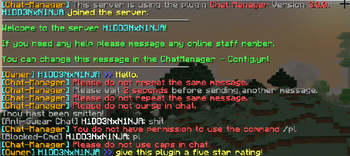
🔍 Analysis
- 👍 0.2% endorsement rate
- 🏆 #11 of 169 folia mods in this game by downloads
📋 About This Mod
<center><div align="center"> (https://raw.githubusercontent.com/ryderbelserion/Branding/refs/heads/main/orgs/crazycrew/webp/ChatManagerWebsite.webp)](https://modrinth.com/plugin/chatmanager/) ] ] ] ] ] ] ] </div></center> ## Installation 1) Download the update from modrinth/hangar for your version of Minecraft. 2) You must be using at least https://papermc.io 3) The file you downloaded goes in the `plugins` folder. 4) Add LuckPerms, and Vault to your server! 5) Restart the server. 6) View the documentation @ https://docs.crazycrew.us/mods/chatmanager/ ## Quick Builds Get the latest builds for every commit! - https://ci.crazycrew.us/job/CrazyCrates/ ## Features <details> <summary>Anti-Advertising</summary> * Block players from advertising other servers in chat, commands, and on signs.<br> * Staff gets notified when someone advertises.<br> * A command can be executed on the player that advertises.<br> * Whitelist URLs so those URLs wont be blocked when players use them in chat, commands, or on signs.<br> * Increase sensitivity option to increase the sensitivity of the anti-advertising checker, can cause false positives.<br> </details> <details> <summary>Anti-Bot Attack</summary> * Block chat and commands until player moves on join.<br> </details> <details> <summary>Anti-Caps</summary> * Prevent players from using caps in chat or in commands.<br> * Customize minimum message length.<br> * Cap percentage.<br> * Sets the players message to lowercase.<br> </details> <details> <summary>Anti-Spam</summary> * Blocks players from repeating the same chat message and the same commands.<br> * Delay between sending messages meaning you have to wait X seconds before sending another message.<br> * Delay between sending commands meaning you have to wait X seconds before sending another command.<br> </details> <details> <summary>Anti-Swear</summary> * Block swear words in chat, commands, and on signs.<br> * Blocks words together (Example: YouAreAPieceOfCrap).<br> * Blocks spaces between words (Example: C r a p).<br> * Increase sensitivity option to increase the sensitivity of the anti-swear checker, can cause false positives.<br> * Add and remove swear words in game!<br> * Staff gets notified when a player swears.<br> * A command can be executed on the player that swears.<br> * Add as many commands as you like.<br> * Whitelist commands, so players can swear in those commands without the message being blocked.<br> * Whitelist words that won't be detected by the anti-swear if increase sensitivity is enabled.<br> * Option to block the message from being sent to chat.<br> </details> <details> <summary>Anti-Unicode</summary> * Prevents players from typing special characters in chat. (Example: Ω≈ç√∫˜µ≤≥)<br> * Prevents players from typing fancy chat messages from hack clients.<br> * This prevents players from bypassing the Anti-Advertising checker and Anti-Swear checker.<br> * Staff gets notified when someone uses special characters in chat.<br> * A command can be executed to the player that uses special characters in chat.<br> * A Unicode whitelist so players can send those messages in chat and their message wont be blocked.<br> </details> <details> <summary>Auto-Broadcast</summary> * Edit auto broadcast messages in the AutoBroadcast.yml file.<br> * The auto-broadcast feature can send messages globally.<br> * The auto-broadcast feature can send messages per-world.<br> * The auto-broadcast feature can send messages via action bar.<br> * The auto-broadcast feature can send messages via title.<br> * The auto-broadcast feature can send messages via boss bar.<br> * Each option has it's own section so you can...<br> <ul><li>Enable or disable each section. <li>Set a custom prefix for each section. <li>Set a custom interval for each section. <li>Enable or disable the header footer for global and per world messages. <li>Set a custom header and footer for global and per world messages.</ul> * You can add broadcast messages in-game.<br> * You can view a list of all the broadcast messages in-game.<br> * You can create a new auto broadcast world in-game.<br> * Sounds can be played when messages are sent.<br> * Set boss bar messages to be permanent by adding the bar delay to -1. </details> <details> <summary>Banned Commands</summary> * Deny players from using specific commands.<br> * Add and remove commands in game.<br> * Staff gets notified when a pl
[!(https://raw.githubusercontent.com/ryderbelserion/Branding/refs/heads/main/orgs/crazycrew/webp/ChatManagerWebsite.webp)](https://modrinth.com/plugin/chatmanager/)
[![]] [![]] [![]] [![]] [![]] [![]] [![]]
## Installation 1) Download the update from modrinth/hangar for your version of Minecraft. 2) You must be using at least https://papermc.io 3) The file you downloaded goes in the `plugins` folder. 4) Add LuckPerms, and Vault to your server! 5) Restart the server. 6) View the documentation @ https://docs.crazycrew.us/mods/chatmanager/
## Quick Builds Get the latest builds for every commit! - https://ci.crazycrew.us/job/CrazyCrates/
## Features
Anti-Advertising
Block players from advertising other servers in chat, commands, and on signs.
Staff gets notified when someone advertises.
A command can be executed on the player that advertises.
Whitelist URLs so those URLs wont be blocked when players use them in chat, commands, or on signs.
Increase sensitivity option to increase the sensitivity of the anti-advertising checker, can cause false positives.
Anti-Bot Attack
Block chat and commands until player moves on join.
Anti-Caps
Prevent players from using caps in chat or in commands.
Customize minimum message length.
Cap percentage.
Sets the players message to lowercase.
Anti-Spam
Blocks players from repeating the same chat message and the same commands.
Delay between sending messages meaning you have to wait X seconds before sending another message.
Delay between sending commands meaning you have to wait X seconds before sending another command.
Anti-Swear
Block swear words in chat, commands, and on signs.
Blocks words together (Example: YouAreAPieceOfCrap).
Blocks spaces between words (Example: C r a p).
Increase sensitivity option to increase the sensitivity of the anti-swear checker, can cause false positives.
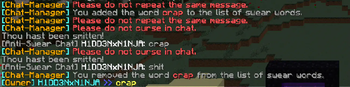
Add and remove swear words in game!
Staff gets notified when a player swears.
A command can be executed on the player that swears.
Add as many commands as you like.
Whitelist commands, so players can swear in those commands without the message being blocked.
Whitelist words that won't be detected by the anti-swear if increase sensitivity is enabled.
Option to block the message from being sent to chat.
Anti-Unicode
Prevents players from typing special characters in chat. (Example: Ω≈ç√∫˜µ≤≥)
Prevents players from typing fancy chat messages from hack clients.
This prevents players from bypassing the Anti-Advertising checker and Anti-Swear checker.
Staff gets notified when someone uses special characters in chat.
A command can be executed to the player that uses special characters in chat.
A Unicode whitelist so players can send those messages in chat and their message wont be blocked.
Auto-Broadcast
Edit auto broadcast messages in the AutoBroadcast.yml file.
The auto-broadcast feature can send messages globally.
The auto-broadcast feature can send messages per-world.
The auto-broadcast feature can send messages via action bar.
The auto-broadcast feature can send messages via title.
The auto-broadcast feature can send messages via boss bar.
Each option has it's own section so you can...
- Enable or disable each section.
- Set a custom prefix for each section.
- Set a custom interval for each section.
- Enable or disable the header footer for global and per world messages.
- Set a custom header and footer for global and per world messages.
You can view a list of all the broadcast messages in-game.
You can create a new auto broadcast world in-game.
Sounds can be played when messages are sent.
Set boss bar messages to be permanent by adding the bar delay to -1.
Banned Commands
Deny players from using specific commands.
Add and remove commands in game.
* Staff gets notified when a pl
📊 Mod Details
- Game
- Minecraft Plugins
- Author
- H1DD3NxN1NJA
- Version
- 4.0.4
- Downloads
- 42,140
- Endorsements
- 105
- Category
- folia
- Created
- 1/8/2023
- Updated
- 5/9/2026
- Game Versions
- 26.1.2, 26.2
- Tags
- social
🔧 How to Install Minecraft Plugins Mods
Download from Modrinth. Use Prism Launcher or drop into your mods folder.
📖 Full step-by-step install guide for Minecraft Plugins →
Visit the official mod page for specific installation instructions for this mod.
🎮 Need cheat codes or console commands? Check ur gaming wiki for Minecraft Plugins commands, item IDs, and more.
❓ Frequently Asked Questions
Which Minecraft Plugins versions does ChatManager support?
The author lists 26.1.2, 26.2. Other versions may work but are untested by the author.
What is the latest version of ChatManager?
Version 4.0.4, published 2026-05-09 with 42,140 downloads recorded at the source.
Keep browsing — more Minecraft Plugins mods await