BiomesTitle
🟠 Updated over a year ago🖼️ Gallery (3 images)
🔍 Analysis
- 👍 0.9% endorsement rate
- 🏆 #41 of 351 adventure mods in this game by downloads
📋 About This Mod
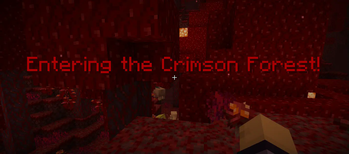
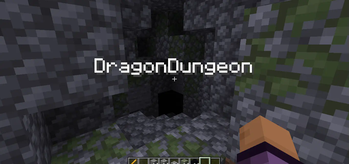
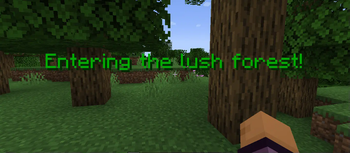
# Display message once a player enter Biome/Area <br> !(https://cdn.modrinth.com/data/cached_images/30781c28d10db90f1cfdca85c2c48fb16f66851b.png) <br> !(https://cdn.modrinth.com/data/cached_images/2846583a9213024b08ba6609d8a680d81c2e6fcd.png) <br> **This plugin sadly wont receive any update anymore(ABANDONED)** ## Other feature<br> * Display message once a player step into biomes/area/Structure<br> * Display option<br> - title<br> - subtitle<br> - actionbar<br> - bossbar<br> * Create your own Area<br> * Display message in structures<br> * Particles(Spawn a particle once a player step into the biomes/area)<br> * Trails Particle (spawn a trails once a player step into the biomes/area)<br> * Execute command (Executed command for player once a player step into the biomes/area)<br> * Custom sounds (Play sound once a player step into the biomes/area)<br> * RGB support using <rgb></rgb> <br> **Commands** <br> ``` /biometitlewand (Use to get Area wand) /biometitlesetarea(Use to set the area) ``` **Permissions** <br> ``` biomestitle.command.wand biomestitle.command.setarea ``` How to use Area Wand? check (https://github.com/NotSabrina/BiomesTitle) ,Also custom area will appear in Area.yml <details> <summary>Config.yml</summary> ``` # BiomesTitle Plugin # Having an issue or suggestion? go to my github and create new issue nd label the issue # with bug/request ,if i label it as Trying it means im working for it # https://github.com/NotSabrina/BiomesTitle disabled-worlds: - example_world - another_world biomes: # if u use PlaceholderAPI Plugin you can display a image,custom font Ex: #PLAINS: # message: "&aEntering the sunny plains! %image_placeholder%" <- PlaceholderAPI image # display: "title" # display option # - title (the message will appear as title) # - actionbar (the message will appear as action bar) # - subtitle (the message will appearr as subtitle) # - bossbar (the message will appeear as bossbar permanently) # EXAMPLE_BIOME: # message: "&aEntering the sunny plains!" # display: "title" # sound: "minecraft:entity.player.levelup" <-- Minecraft sound effect # All minecraft sound effect : https://www.digminecraft.com/lists/sound_list_pc.php # Use sudo if you want the player to execute command # you cane use %player% without PlaceholderAPI # commands: # - "give %player% minecraft:diamond 1" # - "say %player% has entered the plains." # particles: # type: "FLAME" <-- Particles spawn once a player step into the biome # all minecraft particles : https://minecraft.wiki/w/Particles_%28Java_Edition%29 # count: 10 <-- How many particles appear(you can adjust this if you get lag issue) # offsetX: 0.5 <-- X cordinate # offsetY: 0.5 <-- Y cordinate # offsetZ: 0.5 <-- Z cordinate # speed: 0.1 <-- The speed of particles # trail_particles: # type: "VILLAGER_HAPPY" <-- Particles spawn as a trails that will follow player when in biome/area # count: 5 # offsetX: 0.3 # offsetY: 0.1 # offsetZ: 0.3 # you can use <rgb> to make the message rgb example: # message : <rgb> this is rgb text</rgb> # Note: # if u want to display a message once a player step into a Structure u should # go to Area.yml and add it like #structures: # Village: # pos1: # x: 100 # y: 64 # z: 100 # pos2: # x: 200 # y: 80 # z: 200 # message: "Welcome to the Village!" # displayType: "bossbar" # Vanilla Biomes world: DESERT: message: "&eEntering the hot desert!" display: "title" sound: - "" commands: - "" - "" particles: type: "" count: 10 offsetX: 0.5 offsetY: 0.5 offsetZ: 0.5 speed: 0.1 trail_particles: type: "" count: 5 offsetX: 0.5 offsetY: 0.3 offsetZ: 0.1 FOREST: message: "&2Entering the lush forest!" display: "title" sound: - "" commands: - "" - "" particles: type: "" count: 10 offsetX: 0.5 offsetY: 0.5 offsetZ: 0.5 speed: 0.1 trail_particles: type: "" count: 5 offsetX: 0.3 offsetY: 0.1 offsetZ: 0.3 world_nether: NETHER_WASTES: message: "&cEntering the fiery Nether Wastes!" display: "title" sound: - "" commands: - "" - "" particles: type: "" count: 10 offsetX: 0.5 offsetY: 0.5 offsetZ: 0.5 speed: 0.1 trail_particles: type: "" count: 5 offsetX: 0.3 offsetY: 0.1 offsetZ: 0.3 SOUL_SAND_VALLEY: message: "&7Entering the eerie Soul Sand Valley!" display: "title" sound: - "" commands: - "" - "" particles: type: "" count: 10 offsetX: 0.5 offsetY: 0.5 offsetZ: 0.5 speed: 0.1 trail_particles: type: "" count: 5 offsetX: 0.3 offsetY: 0
# Display message once a player enter Biome/Area
!(https://cdn.modrinth.com/data/cached_images/30781c28d10db90f1cfdca85c2c48fb16f66851b.png)
!(https://cdn.modrinth.com/data/cached_images/2846583a9213024b08ba6609d8a680d81c2e6fcd.png)
This plugin sadly wont receive any update anymore(ABANDONED) ## Other feature
Display message once a player step into biomes/area/Structure
Display option
- actionbar
Create your own Area
Display message in structures
Particles(Spawn a particle once a player step into the biomes/area)
Trails Particle (spawn a trails once a player step into the biomes/area)
Execute command (Executed command for player once a player step into the biomes/area)
Custom sounds (Play sound once a player step into the biomes/area)
* RGB support using
Commands
``` /biometitlewand (Use to get Area wand) /biometitlesetarea(Use to set the area) ``` Permissions
```
biomestitle.command.wand
biomestitle.command.setarea
```
How to use Area Wand? check (https://github.com/NotSabrina/BiomesTitle) ,Also custom area will appear in Area.yml
Config.yml
``` # BiomesTitle Plugin # Having an issue or suggestion? go to my github and create new issue nd label the issue # with bug/request ,if i label it as Trying it means im working for it # https://github.com/NotSabrina/BiomesTitle disabled-worlds: - example_world - another_world
biomes: # if u use PlaceholderAPI Plugin you can display a image,custom font Ex: #PLAINS: # message: "&aEntering the sunny plains! %image_placeholder%" <- PlaceholderAPI image # display: "title"
# display option # - title (the message will appear as title) # - actionbar (the message will appear as action bar) # - subtitle (the message will appearr as subtitle) # - bossbar (the message will appeear as bossbar permanently)
# EXAMPLE_BIOME: # message: "&aEntering the sunny plains!" # display: "title" # sound: "minecraft:entity.player.levelup" <-- Minecraft sound effect # All minecraft sound effect : https://www.digminecraft.com/lists/sound_list_pc.php # Use sudo if you want the player to execute command # you cane use %player% without PlaceholderAPI # commands: # - "give %player% minecraft:diamond 1" # - "say %player% has entered the plains." # particles: # type: "FLAME" <-- Particles spawn once a player step into the biome # all minecraft particles : https://minecraft.wiki/w/Particles_%28Java_Edition%29 # count: 10 <-- How many particles appear(you can adjust this if you get lag issue) # offsetX: 0. 5 <-- X cordinate # offsetY: 0. 5 <-- Y cordinate # offsetZ: 0. 5 <-- Z cordinate # speed: 0. 1 <-- The speed of particles # trail_particles: # type: "VILLAGER_HAPPY" <-- Particles spawn as a trails that will follow player when in biome/area # count: 5 # offsetX: 0. 3 # offsetY: 0. 1 # offsetZ: 0. 3
# you can use
# Note: # if u want to display a message once a player step into a Structure u should # go to Area.yml and add it like #structures: # Village: # pos1: # x: 100 # y: 64 # z: 100 # pos2: # x: 200 # y: 80 # z: 200 # message: "Welcome to the Village!" # displayType: "bossbar"
# Vanilla Biomes world: DESERT: message: "&eEntering the hot desert!" display: "title" sound: - "" commands: - "" - "" particles: type: "" count: 10 offsetX: 0. 5 offsetY: 0. 5 offsetZ: 0. 5 speed: 0. 1 trail_particles: type: "" count: 5 offsetX: 0. 5 offsetY: 0. 3 offsetZ: 0. 1 FOREST: message: "&2Entering the lush forest!" display: "title" sound: - "" commands: - "" - "" particles: type: "" count: 10 offsetX: 0. 5 offsetY: 0. 5 offsetZ: 0. 5 speed: 0. 1 trail_particles: type: "" count: 5 offsetX: 0. 3 offsetY: 0. 1 offsetZ: 0. 3
world_nether: NETHER_WASTES: message: "&cEntering the fiery Nether Wastes!" display: "title" sound: - "" commands: - "" - "" particles: type: "" count: 10 offsetX: 0. 5 offsetY: 0. 5 offsetZ: 0. 5 speed: 0. 1 trail_particles: type: "" count: 5 offsetX: 0. 3 offsetY: 0. 1 offsetZ: 0. 3 SOUL_SAND_VALLEY: message: "&7Entering the eerie Soul Sand Valley!" display: "title" sound: - "" commands: - "" - "" particles: type: "" count: 10 offsetX: 0. 5 offsetY: 0. 5 offsetZ: 0. 5 speed: 0. 1 trail_particles: type: "" count: 5 offsetX: 0. 3 offsetY: 0
📊 Mod Details
- Game
- Minecraft Plugins
- Author
- Supramental
- Version
- 1.4
- Downloads
- 897
- Endorsements
- 8
- Category
- adventure
- Created
- 7/10/2024
- Updated
- 6/4/2025
- Game Versions
- 1.21, 1.21.1, 1.21.2, 1.21.3, 1.21.4
- Tags
- adventure, game-mechanics
🔧 How to Install Minecraft Plugins Mods
Download from Modrinth. Use Prism Launcher or drop into your mods folder.
📖 Full step-by-step install guide for Minecraft Plugins →
Visit the official mod page for specific installation instructions for this mod.
🎮 Need cheat codes or console commands? Check ur gaming wiki for Minecraft Plugins commands, item IDs, and more.
❓ Frequently Asked Questions
Which Minecraft Plugins versions does BiomesTitle support?
The author lists 1.21, 1.21.1, 1.21.2, 1.21.3, 1.21.4, 1.21.5. Other versions may work but are untested by the author.
What is the latest version of BiomesTitle?
Version 1.4, published 2025-06-04 with 897 downloads recorded at the source.
Keep browsing — more Minecraft Plugins mods await