Balebot
🟡 Updated this year🖼️ Gallery (2 images)

🔍 Analysis
- 🏆 #382 of 599 bukkit mods in this game by downloads
📋 About This Mod
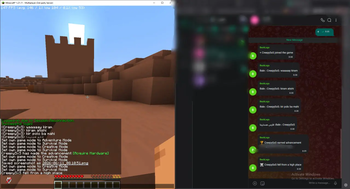
# Zen Zen bridges Minecraft chat with Bale messenger groups through the official Bale Bot API Messages sent in-game appear in Bale, and messages sent in Bale are delivered directly to Minecraft ## Features * **Two-Way Chat Bridge** — Synchronize messages between Minecraft and Bale in real time. * **Official Bale Bot API Integration** — Uses Bale's official API for communication. * **Retry System** — Automatic exponential backoff for failed API requests * **Per-Event Control** — Enable or disable individual bridge events: * Chat messages * Player joins * Player leaves * Death messages * Advancements * **Rate Limiting** — Token-bucket based protection against spam and API abuse * **Improved Logging** — Detailed console output with actionable error information * **Thread-Safe Architecture** — Designed for concurrent message processing and validation * **Long Polling Support** — Efficient update retrieval with offset tracking * **Banned Word Filter** — Block configured words before they reach either platform * **Player Ignore List** — Exclude selected players from the bridge * **Custom Formatting** — Supports placeholders and Minecraft color formatting * **Lightweight & Configurable** — Simple setup with minimal overhead ## Commands | Command | Permission | Description | | ----------------- | ----------- | --------------------------------------------------- | | `/zen reload` | `zen.admin` | Reload plugin configuration | | `/zen status` | `zen.admin` | Display bridge status | | `/zen info` | `zen.admin` | Show plugin information | | `/bale <message>` | `zen.bale` | Send a message directly to the connected Bale group | ## Configuration ```yaml bale: token: "YOUR_BALE_BOT_TOKEN" group-id: "YOUR_GROUP_ID" api-base: "https://tapi.bale.ai" poll-interval: 3 timeout: 30 ``` ## Supported Placeholders | Placeholder | Description | | --------------- | ---------------------- | | `%player%` | Minecraft player name | | `%displayname%` | Minecraft display name | | `%message%` | Message content | | `%username%` | Bale username | ## Installation 1. Create a Bale bot and obtain its API token 2. Add the bot to your Bale group 3. Retrieve the group ID from Bale updates 4. Place the plugin JAR into your server's `plugins` directory 5. Start the server to generate configuration files 6. Edit `plugins/Zen/config.yml` and enter your token and group ID 7. Restart the server ## How It Works ### Minecraft → Bale Messages sent by players in Minecraft are forwarded directly to the configured Bale group ## Requirements * Java 21+ * Bukkit, Spigot, Paper, or compatible server software * Valid Bale Bot Token * Bale Group ID ## License This project is released under the MIT License
Zen bridges Minecraft chat with Bale messenger groups through the official Bale Bot API Messages sent in-game appear in Bale, and messages sent in Bale are delivered directly to Minecraft
## Features
Two-Way Chat Bridge — Synchronize messages between Minecraft and Bale in real time. Official Bale Bot API Integration — Uses Bale's official API for communication. Retry System — Automatic exponential backoff for failed API requests Per-Event Control — Enable or disable individual bridge events:
Chat messages Player joins Player leaves Death messages Advancements Rate Limiting — Token-bucket based protection against spam and API abuse Improved Logging — Detailed console output with actionable error information Thread-Safe Architecture — Designed for concurrent message processing and validation Long Polling Support — Efficient update retrieval with offset tracking Banned Word Filter — Block configured words before they reach either platform Player Ignore List — Exclude selected players from the bridge Custom Formatting — Supports placeholders and Minecraft color formatting Lightweight & Configurable — Simple setup with minimal overhead
## Commands
| Command | Permission | Description |
| ----------------- | ----------- | --------------------------------------------------- |
| `/zen reload` | `zen.admin` | Reload plugin configuration |
| `/zen status` | `zen.admin` | Display bridge status |
| `/zen info` | `zen.admin` | Show plugin information |
| `/bale
## Configuration
```yaml bale: token: "YOUR_BALE_BOT_TOKEN" group-id: "YOUR_GROUP_ID" api-base: "https://tapi.bale.ai" poll-interval: 3 timeout: 30 ```
## Supported Placeholders
| Placeholder | Description | | --------------- | ---------------------- | | `%player%` | Minecraft player name | | `%displayname%` | Minecraft display name | | `%message%` | Message content | | `%username%` | Bale username |
## Installation
1. Create a Bale bot and obtain its API token 2. Add the bot to your Bale group 3. Retrieve the group ID from Bale updates 4. Place the plugin JAR into your server's `plugins` directory 5. Start the server to generate configuration files 6. Edit `plugins/Zen/config.yml` and enter your token and group ID 7. Restart the server
## How It Works
### Minecraft → Bale
Messages sent by players in Minecraft are forwarded directly to the configured Bale group
## Requirements
Java 21+ Bukkit, Spigot, Paper, or compatible server software Valid Bale Bot Token * Bale Group ID
This project is released under the MIT License
📊 Mod Details
- Game
- Minecraft Plugins
- Author
- Macronis
- Version
- 1.0.3
- Downloads
- 16
- Endorsements
- 0
- Category
- bukkit
- Created
- 6/18/2026
- Updated
- 6/11/2026
- Game Versions
- 1.21, 1.21.1, 1.21.2, 1.21.3, 1.21.4
- Tags
- management, social, technology
🔧 How to Install Minecraft Plugins Mods
Download from Modrinth. Use Prism Launcher or drop into your mods folder.
📖 Full step-by-step install guide for Minecraft Plugins →
Visit the official mod page for specific installation instructions for this mod.
🎮 Need cheat codes or console commands? Check ur gaming wiki for Minecraft Plugins commands, item IDs, and more.
❓ Frequently Asked Questions
Which Minecraft Plugins versions does Balebot support?
The author lists 1.21, 1.21.1, 1.21.2, 1.21.3, 1.21.4, 1.21.5. Other versions may work but are untested by the author.
What is the latest version of Balebot?
Version 1.0.3, published 2026-06-11 with 16 downloads recorded at the source.
Keep browsing — more Minecraft Plugins mods await