AIHelper
🟡 Updated this year🖼️ Gallery (2 images)
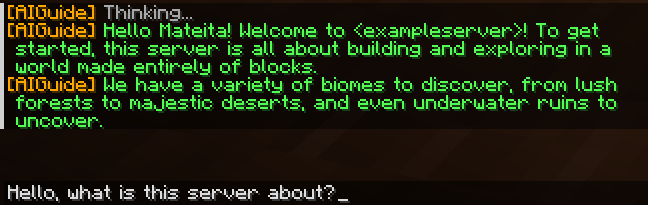
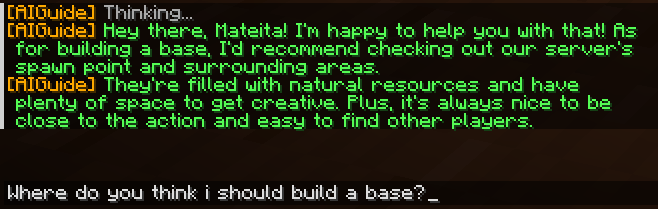
🔍 Analysis
- 👍 0.5% endorsement rate
- 🏆 #1411 of 1560 bukkit mods in this game by downloads
📋 About This Mod
AIHelper - Your Ultimate AI Assistant for Minecraft AIHelper is a powerful Minecraft plugin that integrates AI assistance directly into your game. Whether you're a server admin, developer, or casual player, AIHelper enhances your experience by providing intelligent responses, automated assistance, and game-related insights—all in real time! Features: ✅ Smart AI Responses – Get players some instant help with commands, gameplay tips, and more. ✅ Multi-AI Support – Works with OpenAI, Claude, Hugging Face, and Ollama. ✅ Customizable Context – AI learns from server-specific information for personalized replies. ✅ Efficient Caching – Speeds up responses by remembering previous queries. ✅ Easy Integration – Plug and play with minimal setup required. Enhance your Minecraft server with the power of AI—AIHelper is here to assist! The config file: ``` # AI Guide Plugin Configuration # AI Provider Selection # Available options: "ollama", "groq", "anthropic" (claude) , "huggingface", "openai" # Recommended is ollama as it runs locally ai_provider: "ollama" # Ollama Configuration (free, runs locally) # You need to install Ollama on your server: https://ollama.com/download # No API key required as it runs locally # Default URL is for local installation # Recommended! Free and local! No internet hassle. # To check if ollama works use http://localhost:11434 also if running on alternate computer please install on that computer/server # Also to install run in a cmd ollama pull <anymodel> (in the anymodel thing you can put llama3 as default) ( and before that run ollama serve if on linux ) ollama_url: "http://localhost:11434" # Recommended models: llama3, gemma, mistral but you can put any! ollama_model: "llama3" # Groq Configuration (generous free tier) # Get your free API key at: https://console.groq.com/keys # Use this if you know what you are doing! groq_api_key: "yourapikey" # Recommended models: llama3-8b-8192, gemma-7b-it groq_model: "llama3-8b-8192" # Anthropic Claude Configuration (free trial credits) # Use this if you know what you are doing! also # Get a free API key: # Go to https://console.anthropic.com/ # Sign up for an account (you get free credits to start) | but it is limited | # Create an API key in the console anthropic_api_key: "yourapikey" # Recommended model: claude-3-haiku-20240307 anthropic_model: "claude-3-haiku-20240307" # HuggingFace Configuration (as fallback) # Use this if you know what you are doing! # Also if you really want deepseek you can use this... Get a key here for free: https://huggingface.co/settings/tokens huggingface_api_key: "api_key_here" huggingface_model: "deepseek-ai/deepseek-coder-1.3b-base" # OpenAI Configuration (as fallback) # Use this if you know what you are doing! You also do require a paid API key openai_api_key: "api_key_here" openai_model: "gpt-3.5-turbo" # System prompt for the AI | Basically start of conversation system_prompt: "You are an AI assistant for a Minecraft server. Your role is to help players with server-specific information and answer general Minecraft questions. Be concise and friendly. Also you ONLY know about these commands: /giveinfo, /info, /listinfo, /deleteinfo, /aichat, /aireload. Do NOT mention or suggest any commands that aren't in this list unless THEY ARE SPECIFIED IN THE /giveinfo for example: we have a shop just say /shop but not assume /spawn or something only give commands that actually are either in the list or are said in the info" # Cooldown between AI requests (in seconds) # DO NOT MAKE IT UNDER 2 seconds! It may overload the ai! cooldown_seconds: 3 # Enable chatbot functionality (respond to chat messages) chatbot_enabled: true # Chat prefix to trigger AI response in normal chat chat_prefix: "?" # Enable debug mode (for detailed error messages) # Default: true - Leave this as so debug_mode: true # Run first-time setup wizard for server admin when plugin loads first time run_setup_wizard: true # Server-specific information will be stored here # This if you do not want any hassle or AI and just want diffrent subjects people will do /info (subject) and they will see the stuff you write info: example: "This is an example topic. Replace with your server info. You can make some examples using /giveinfo (title) (content) or use config" Starting: "Welcome to <exampleserver>! To get started, ....(complete this further, fellow admin)" ``` Commands and perms ``` commands: giveinfo: description: Add information to the AI database usage: /giveinfo <topic> <information> permission: aiguide.admin info: description: Get information from the custom written things made by the server owner for the AI usage: /info <topic> permission: aiguide.use (but it will limit all the other) listinfo: description: List all available information topics usage: /listinfo permission: aiguide.use (but it will limit all the other) deleteinfo: description: Delete a topic from the AI database usage: /deleteinfo <topic> permission:
AIHelper - Your Ultimate AI Assistant for Minecraft
AIHelper is a powerful Minecraft plugin that integrates AI assistance directly into your game. Whether you're a server admin, developer, or casual player, AIHelper enhances your experience by providing intelligent responses, automated assistance, and game-related insights—all in real time!
✅ Smart AI Responses – Get players some instant help with commands, gameplay tips, and more.
✅ Multi-AI Support – Works with OpenAI, Claude, Hugging Face, and Ollama.
✅ Customizable Context – AI learns from server-specific information for personalized replies.
✅ Efficient Caching – Speeds up responses by remembering previous queries.
✅ Easy Integration – Plug and play with minimal setup required.
Enhance your Minecraft server with the power of AI—AIHelper is here to assist!
The config file:
``` # AI Guide Plugin Configuration
# AI Provider Selection # Available options: "ollama", "groq", "anthropic" (claude) , "huggingface", "openai" # Recommended is ollama as it runs locally ai_provider: "ollama"
# Ollama Configuration (free, runs locally)
# You need to install Ollama on your server: https://ollama.com/download
# No API key required as it runs locally
# Default URL is for local installation
# Recommended! Free and local! No internet hassle.
# To check if ollama works use http://localhost:11434 also if running on alternate computer please install on that computer/server
# Also to install run in a cmd ollama pull
# Groq Configuration (generous free tier) # Get your free API key at: https://console.groq.com/keys # Use this if you know what you are doing! groq_api_key: "yourapikey" # Recommended models: llama3-8b-8192, gemma-7b-it groq_model: "llama3-8b-8192"
# Anthropic Claude Configuration (free trial credits) # Use this if you know what you are doing! also # Get a free API key: # Go to https://console.anthropic.com/ # Sign up for an account (you get free credits to start) | but it is limited | # Create an API key in the console anthropic_api_key: "yourapikey" # Recommended model: claude-3-haiku-20240307 anthropic_model: "claude-3-haiku-20240307"
# HuggingFace Configuration (as fallback) # Use this if you know what you are doing! # Also if you really want deepseek you can use this... Get a key here for free: https://huggingface.co/settings/tokens huggingface_api_key: "api_key_here" huggingface_model: "deepseek-ai/deepseek-coder-1. 3b-base"
# OpenAI Configuration (as fallback) # Use this if you know what you are doing! You also do require a paid API key openai_api_key: "api_key_here" openai_model: "gpt-3. 5-turbo"
# System prompt for the AI | Basically start of conversation system_prompt: "You are an AI assistant for a Minecraft server. Your role is to help players with server-specific information and answer general Minecraft questions. Be concise and friendly. Also you ONLY know about these commands: /giveinfo, /info, /listinfo, /deleteinfo, /aichat, /aireload. Do NOT mention or suggest any commands that aren't in this list unless THEY ARE SPECIFIED IN THE /giveinfo for example: we have a shop just say /shop but not assume /spawn or something only give commands that actually are either in the list or are said in the info"
# Cooldown between AI requests (in seconds) # DO NOT MAKE IT UNDER 2 seconds! It may overload the ai! cooldown_seconds: 3
# Enable chatbot functionality (respond to chat messages) chatbot_enabled: true
# Chat prefix to trigger AI response in normal chat chat_prefix: "?"
# Enable debug mode (for detailed error messages) # Default: true - Leave this as so debug_mode: true
# Run first-time setup wizard for server admin when plugin loads first time run_setup_wizard: true
# Server-specific information will be stored here
# This if you do not want any hassle or AI and just want diffrent subjects people will do /info (subject) and they will see the stuff you write
info:
example: "This is an example topic. Replace with your server info. You can make some examples using /giveinfo (title) (content) or use config"
Starting: "Welcome to
```
commands:
giveinfo:
description: Add information to the AI database
usage: /giveinfo
📊 Mod Details
- Game
- Minecraft Plugins
- Author
- natzproz
- Version
- 1.1-3
- Downloads
- 1,243
- Endorsements
- 6
- Category
- bukkit
- Created
- 3/31/2025
- Updated
- 6/16/2026
- Game Versions
- 1.21, 1.21.1, 1.21.2, 1.21.3, 1.21.4
- Tags
- library, social, utility
🔧 How to Install Minecraft Plugins Mods
Download from Modrinth. Use Prism Launcher or drop into your mods folder.
📖 Full step-by-step install guide for Minecraft Plugins →
Visit the official mod page for specific installation instructions for this mod.
🎮 Need cheat codes or console commands? Check ur gaming wiki for Minecraft Plugins commands, item IDs, and more.
❓ Frequently Asked Questions
Which Minecraft Plugins versions does AIHelper support?
The author lists 1.21, 1.21.1, 1.21.2, 1.21.3, 1.21.4, 1.21.5. Other versions may work but are untested by the author.
What is the latest version of AIHelper?
Version 1.1-3, published 2026-06-16 with 1,243 downloads recorded at the source.
Keep browsing — more Minecraft Plugins mods await