WorldPreview
⚪ Last updated 2022⚠️ Install Order · 2 steps
Install in this order, then this mod last — most mods fail to load without their framework and dependencies in place.
🖼️ Gallery (2 images)
🔍 Analysis
- 👍 0.0% endorsement rate
- 🏆 #109 of 983 fabric mods in this game by downloads
📋 About This Mod
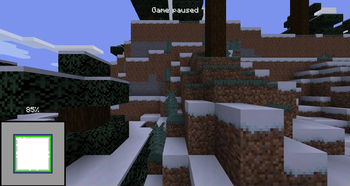
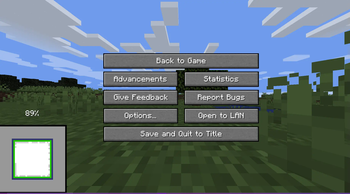
# World Preview (https://ko-fi.com/img/githubbutton_sm.svg)](https://ko-fi.com/voidxwalker) Minecraft mod that draws a preview of the world on the loading screen during chunk generation. - **Legal** for the minecraft java edition leaderboards - The **full chunk map** must be shown in the recording to get a run verified - Switching to the F3 + Esc menu will make your run **count as f3** - **Compatible** with all allowed mods - **Compatible** with the newest releases of specnr's multi-instance macros and with FinestPigeon's spawn reset macro for ssg **For macro - World preview **doesn't modify world generation** in any way. It simply takes already completed chunks, converts them to client chunks (Chunks minecraft can render) and then draws these chunks on the loading screen. - There are **no server side modifications** besides minecraft getting the random value for the player spawn earlier (Random is Random so it doesn't change anything) - You will not be able to reset after ~ when the chunk map reaches 100%. This is intentional !(https://github.com/VoidXWalker/WorldPreview/blob/1.16.1/WorldPreview-example.png?raw=true) ## Usage The preview will always render when you create a world. There are 5 ways the player can interact with the preview: **Direct Inputs** - Leave World Generation and Reset: Press the "Save and Quit to Title" button to instantly leave the World Generation to the title screen - F3 + Esc: Press F3 and Esc at the same time to switch the pause menu to the F3+Esc pause menu (shown below) and press Esc to switch back. This will make your run count as f3. !(https://github.com/VoidXWalker/WorldPreview/blob/1.16.1/WorldPreview-f3esc-example.png?raw=true) -------- **Hotkeys** (These can be changed in the Controls Screen) - Leave World Generation and Reset with Hotkey, default button "g" (English keyboard): Press the hotkey button to instantly leave the World Generation to the title screen - Cycle Chunk Map, default button "h" (English keyboard): Cycle through the 4 positions of the chunk map - Freeze Preview, default button "j" (English keyboard): Freezes the preview (helps with CPU performance) ## For Macro Makers The mod prints 3 different log lines: - "Starting preview at (x, y, z)" at the start of the preview (Reset buttons unlocked) - "Leaving world generation" when leaving world generation (Reset buttons locked) - "Freezing Preview / Unfreezing Preview" when the freezing / unfreezing the preview You will not be able to reset after ~ when the chunk map reaches 100%. This is intentional. ## Authors - (https://www.github.com/voidxwalker) (https://ko-fi.com/voidxwalker)
# World Preview [!(https://ko-fi.com/img/githubbutton_sm.svg)](https://ko-fi.com/voidxwalker)
Minecraft mod that draws a preview of the world on the loading screen during chunk generation. - Legal for the minecraft java edition leaderboards - The full chunk map must be shown in the recording to get a run verified - Switching to the F3 + Esc menu will make your run count as f3 - Compatible with all allowed mods - Compatible with the newest releases of specnr's multi-instance macros and with FinestPigeon's spawn reset macro for ssg For macro - World preview doesn't modify world generation in any way. It simply takes already completed chunks, converts them to client chunks (Chunks minecraft can render) and then draws these chunks on the loading screen. - There are no server side modifications besides minecraft getting the random value for the player spawn earlier (Random is Random so it doesn't change anything) - You will not be able to reset after ~ when the chunk map reaches 100%. This is intentional
!(https://github.com/VoidXWalker/WorldPreview/blob/1. 16. 1/WorldPreview-example.png?raw=true) ## Usage The preview will always render when you create a world.
There are 5 ways the player can interact with the preview:
Direct Inputs - Leave World Generation and Reset: Press the "Save and Quit to Title" button to instantly leave the World Generation to the title screen - F3 + Esc: Press F3 and Esc at the same time to switch the pause menu to the F3+Esc pause menu (shown below) and press Esc to switch back. This will make your run count as f3.
!(https://github.com/VoidXWalker/WorldPreview/blob/1. 16. 1/WorldPreview-f3esc-example.png?raw=true) -------- Hotkeys** (These can be changed in the Controls Screen) - Leave World Generation and Reset with Hotkey, default button "g" (English keyboard): Press the hotkey button to instantly leave the World Generation to the title screen - Cycle Chunk Map, default button "h" (English keyboard): Cycle through the 4 positions of the chunk map - Freeze Preview, default button "j" (English keyboard): Freezes the preview (helps with CPU performance)
## For Macro Makers The mod prints 3 different log lines: - "Starting preview at (x, y, z)" at the start of the preview (Reset buttons unlocked) - "Leaving world generation" when leaving world generation (Reset buttons locked) - "Freezing Preview / Unfreezing Preview" when the freezing / unfreezing the preview You will not be able to reset after ~ when the chunk map reaches 100%. This is intentional.
- [@Void_X_Walker](https://www.github.com/voidxwalker) (https://ko-fi.com/voidxwalker)
📊 Mod Details
- Game
- Minecraft Mods
- Author
- voidxwalker
- Version
- 2.3.3
- Downloads
- 80,089
- Endorsements
- 38
- Category
- fabric
- Created
- 12/5/2022
- Updated
- 12/4/2022
- Game Versions
- 20w14infinite
- Tags
- worldgen
🔧 How to Install Minecraft Mods Mods
Download from Modrinth. Use Prism Launcher or drop into your mods folder.
📖 Full step-by-step install guide for Minecraft Mods →
Visit the official mod page for specific installation instructions for this mod.
🎮 Need cheat codes or console commands? Check ur gaming wiki for Minecraft Mods commands, item IDs, and more.
❓ Frequently Asked Questions
Which Minecraft Mods versions does WorldPreview support?
The author lists 20w14infinite. Other versions may work but are untested by the author.
What is the latest version of WorldPreview?
Version 2.3.3, published 2022-12-04 with 80,089 downloads recorded at the source.
Keep browsing — more Minecraft Mods mods await