VoteKick
🟡 Updated this year⚠️ Install Order · 2 steps
Install in this order, then this mod last — most mods fail to load without their framework and dependencies in place.
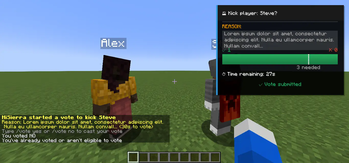
🖼️ Gallery (1 images)
🔍 Analysis
- 👍 0.1% endorsement rate
- 🏆 #201 of 945 fabric mods in this game by downloads
📋 About This Mod
# VoteKick A democratic voting system that allows players to collectively remove disruptive players from the server through a clean, fair voting process. ## Features - **Simple Voting Interface** - Unobtrusive UI with F1/F2 keybinds or chat commands - **Anti-Abuse Protection** - Prevents harassment and vote spam with cooldowns and immunity periods - **Configurable Client UI** - Adjustable scaling, positioning, and visual options - **Real-time Vote Tracking** - Live progress bars and vote counts - **Flexible Configuration** - Extensive server-side settings for fine-tuning ## Usage ### Starting a Vote ``` /votekick <player> <reason> /vk <player> <reason> ``` ### Voting - Press **F1** for YES (kick player) - Press **F2** for NO (keep player) - Commands: `/vote yes` or `/vote no` ### Status ``` /vote status ``` ### Admin Commands ``` /votekick-admin cancel /votekick-admin force /votekick-admin reload /votekick-admin history ``` Requires the `votekick.admin` permission (or op level configured in `permissions_admin_default_level`). `cancel` ends the active vote without a kick; `force` ends it as passed. ## Configuration ### Server Configuration Located in `config/votekick.properties`: ```properties # Basic Settings vote_duration_seconds=30 vote_pass_percentage=0.6 minimum_players=2 cooldown_seconds=120 # Protection System new_player_protection_enabled=true post_kick_protection_enabled=true harassment_detection_enabled=true vote_threshold_modifiers_enabled=true # Customization require_kick_reason=true allow_self_voting=false # Permissions (default op levels) permissions_enabled=true permissions_start_default_level=0 permissions_vote_default_level=0 permissions_admin_default_level=2 permissions_exempt_default_level=2 # Vote History vote_history_enabled=true vote_history_max_entries=200 vote_history_retention_days=90 ``` ### Client Configuration Customize your voting experience through: - **ModMenu Integration** - Graphical configuration screen - **Properties File** - `config/votekick-client.properties` for manual editing Options include UI scaling, panel positioning, sound controls, and animation settings. ## Permissions Permission nodes: - `votekick.start` — allow starting votes - `votekick.vote` — allow casting votes - `votekick.admin` — allow admin commands - `votekick.exempt` — exempt a player from being vote-kicked Defaults are controlled by `permissions_*_default_level` in the server config (0 = all, 2 = ops). If a permissions API is present (Fabric Permissions API or LuckPerms on Fabric/NeoForge), the nodes above are checked; otherwise the defaults apply. ### LuckPerms setup - **Fabric**: install `LuckPerms` and `fabric-permissions-api` on the server. - **NeoForge**: install `LuckPerms` on the server. Example grants: ``` /lp group default permission set votekick.start true /lp group default permission set votekick.vote true /lp group mod permission set votekick.admin true /lp group mod permission set votekick.exempt true ``` ## Vote History History is stored in `config/votekick_history.json` and follows the retention/max entry limits. ## Anti-Abuse Features - **New Player Protection** - Grace period for first-time joiners - **Post-Kick Immunity** - Temporary protection after being kicked - **Harassment Detection** - Automatic protection for repeatedly targeted players - **Vote Cooldowns** - Prevents spam voting and target harassment - **Threshold Modifiers** - Requires more votes to kick frequently kicked players ## Requirements - **Fabric**: Fabric API (required), ModMenu (optional for GUI configuration) - **NeoForge**: no extra dependencies - Must be installed on both client and server ## Default Behavior - Server operators and players with permission level 2+ are exempt from being vote-kicked. - All other players can participate in voting (unless protected). ## Compatibility - Minecraft 1.20.1 (Fabric only) - Minecraft 1.20.4, 1.20.6, 1.21.1, 1.21.4 (Fabric + NeoForge)
A democratic voting system that allows players to collectively remove disruptive players from the server through a clean, fair voting process.
## Features
- Simple Voting Interface - Unobtrusive UI with F1/F2 keybinds or chat commands
- Anti-Abuse Protection - Prevents harassment and vote spam with cooldowns and immunity periods
- Configurable Client UI - Adjustable scaling, positioning, and visual options
- Real-time Vote Tracking - Live progress bars and vote counts
- Flexible Configuration - Extensive server-side settings for fine-tuning
### Starting a Vote
```
/votekick
### Voting - Press F1 for YES (kick player) - Press F2 for NO (keep player) - Commands: `/vote yes` or `/vote no`
### Status ``` /vote status ```
### Admin Commands ``` /votekick-admin cancel /votekick-admin force /votekick-admin reload /votekick-admin history ``` Requires the `votekick.admin` permission (or op level configured in `permissions_admin_default_level`). `cancel` ends the active vote without a kick; `force` ends it as passed.
## Configuration
### Server Configuration Located in `config/votekick.properties`:
```properties # Basic Settings vote_duration_seconds=30 vote_pass_percentage=0. 6 minimum_players=2 cooldown_seconds=120
# Protection System new_player_protection_enabled=true post_kick_protection_enabled=true harassment_detection_enabled=true vote_threshold_modifiers_enabled=true
# Customization require_kick_reason=true allow_self_voting=false
# Permissions (default op levels) permissions_enabled=true permissions_start_default_level=0 permissions_vote_default_level=0 permissions_admin_default_level=2 permissions_exempt_default_level=2
# Vote History vote_history_enabled=true vote_history_max_entries=200 vote_history_retention_days=90 ```
### Client Configuration Customize your voting experience through: - ModMenu Integration - Graphical configuration screen - Properties File - `config/votekick-client.properties` for manual editing
Options include UI scaling, panel positioning, sound controls, and animation settings.
## Permissions
Permission nodes: - `votekick.start` — allow starting votes - `votekick.vote` — allow casting votes - `votekick.admin` — allow admin commands - `votekick.exempt` — exempt a player from being vote-kicked
Defaults are controlled by `permissions_*_default_level` in the server config (0 = all, 2 = ops). If a permissions API is present (Fabric Permissions API or LuckPerms on Fabric/NeoForge), the nodes above are checked; otherwise the defaults apply.
### LuckPerms setup
- Fabric: install `LuckPerms` and `fabric-permissions-api` on the server.
- NeoForge: install `LuckPerms` on the server.
Example grants: ``` /lp group default permission set votekick.start true /lp group default permission set votekick.vote true /lp group mod permission set votekick.admin true /lp group mod permission set votekick.exempt true ```
## Vote History
History is stored in `config/votekick_history.json` and follows the retention/max entry limits.
## Anti-Abuse Features
- New Player Protection - Grace period for first-time joiners
- Post-Kick Immunity - Temporary protection after being kicked
- Harassment Detection - Automatic protection for repeatedly targeted players
- Vote Cooldowns - Prevents spam voting and target harassment
- Threshold Modifiers - Requires more votes to kick frequently kicked players
## Requirements
- Fabric: Fabric API (required), ModMenu (optional for GUI configuration)
- NeoForge: no extra dependencies
- Must be installed on both client and server
## Default Behavior
- Server operators and players with permission level 2+ are exempt from being vote-kicked.
- All other players can participate in voting (unless protected).
## Compatibility
- Minecraft 1. 20. 1 (Fabric only)
- Minecraft 1. 20. 4, 1. 20. 6, 1. 21. 1, 1. 21. 4 (Fabric + NeoForge)
📊 Mod Details
- Game
- Minecraft Mods
- Author
- HiSierra
- Version
- 3.0.0+1.21.11-neoforge
- Downloads
- 2,711
- Endorsements
- 3
- Category
- fabric
- Created
- 5/18/2025
- Updated
- 1/31/2026
- Game Versions
- 1.21.11
- Tags
- management, social, utility
🔧 How to Install Minecraft Mods Mods
Download from Modrinth. Use Prism Launcher or drop into your mods folder.
📖 Full step-by-step install guide for Minecraft Mods →
Visit the official mod page for specific installation instructions for this mod.
🎮 Need cheat codes or console commands? Check ur gaming wiki for Minecraft Mods commands, item IDs, and more.
❓ Frequently Asked Questions
Which Minecraft Mods versions does VoteKick support?
The author lists 1.21.11. Other versions may work but are untested by the author.
What is the latest version of VoteKick?
Version 3.0.0+1.21.11-neoforge, published 2026-01-31 with 2,711 downloads recorded at the source.
Keep browsing — more Minecraft Mods mods await