Unstable SMP Death Sound
🟡 Updated this year⚠️ Install Order · 2 steps
Install in this order, then this mod last — most mods fail to load without their framework and dependencies in place.
🖼️ Gallery (1 images)
🔍 Analysis
- 👍 0.0% endorsement rate
- 🏆 #127 of 225 datapack mods in this game by downloads
📋 About This Mod
# Unstable SMP Death Sound Bring the **Unstable SMP** experience into your own world or server! This datapack/mod adds the iconic **Wither Released sound effect** whenever a player dies — and optionally when they kill a mob. ✅ Compatible with **Vanilla**, **Paper**, **Spigot**, **Bukkit** servers (via datapack)\ ✅ Mod versions for **Forge**, **Fabric**, **NeoForge**, **Quilt**\ ✅ Works in **singleplayer** worlds\ ✅ Easy **scoreboard‑based** configuration --- ## ⚙️ Configuration & Defaults Defaults → **Sound: Enabled**, **Mob Death Sound: Disabled**, **Sound Radius: Global** | **Setting** | **Default** | **Description** | **Commands** | |:------------:|:-----------:|-----------------|---------------| | **Enable sound** | `1` (enabled) | Master switch that determines whether the Wither death sound system is active. | Enable → `/scoreboard players set #sound_toggle usmp_ds.config 1`<br>Disable → `/scoreboard players set #sound_toggle usmp_ds.config 0` | | **Play sound on mob death** | `0` (disabled) | Controls whether mob kills also trigger the Wither sound in addition to player deaths. | Enable → `/scoreboard players set #mob_toggle usmp_ds.config 1`<br>Disable → `/scoreboard players set #mob_toggle usmp_ds.config 0` | | **Sound radius** | `0` (global playback) | Defines how far the sound travels. `0` plays it to all players; any positive number limits playback to players within that radius (in blocks). | Global → `/scoreboard players set #sound_radius usmp_ds.config 0` Example → `/scoreboard players set #sound_radius usmp_ds.config 30` | | **Reset to defaults** | N/A | Restores all settings to their original values (sound enabled, mob kills disabled, global playback). | `/function usmp_ds:reset` | --- ## 📦 Installation ### 🧩 For Datapacks 1. Download the `.zip` file from Modrinth. 2. Place it inside your world folder (works for both **Singleplayer worlds** and **Multiplayer servers**): `world/datapacks/` 3. Run `/reload` in-game to activate the datapack. 4. Configure using the scoreboard commands listed above. ### ⚙️ For Mods 1. Download the `.jar` file from Modrinth. 2. Place it in your Minecraft `mods` folder: - **Windows:** `%appdata%/.minecraft/mods` - **macOS/Linux:** `~/.minecraft/mods` 3. Launch Minecraft. 4. The mod will automatically load with the same configuration system as the datapack. 💡 **Tip:** Both the datapack and mod versions share identical configuration commands — you can use the same scoreboard settings no matter which format you choose. --- ## 🗑️ Uninstall To completely remove **Unstable SMP Death Sound**, always run the uninstall function first before deleting any files. This ensures all scoreboard values and storage are properly cleaned up. 1. Run the uninstall function in‑game to clear all configuration data and scoreboard values: `/function usmp_ds:uninstall` 2. After running the command: - If you installed the **datapack**, remove it from your `world/datapacks/` folder. - If you installed the **mod**, delete the `.jar` file from your `mods` folder. 3. Restart or run `/reload` to finalize removal. ⚠️ **Important:** Skipping the uninstall function may leave scoreboard entries or storage data behind in your world. --- ## ❓FAQ ### Can I install this on a server (Paper, Spigot, Bukkit, Vanilla, etc.)? Yes! The datapack version works perfectly on vanilla servers and popular server software like Paper, Spigot, and Bukkit. Just go to your server's files and drop the datapack into the `world/datapacks/` folder, and run the `/reload` command in-game to apply it. ### Does it work in singleplayer? Absolutely. Both the datapack and mod versions can be used in singleplayer.\ 👉 **Note**: In singleplayer, mob death sounds are disabled by default. To hear them, run: `/scoreboard players set #mob_toggle usmp_ds.config 1` ### Do I need to download this on my client too? No. All functionality runs server-side, so nothing is required on the client. ### How do I configure the sounds? Use the commands listed in the **Configuration & Defaults** section. --- **Check out my other mods (https://modrinth.com/user/Sumbaii999).**
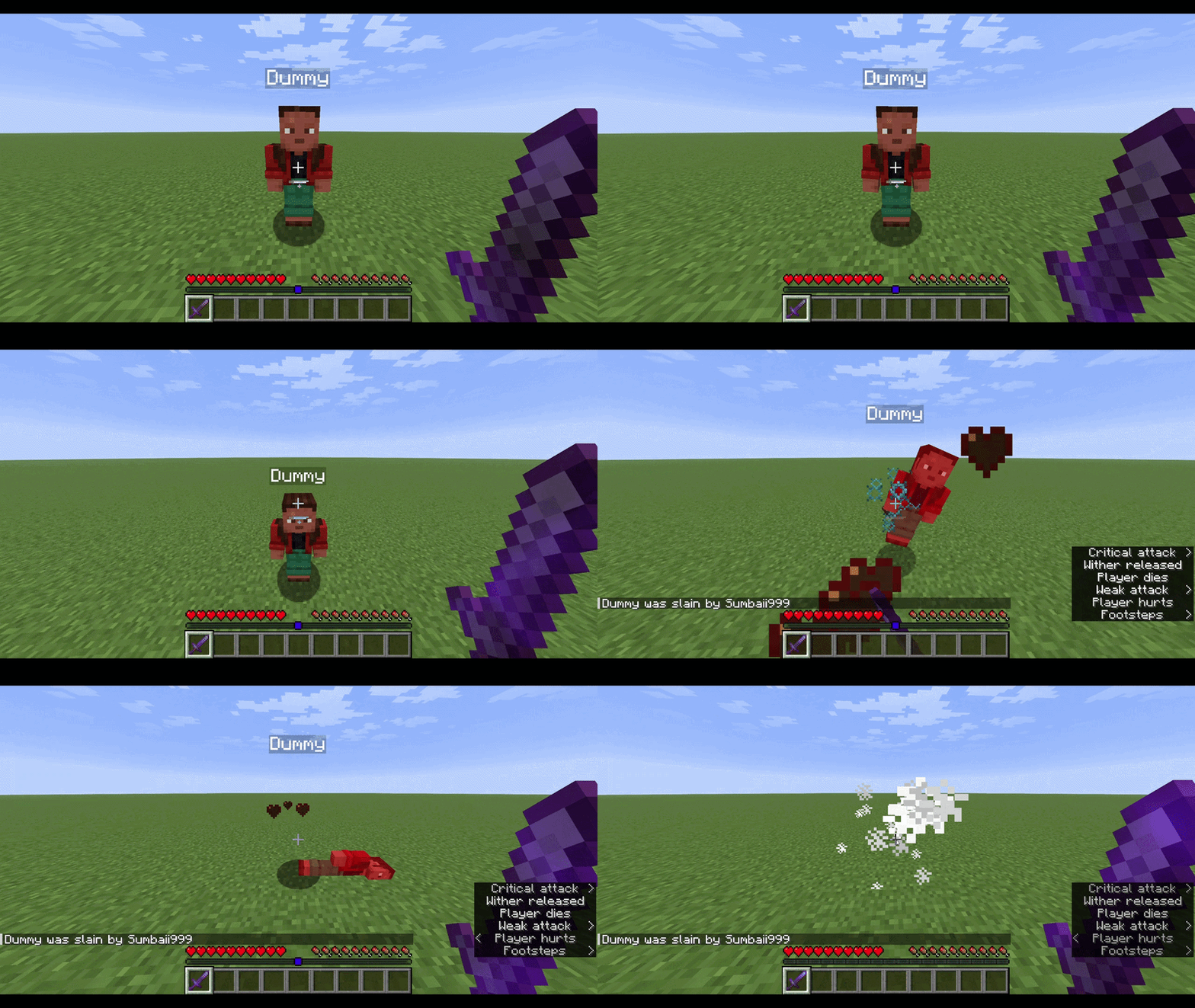
# Unstable SMP Death Sound Bring the Unstable SMP experience into your own world or server! This datapack/mod adds the iconic Wither Released sound effect whenever a player dies — and optionally when they kill a mob.
✅ Compatible with Vanilla, Paper, Spigot, Bukkit servers (via datapack)\ ✅ Mod versions for Forge, Fabric, NeoForge, Quilt\ ✅ Works in singleplayer worlds\ ✅ Easy scoreboard‑based configuration
## ⚙️ Configuration & Defaults
Defaults → Sound: Enabled, Mob Death Sound: Disabled, Sound Radius: Global
| Setting | Default | Description | Commands | |:------------:|:-----------:|-----------------|---------------| | Enable sound | `1` (enabled) | Master switch that determines whether the Wither death sound system is active. | Enable → `/scoreboard players set #sound_toggle usmp_ds.config 1` Disable → `/scoreboard players set #sound_toggle usmp_ds.config 0` | | Play sound on mob death | `0` (disabled) | Controls whether mob kills also trigger the Wither sound in addition to player deaths. | Enable → `/scoreboard players set #mob_toggle usmp_ds.config 1` Disable → `/scoreboard players set #mob_toggle usmp_ds.config 0` | | Sound radius | `0` (global playback) | Defines how far the sound travels. `0` plays it to all players; any positive number limits playback to players within that radius (in blocks). | Global → `/scoreboard players set #sound_radius usmp_ds.config 0` Example → `/scoreboard players set #sound_radius usmp_ds.config 30` | | Reset to defaults | N/A | Restores all settings to their original values (sound enabled, mob kills disabled, global playback). | `/function usmp_ds:reset` |
## 📦 Installation
### 🧩 For Datapacks 1. Download the `.zip` file from Modrinth. 2. Place it inside your world folder (works for both Singleplayer worlds and Multiplayer servers): `world/datapacks/` 3. Run `/reload` in-game to activate the datapack. 4. Configure using the scoreboard commands listed above.
### ⚙️ For Mods 1. Download the `.jar` file from Modrinth. 2. Place it in your Minecraft `mods` folder: - Windows: `%appdata%/.minecraft/mods` - macOS/Linux: `~/.minecraft/mods` 3. Launch Minecraft. 4. The mod will automatically load with the same configuration system as the datapack.
💡 Tip: Both the datapack and mod versions share identical configuration commands — you can use the same scoreboard settings no matter which format you choose.
## 🗑️ Uninstall
To completely remove Unstable SMP Death Sound, always run the uninstall function first before deleting any files. This ensures all scoreboard values and storage are properly cleaned up.
1. Run the uninstall function in‑game to clear all configuration data and scoreboard values: `/function usmp_ds:uninstall` 2. After running the command: - If you installed the datapack, remove it from your `world/datapacks/` folder. - If you installed the mod, delete the `.jar` file from your `mods` folder. 3. Restart or run `/reload` to finalize removal.
### Can I install this on a server (Paper, Spigot, Bukkit, Vanilla, etc.)? Yes! The datapack version works perfectly on vanilla servers and popular server software like Paper, Spigot, and Bukkit. Just go to your server's files and drop the datapack into the `world/datapacks/` folder, and run the `/reload` command in-game to apply it.
### Does it work in singleplayer? Absolutely. Both the datapack and mod versions can be used in singleplayer.\ 👉 Note: In singleplayer, mob death sounds are disabled by default. To hear them, run: `/scoreboard players set #mob_toggle usmp_ds.config 1`
### Do I need to download this on my client too? No. All functionality runs server-side, so nothing is required on the client.
### How do I configure the sounds? Use the commands listed in the Configuration & Defaults section.
**Check out my other mods (https://modrinth.com/user/Sumbaii999).**
📊 Mod Details
- Game
- Minecraft Mods
- Author
- Sumbaii999
- Version
- 1.1+mod
- Downloads
- 2,450
- Endorsements
- 1
- Category
- datapack
- Created
- 7/31/2026
- Updated
- 7/31/2026
- Game Versions
- 1.15, 1.15.1, 1.15.2, 1.16, 1.16.1
- Tags
- game-mechanics, mobs, utility
🔧 How to Install Minecraft Mods Mods
Download from Modrinth. Use Prism Launcher or drop into your mods folder.
📖 Full step-by-step install guide for Minecraft Mods →
Visit the official mod page for specific installation instructions for this mod.
🎮 Need cheat codes or console commands? Check ur gaming wiki for Minecraft Mods commands, item IDs, and more.
❓ Frequently Asked Questions
Which Minecraft Mods versions does Unstable SMP Death Sound support?
The author lists 1.15, 1.15.1, 1.15.2, 1.16, 1.16.1. Other versions may work but are untested by the author.
What is the latest version of Unstable SMP Death Sound?
Version 1.1+mod, published 2026-07-31 with 2,450 downloads recorded at the source.
Keep browsing — more Minecraft Mods mods await