Better Happy Ghast Controls
🟡 Updated this year⚠️ Install Order · 2 steps
Install in this order, then this mod last — most mods fail to load without their framework and dependencies in place.
🖼️ Gallery (2 images)
🔍 Analysis
- 👍 0.6% endorsement rate
- 🏆 #591 of 945 fabric mods in this game by downloads
📋 About This Mod
# Key Features * **Speed Control** - Configurable movement speeds in all directions, as well as boosting. * **Creative Feel** - Natural movement that feels more like creative mode. * **Context Switching** - Multiple config profiles allow for situational control styles. * **Precision Movement** - Sharper movements, fixed rotation, maintained Y position. * **Custom Keybinds** - Descend, Dismount, Toggle Profile, Open Config. * **Server Controls** (optional) - Adjust size and reach, or disable roaming, mining penalty, and ambient sounds. # Default Flight Controls These map to your default Minecraft movement controls to align with creative flight. Set within Minecraft `Options...` -> `Controls...` -> `Key Binds...`. Your bindings may differ to the default below. | Happy Ghast Control | Default Key | Minecraft Control | | ------- | ----------- | ----------------- | | Forward | `W` | Walk Forward | | Backward | `S` | Walk Backward | | Left | `A` | Strafe Left | | Right | `D` | Strafe Right | | Ascend | `Space` | Jump | | Descend | `Left Shift` | Sneak | | Boost | `Left Control` <br> `Double-Tap W` | Sprint <br> Walk Forward (x2) | | Dismount | `Double-Tap Left Shift` | Sneak (x2)| # Client Settings Set on the client, does not require the server-side mod. Use Mod Menu to customize settings in-game, or assign a custom keybind for `Open Config` to open the settings in-game. ## Custom Key Binds Flight controls align with regular creative flight by default, with dismount requiring to double-tap sneak. Descend key can be rebound to restore regular single-press sneak to dismount behaviour. | Key Bind | Default | Description | | -------- | ------- | ----------- | | Descend | `Unbound`<br> _Uses Sneak unless otherwise disabled._ | A custom keybind that can be assigned instead of Sneak to descend while riding a Happy Ghast. This can be assigned as an alternative to Sneak when using Sneak to dismount. | | Dismount | `Unbound` <br> _Uses Double-Tap Sneak unless otherwise disabled._ | A custom keybind that can be assigned instead of Sneak or Double-Tap Sneak to dismount while riding a Happy Ghast. This can be assigned as an alternative to Sneak when using Sneak to descend. | | Toggle Profile | `` ` `` (backtick) | Allows you to toggle between preset profiles while riding a Happy Ghast to switch between control sets. E.g. to toggle between a "Travel" profile adjusted for speed and ease of use, and a "Build" profile adjusted for smaller more precise movements. | | Open Config | `Unbound` | Opens the client config screen from in-game. Saves having to use Mod Menu. | ## Profile Settings Create one or more profiles to switch between different situations in real-time, for when you want speed and fluidity while traveling, or sharp precision while building. | Setting | Description | Default | | ------- | ----------- | ------- | | Name | A friendly name for the profile. This is shown on screen when toggling between profiles. | `Default` | | Master Speed | Sets a consistent speed for all Happy Ghast movements. This simply sets all other speed settings at once. | `1.0` (100%) | | Forward Speed | Sets the Happy Ghast speed while moving forward (W). | `1.0` (100%) | | Backward Speed | Sets the Happy Ghast speed while moving backward (S). | `1.0` (100%) | | Strafe Speed | Sets the Happy Ghast speed while moving sideways (A and D). | `1.0` (100%) | | Ascend Speed | Sets the Happy Ghast speed while ascending vertically (Space Bar). | `1.0` (100%) | | Descend Speed | Sets the Happy Ghast speed while descending vertically (Left Ctrl). | `1.0` (100%) | | Automatic Pitch | Adjusts the Happy Ghast vertical position automatically while moving forward based on whether the player is looking up or down. Turn OFF to maintain the Y position unless using the Ascend/Descend key. | `true` (ON) | | Fixed Rotation | Fixes the Happy Ghast rotation to center around the player rider, allowing more precision while stationary and looking around. Turn OFF to restore the standard rotation centering around the Happy Ghast. | `true` (ON) | | Smooth Glide | Sets whether movements are smooth or instant while riding Happy Ghasts. Turn OFF for more precise movement. | `false` (OFF) | | Speed Boost Rate | Apply a speed boost multiplier when pressing the Sprint key while riding Happy Ghasts. Double-tapping forward also boosts based on the global Minecraft setting. Resulting speed must be within the server maximum. | `2.0` (2x) | | Descend Key | Select whether to use the Minecraft key bind for Sneak/Crouch to Descend while riding a Happy Ghast, or to only use the custom Descend key bind. If using Double-Tap to Dismount, this should use Custom Key Bind only. | `SNEAK` <br><br> other option: <br> `CUSTOM_KEYBIND` | | Dismount Key | Select whether to require double tapping the Sneak/Crouch key to dismount while riding Happy Ghasts, or to apply the standard single tap Sneak/Crouch to dismount behaviour, or to only use the custom Dismount key bind. | `DOUBLE_TAP_SNEA
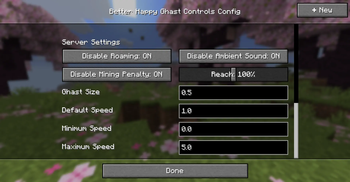
# Key Features Speed Control - Configurable movement speeds in all directions, as well as boosting. Creative Feel - Natural movement that feels more like creative mode. Context Switching - Multiple config profiles allow for situational control styles. Precision Movement - Sharper movements, fixed rotation, maintained Y position. Custom Keybinds - Descend, Dismount, Toggle Profile, Open Config. Server Controls (optional) - Adjust size and reach, or disable roaming, mining penalty, and ambient sounds.
# Default Flight Controls These map to your default Minecraft movement controls to align with creative flight. Set within Minecraft `Options...` -> `Controls...` -> `Key Binds...`. Your bindings may differ to the default below.
| Happy Ghast Control | Default Key | Minecraft Control | | ------- | ----------- | ----------------- | | Forward | `W` | Walk Forward | | Backward | `S` | Walk Backward | | Left | `A` | Strafe Left | | Right | `D` | Strafe Right | | Ascend | `Space` | Jump | | Descend | `Left Shift` | Sneak | | Boost | `Left Control` `Double-Tap W` | Sprint Walk Forward (x2) | | Dismount | `Double-Tap Left Shift` | Sneak (x2)|
# Client Settings Set on the client, does not require the server-side mod. Use Mod Menu to customize settings in-game, or assign a custom keybind for `Open Config` to open the settings in-game.
## Custom Key Binds Flight controls align with regular creative flight by default, with dismount requiring to double-tap sneak. Descend key can be rebound to restore regular single-press sneak to dismount behaviour.
| Key Bind | Default | Description | | -------- | ------- | ----------- | | Descend | `Unbound` _Uses Sneak unless otherwise disabled._ | A custom keybind that can be assigned instead of Sneak to descend while riding a Happy Ghast. This can be assigned as an alternative to Sneak when using Sneak to dismount. | | Dismount | `Unbound` _Uses Double-Tap Sneak unless otherwise disabled._ | A custom keybind that can be assigned instead of Sneak or Double-Tap Sneak to dismount while riding a Happy Ghast. This can be assigned as an alternative to Sneak when using Sneak to descend. | | Toggle Profile | `` ` `` (backtick) | Allows you to toggle between preset profiles while riding a Happy Ghast to switch between control sets. E.g. to toggle between a "Travel" profile adjusted for speed and ease of use, and a "Build" profile adjusted for smaller more precise movements. | | Open Config | `Unbound` | Opens the client config screen from in-game. Saves having to use Mod Menu. |
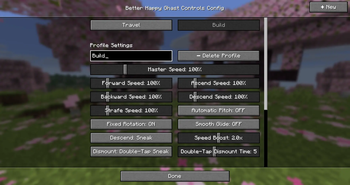
## Profile Settings Create one or more profiles to switch between different situations in real-time, for when you want speed and fluidity while traveling, or sharp precision while building.
| Setting | Description | Default | | ------- | ----------- | ------- | | Name | A friendly name for the profile. This is shown on screen when toggling between profiles. | `Default` | | Master Speed | Sets a consistent speed for all Happy Ghast movements. This simply sets all other speed settings at once. | `1. 0` (100%) | | Forward Speed | Sets the Happy Ghast speed while moving forward (W). | `1. 0` (100%) | | Backward Speed | Sets the Happy Ghast speed while moving backward (S). | `1. 0` (100%) | | Strafe Speed | Sets the Happy Ghast speed while moving sideways (A and D). | `1. 0` (100%) | | Ascend Speed | Sets the Happy Ghast speed while ascending vertically (Space Bar). | `1. 0` (100%) | | Descend Speed | Sets the Happy Ghast speed while descending vertically (Left Ctrl). | `1. 0` (100%) | | Automatic Pitch | Adjusts the Happy Ghast vertical position automatically while moving forward based on whether the player is looking up or down. Turn OFF to maintain the Y position unless using the Ascend/Descend key. | `true` (ON) | | Fixed Rotation | Fixes the Happy Ghast rotation to center around the player rider, allowing more precision while stationary and looking around. Turn OFF to restore the standard rotation centering around the Happy Ghast. | `true` (ON) | | Smooth Glide | Sets whether movements are smooth or instant while riding Happy Ghasts. Turn OFF for more precise movement. | `false` (OFF) | | Speed Boost Rate | Apply a speed boost multiplier when pressing the Sprint key while riding Happy Ghasts. Double-tapping forward also boosts based on the global Minecraft setting. Resulting speed must be within the server maximum. | `2. 0` (2x) | | Descend Key | Select whether to use the Minecraft key bind for Sneak/Crouch to Descend while riding a Happy Ghast, or to only use the custom Descend key bind. If using Double-Tap to Dismount, this should use Custom Key Bind only. | `SNEAK`
other option: `CUSTOM_KEYBIND` | | Dismount Key | Select whether to require double tapping the Sneak/Crouch key to dismount while riding Happy Ghasts, or to apply the standard single tap Sneak/Crouch to dismount behaviour, or to only use the custom Dismount key bind. | `DOUBLE_TAP_SNEA
📊 Mod Details
- Game
- Minecraft Mods
- Author
- PaulNZ
- Version
- 26.2-1.0.6-neoforge
- Downloads
- 2,373
- Endorsements
- 15
- Category
- fabric
- Created
- 5/5/2026
- Updated
- 6/17/2026
- Game Versions
- 26.2
- Tags
- game-mechanics, mobs, utility
🔧 How to Install Minecraft Mods Mods
Download from Modrinth. Use Prism Launcher or drop into your mods folder.
📖 Full step-by-step install guide for Minecraft Mods →
Visit the official mod page for specific installation instructions for this mod.
🎮 Need cheat codes or console commands? Check ur gaming wiki for Minecraft Mods commands, item IDs, and more.
❓ Frequently Asked Questions
Which Minecraft Mods versions does Better Happy Ghast Controls support?
The author lists 26.2. Other versions may work but are untested by the author.
What is the latest version of Better Happy Ghast Controls?
Version 26.2-1.0.6-neoforge, published 2026-06-17 with 2,373 downloads recorded at the source.
Keep browsing — more Minecraft Mods mods await