Ultimate Hud
⚪ Last updated 2024⚠️ Install Order · 2 steps
Install in this order, then this mod last — most mods fail to load without their framework and dependencies in place.
🖼️ Gallery (5 images)
🔍 Analysis
- 👍 0.6% endorsement rate
- 🏆 #51 of 945 fabric mods in this game by downloads
📋 About This Mod
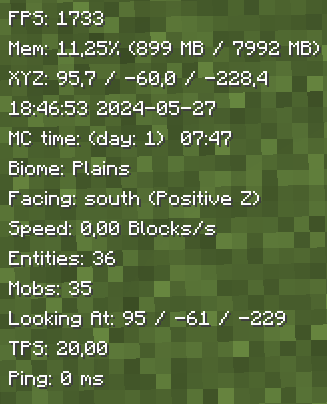
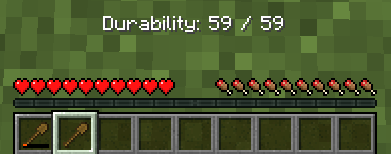
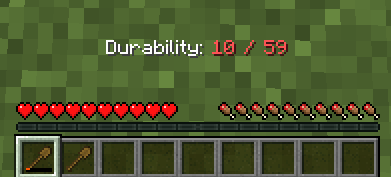
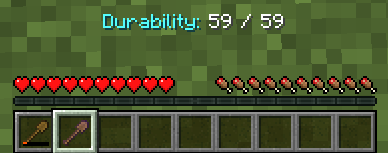
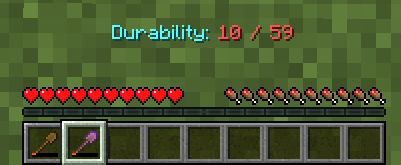
# Ultimate Hud UltimateHud is a mod that displays essential information for each user in the HUD. Everything is configurable from the `ultimatehud.json` file inside your `./minecraft/config` folder. In it, you will find a file similar to this: **Now, you can also change the options with the "Mod Menu" mod.** ```json { "showFPS": true, // Displays the Frames Per Second (FPS) on the screen. "showRAM": true, // Displays the amount of RAM (memory) being used. "showCoordinates": true, // Shows the player's current coordinates in the game world. "showRealTime": true, // Displays the real-world current time. "showRealDate": true, // Displays the real-world current date. "showMinecraftTime": true, // Shows the in-game time. "showBiome": true, // Displays the current biome the player is in. "showFacing": true, // Shows the direction the player is facing. "showSpeed": true, // Displays the player's current speed. "showEntities": true, // Shows the number of entities around the player. "showMobs": true, // Displays the number of mobs around the player. "showLookingAt": true, // Shows information about the block or entity the player is currently looking at. "showTps": true, // Displays the server's Ticks Per Second (TPS). "showPing": true, // Shows the player's ping to the server. "textShadow": true, // Adds a shadow effect to the text for better readability. "showItemDurability": true, // Displays the durability of the item the player is currently holding. "hudPosition": "LEFT" // Positions the HUD (Heads-Up Display) on the left side of the screen. } ``` **Fabric Loader 0.15.11 or newer is needed.** All options are toggled by setting them to `true` (enabled) or `false` (disabled), except for the last option, which sets the HUD to the left (`left`) or to the right (`right`). !(https://cdn.modrinth.com/data/cached_images/f296ea243fe51502c6a160703dc947b8ed05a44b.png) ## **TO-DO:** 1. ~~Add integration with Mod Menu to modify the options from within the game.~~ (Done) 2. ~~Update to **1.20.5/1.20.6.**~~ (Done) 3. ~~Add Mob Counter.~~ (Done) 4. ~~Add Entity Counter.~~ (Done) 5. ~~Add TPS.~~ (Done) 6. ~~Add Tool Durability.~~ (Done) 7. Add underline behind the HUD information. 8. Add color change functionality. 9. Add the ability to change the name and format in which the information appears. 10. Add the option to individually move the parameters to the right or left. 11. Add MSPT ### Translated into the following languages: - English - Spanish - French - Japanese - Portuguese - Chinese
# Ultimate Hud
UltimateHud is a mod that displays essential information for each user in the HUD. Everything is configurable from the `ultimatehud.json` file inside your `./minecraft/config` folder. In it, you will find a file similar to this:
Now, you can also change the options with the "Mod Menu" mod.
```json { "showFPS": true, // Displays the Frames Per Second (FPS) on the screen. "showRAM": true, // Displays the amount of RAM (memory) being used. "showCoordinates": true, // Shows the player's current coordinates in the game world. "showRealTime": true, // Displays the real-world current time. "showRealDate": true, // Displays the real-world current date. "showMinecraftTime": true, // Shows the in-game time. "showBiome": true, // Displays the current biome the player is in. "showFacing": true, // Shows the direction the player is facing. "showSpeed": true, // Displays the player's current speed. "showEntities": true, // Shows the number of entities around the player. "showMobs": true, // Displays the number of mobs around the player. "showLookingAt": true, // Shows information about the block or entity the player is currently looking at. "showTps": true, // Displays the server's Ticks Per Second (TPS). "showPing": true, // Shows the player's ping to the server. "textShadow": true, // Adds a shadow effect to the text for better readability. "showItemDurability": true, // Displays the durability of the item the player is currently holding. "hudPosition": "LEFT" // Positions the HUD (Heads-Up Display) on the left side of the screen. } ``` Fabric Loader 0. 15. 11 or newer is needed.
All options are toggled by setting them to `true` (enabled) or `false` (disabled), except for the last option, which sets the HUD to the left (`left`) or to the right (`right`).
!(https://cdn.modrinth.com/data/cached_images/f296ea243fe51502c6a160703dc947b8ed05a44b.png)
## TO-DO: 1. ~~Add integration with Mod Menu to modify the options from within the game.~~ (Done) 2. ~~Update to 1. 20. 5/1. 20. 6.~~ (Done) 3. ~~Add Mob Counter.~~ (Done) 4. ~~Add Entity Counter.~~ (Done) 5. ~~Add TPS.~~ (Done) 6. ~~Add Tool Durability.~~ (Done) 7. Add underline behind the HUD information. 8. Add color change functionality. 9. Add the ability to change the name and format in which the information appears. 10. Add the option to individually move the parameters to the right or left. 11. Add MSPT
### Translated into the following languages: - English - Spanish - French - Japanese - Portuguese - Chinese
📊 Mod Details
- Game
- Minecraft Mods
- Author
- Natxo
- Version
- 0.6.1-B-1.21.1
- Downloads
- 2,847
- Endorsements
- 17
- Category
- fabric
- Created
- 5/25/2024
- Updated
- 8/11/2024
- Game Versions
- 1.21, 1.21.1
- Tags
- game-mechanics, utility
🔧 How to Install Minecraft Mods Mods
Download from Modrinth. Use Prism Launcher or drop into your mods folder.
📖 Full step-by-step install guide for Minecraft Mods →
Visit the official mod page for specific installation instructions for this mod.
🎮 Need cheat codes or console commands? Check ur gaming wiki for Minecraft Mods commands, item IDs, and more.
❓ Frequently Asked Questions
Which Minecraft Mods versions does Ultimate Hud support?
The author lists 1.21, 1.21.1. Other versions may work but are untested by the author.
What is the latest version of Ultimate Hud?
Version 0.6.1-B-1.21.1, published 2024-08-11 with 2,847 downloads recorded at the source.
Keep browsing — more Minecraft Mods mods await