True Fullbright
🟡 Updated this year⚠️ Install Order · 2 steps
Install in this order, then this mod last — most mods fail to load without their framework and dependencies in place.
🖼️ Gallery (4 images)
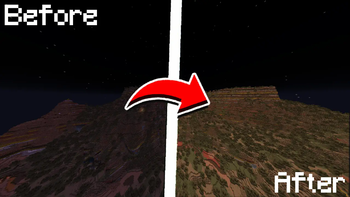
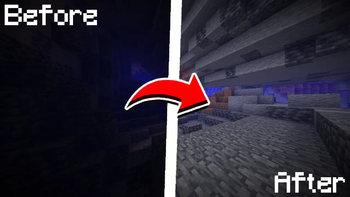
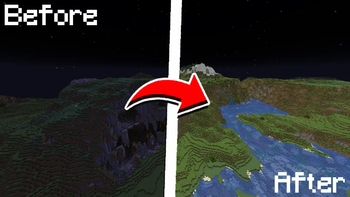
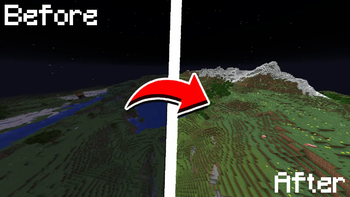
🔍 Analysis
- 👍 0.0% endorsement rate
- 🏆 #36 of 940 fabric mods in this game by downloads
📋 About This Mod
# 💡 True Fullbright A simple, toggleable, and configurable full brightness mod for **Fabric**. (https://img.shields.io/curseforge/dt/1297498?logo=curseforge&label=CurseForge&color=F16436&style=for-the-badge)](https://www.curseforge.com/minecraft/mc-mods/true-fullbright) (https://img.shields.io/modrinth/dt/true-fullbright?logo=modrinth&label=Modrinth&color=00AF5C&style=for-the-badge)](https://modrinth.com/mod/true-fullbright) (https://img.shields.io/discord/1389631948359598220?logo=discord&label=Discord&color=5865F2&style=for-the-badge)](https://discord.com/invite/1389631948359598220) --- ### Requires: * (https://modrinth.com/mod/fabric-api) * (https://modrinth.com/mod/yacl) * (https://modrinth.com/mod/modmenu) --- !(https://cdn.modrinth.com/data/cached_images/9d0154f53135b8b068dee5f63fb02e724d39fb11.jpeg) ### Feature List * Toggle fullbright using a keybind (default: <code>`B`</code>) * Adjust gamma value dynamically * Switch between gamma override and night vision modes * Fully configurable via <code>`/fullbright`</code> commands or the in-game config screen * Keybinds available for toggling, increasing/decreasing gamma, and jumping to min/max <details> <summary><strong>Command List</strong></summary> | Command | Description | | ----------------------------------------- | ----------------------------------------- | | <code>/fullbright</code> or <code>/fullbright status</code> | Check current brightness settings | | <code>/fullbright toggle</code> | Turn fullbright on/off | | <code>/fullbright mode gamma</code> | Switch to gamma brightness mode | | <code>/fullbright mode nightvision</code> | Switch to night vision mode | | <code>/fullbright mode off</code> | Turn off all brightness modes | | <code>/fullbright set <number></code> | Set brightness to exact value | | <code>/fullbright increase</code> | Make it brighter by one step | | <code>/fullbright decrease</code> | Make it dimmer by one step | | <code>/fullbright max</code> | Jump to maximum brightness | | <code>/fullbright min</code> | Jump to minimum brightness | | <code>/fullbright config</code> | Open the settings screen | | <code>/fullbright saveconfig</code> | Save your current settings | | <code>/fullbright resetconfig</code> | Reset everything to default | </details> <details> <summary><strong>Default Keybinds</strong></summary> | Action | Default Key | | ----------------------- | ------------- | | Toggle Fullbright On/Off | `B` | | Increase Brightness | `Arrow Up` | | Decrease Brightness | `Arrow Down` | | Maximum Brightness | `End` | | Minimum Brightness | `Home` | | Open Config Screen | *Not set* | Customize all of these under: <code>Options → Controls → Keybinds → True Fullbright</code> </details> --- ### How do I install the mod? 1. Drop the `.jar` file into your `mods/` folder 2. Make sure the dependencies listed above are installed 3. Launch the game --- ### How do I use the mod? * Press <code>`B`</code> to toggle fullbright on/off * Use `/fullbright` commands to adjust gamma, change modes, or view status * Open the config screen with `/fullbright config` or via **Mod Menu** * Use keybinds to adjust brightness step bystep or jump to min/max --- ### Contact / Report Bug Found an issue or have feedback? → DM me on Discord: **rijz.gg** --- **Developed by Rijz & Clyriz4.**
# 💡 True Fullbright
A simple, toggleable, and configurable full brightness mod for Fabric.
[!(https://img.shields.io/curseforge/dt/1297498?logo=curseforge&label=CurseForge&color=F16436&style=for-the-badge)](https://www.curseforge.com/minecraft/mc-mods/true-fullbright) [!(https://img.shields.io/modrinth/dt/true-fullbright?logo=modrinth&label=Modrinth&color=00AF5C&style=for-the-badge)](https://modrinth.com/mod/true-fullbright) [!(https://img.shields.io/discord/1389631948359598220?logo=discord&label=Discord&color=5865F2&style=for-the-badge)](https://discord.com/invite/1389631948359598220)
### Requires:
(https://modrinth.com/mod/fabric-api) (https://modrinth.com/mod/yacl) (https://modrinth.com/mod/modmenu)
!(https://cdn.modrinth.com/data/cached_images/9d0154f53135b8b068dee5f63fb02e724d39fb11.jpeg)
### Feature List
Toggle fullbright using a keybind (default: `B`)
Adjust gamma value dynamically
Switch between gamma override and night vision modes
Fully configurable via `/fullbright` commands or the in-game config screen
Keybinds available for toggling, increasing/decreasing gamma, and jumping to min/max
Command List
| Command | Description |
| ----------------------------------------- | ----------------------------------------- |
| /fullbright or /fullbright status | Check current brightness settings |
| /fullbright toggle | Turn fullbright on/off |
| /fullbright mode gamma | Switch to gamma brightness mode |
| /fullbright mode nightvision | Switch to night vision mode |
| /fullbright mode off | Turn off all brightness modes |
| /fullbright set <number> | Set brightness to exact value |
| /fullbright increase | Make it brighter by one step |
| /fullbright decrease | Make it dimmer by one step |
| /fullbright max | Jump to maximum brightness |
| /fullbright min | Jump to minimum brightness |
| /fullbright config | Open the settings screen |
| /fullbright saveconfig | Save your current settings |
| /fullbright resetconfig | Reset everything to default |
Default Keybinds
| Action | Default Key | | ----------------------- | ------------- | | Toggle Fullbright On/Off | `B` | | Increase Brightness | `Arrow Up` | | Decrease Brightness | `Arrow Down` | | Maximum Brightness | `End` | | Minimum Brightness | `Home` | | Open Config Screen | Not set |
Customize all of these under: Options → Controls → Keybinds → True Fullbright
### How do I install the mod?
1. Drop the `.jar` file into your `mods/` folder 2. Make sure the dependencies listed above are installed 3. Launch the game
### How do I use the mod?
Press `B` to toggle fullbright on/off
Use `/fullbright` commands to adjust gamma, change modes, or view status
Open the config screen with `/fullbright config` or via Mod Menu
Use keybinds to adjust brightness step bystep or jump to min/max
### Contact / Report Bug
Found an issue or have feedback? → DM me on Discord: rijz.gg
Developed by Rijz & Clyriz4.
📊 Mod Details
- Game
- Minecraft Mods
- Author
- Rijz
- Version
- 2.0.2
- Downloads
- 33,806
- Endorsements
- 9
- Category
- fabric
- Created
- 7/14/2025
- Updated
- 7/9/2026
- Game Versions
- 26.2
- Tags
- utility
🔧 How to Install Minecraft Mods Mods
Download from Modrinth. Use Prism Launcher or drop into your mods folder.
📖 Full step-by-step install guide for Minecraft Mods →
Visit the official mod page for specific installation instructions for this mod.
🎮 Need cheat codes or console commands? Check ur gaming wiki for Minecraft Mods commands, item IDs, and more.
❓ Frequently Asked Questions
Which Minecraft Mods versions does True Fullbright support?
The author lists 26.2. Other versions may work but are untested by the author.
What is the latest version of True Fullbright?
Version 2.0.2, published 2026-07-09 with 33,806 downloads recorded at the source.
Keep browsing — more Minecraft Mods mods await