Thanks, I fixed your Inventory
⚪ Last updated 2023⚠️ Install Order · 2 steps
Install in this order, then this mod last — most mods fail to load without their framework and dependencies in place.
🖼️ Gallery (1 images)
🔍 Analysis
- 👍 1.7% endorsement rate — high engagement, a strong quality signal
- 🏆 #159 of 162 cursed mods in this game by downloads
📋 About This Mod
# Thanks, I fixed your Inventory Customize several aspects of the player inventory. Slot x/y positions, highlight color, player render, etc. In Minecraft, the offhand inventory slot, the crafting input slots, and the crafting result slot don't line up with the rest of the grid. (literally unplayable) This mod allows you to customize the positions of these slots, as well as the position of the small player render. It also allows you to customize the slot highlight color of all inventories. Here is the config screen (more to come later!) !(https://github.com/Andrew6rant/Thanks--I-fixed-your-Inventory/assets/57331134/e73a6b43-8ad5-429b-878c-89c5dccdbe93) The default Vanilla values are as follows: - Player Inventory Render X: 51 - Player Inventory Render Y: 75 - Slot Highlight Color: -2130706433 (#80FFFFFF in AARRGGBB) - Offhand Slot X: 77 - Offhand Slot Y: 62 - Crafting Result Slot X: 154 - Crafting Result Slot Y: 28 - Crafting Input Slots X: 98 - Crafting Input Slots Y: 18
# Thanks, I fixed your Inventory Customize several aspects of the player inventory. Slot x/y positions, highlight color, player render, etc.
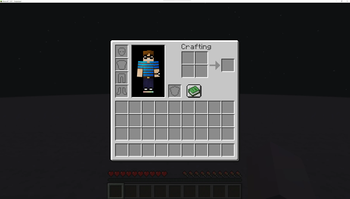
In Minecraft, the offhand inventory slot, the crafting input slots, and the crafting result slot don't line up with the rest of the grid. (literally unplayable) This mod allows you to customize the positions of these slots, as well as the position of the small player render. It also allows you to customize the slot highlight color of all inventories.
Here is the config screen (more to come later!)
!(https://github.com/Andrew6rant/Thanks--I-fixed-your-Inventory/assets/57331134/e73a6b43-8ad5-429b-878c-89c5dccdbe93)
The default Vanilla values are as follows:
- Player Inventory Render X: 51
- Player Inventory Render Y: 75
- Slot Highlight Color: -2130706433 (#80FFFFFF in AARRGGBB)
- Offhand Slot X: 77
- Offhand Slot Y: 62
- Crafting Result Slot X: 154
- Crafting Result Slot Y: 28
- Crafting Input Slots X: 98
- Crafting Input Slots Y: 18
📊 Mod Details
- Game
- Minecraft Mods
- Author
- Andrew6rant
- Version
- 1.1.0
- Downloads
- 2,139
- Endorsements
- 37
- Category
- cursed
- Created
- 8/11/2023
- Updated
- 8/16/2023
- Game Versions
- 1.20, 1.20.1
- Tags
- cursed, decoration
🔧 How to Install Minecraft Mods Mods
Download from Modrinth. Use Prism Launcher or drop into your mods folder.
📖 Full step-by-step install guide for Minecraft Mods →
Visit the official mod page for specific installation instructions for this mod.
🎮 Need cheat codes or console commands? Check ur gaming wiki for Minecraft Mods commands, item IDs, and more.
❓ Frequently Asked Questions
Which Minecraft Mods versions does Thanks, I fixed your Inventory support?
The author lists 1.20, 1.20.1. Other versions may work but are untested by the author.
What is the latest version of Thanks, I fixed your Inventory?
Version 1.1.0, published 2023-08-16 with 2,139 downloads recorded at the source.
Keep browsing — more Minecraft Mods mods await