Terrain Diffusion
🟡 Updated this year⚠️ Install Order · 2 steps
Install in this order, then this mod last — most mods fail to load without their framework and dependencies in place.
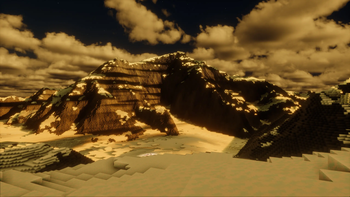
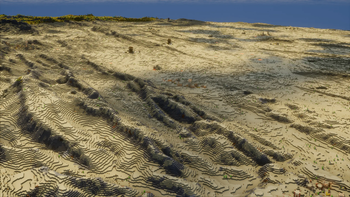
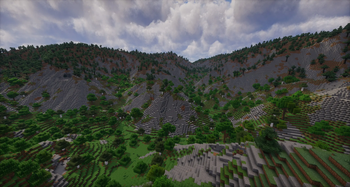
🖼️ Gallery (8 images)
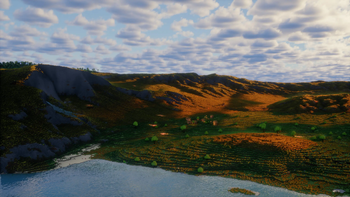
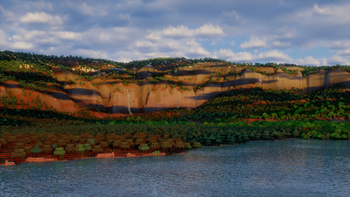
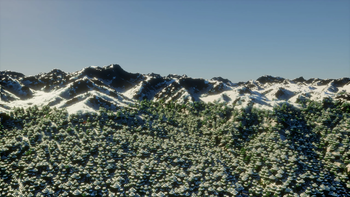
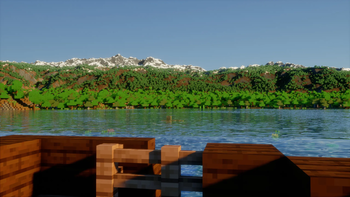
🔍 Analysis
- 👍 0.6% endorsement rate
- 🏆 #370 of 983 fabric mods in this game by downloads
📋 About This Mod
# Terrain Diffusion Fabric Mod This is a Minecraft Fabric mod integrating (https://github.com/xandergos/terrain-diffusion). ## Requirements - Minecraft with (https://fabricmc.net/) and the (https://modrinth.com/mod/fabric-api) installed - Windows with a GPU. For Linux or CPU, please see the (https://github.com/xandergos/terrain-diffusion-mc) - VRAM (GPU RAM) needed: 1.5GB - RAM needed: 2.5GB (May need to increase Minecraft's RAM allocation) ## Usage 1. Download the mod jar from (https://github.com/xandergos/terrain-diffusion-mc/releases) for your Minecraft version and place it in your Minecraft `mods/` folder. Make sure the Minecraft version matches. 2. Launch Minecraft, at least once online to download the models (~2.5GB). 3. Create a world, and select the **Terrain Diffusion** world type. Click **Customize** to set the `World Scale` (see (#per-world-settings) below). ## Exploring the World The mod includes a built-in terrain explorer web UI. Run the `/td-explore` command in-game; it will print a clickable link (e.g. `http://localhost:19801`) that opens an interactive map in your browser. Click the map on the left to open a "detailed view". Click the detailed view to get coordinates in the bottom left. You can also filter for certain climates. Use the explorer to scout continents, mountains, islands, and other interesting terrain before venturing out in Minecraft. ## Configuration Edit `config/terrain-diffusion-mc.properties` (created automatically on first launch): ``` # Terrain Diffusion MC configuration # Inference device: "cpu", "gpu", or "auto" (try GPU first then fall back to CPU). # "gpu" uses DirectML on the -windows build, or CUDA on the -cuda build. # GPU builds default to "gpu" so startup fails loudly if no GPU is detected. # CPU build defaults to "auto": uses CoreML on macOS, otherwise CPU. inference.device=gpu # Offload inactive models from VRAM between pipeline stages. # Keeps peak VRAM to ~1.5-2 GB. Set to false if you have ~2.5+ GB free for slightly # faster generation. inference.offload_models=true # Validate SHA-256 for pre-existing files in .minecraft/terrain-diffusion-models. # Set to false if you want to provide custom models/config files without hash checks. validate_model=true # Port for the local terrain explorer web UI (/td-explore). explorer.port=19801 # Spawn search: coarse-pixel region sizes for finding a land spawn near (0, 0). # Starts at initial_size x initial_size and expands by 8 each step up to max_size x max_size. # Each coarse pixel covers a large area (hundreds of blocks), so 16–128 is typically sufficient. spawn_search.initial_size=16 spawn_search.max_size=128 ``` ### Per-world settings For Terrain Diffusion worlds, click **Customize** in world creation and set: - `World Scale` (integer `1..6`) This value is saved with the world save and affects: - how many real-world meters each block represents (`scale=1` => `30m/block`, `scale=2` => `15m/block`, etc.) - world max height for newly created worlds (assumes tallest point is 10000 real-world meters) - 2 is recommended for a good balance of scale and playability. Use 1 for smaller, more compressed worlds. - Lower values put more stress on the GPU (Terrain Diffusion runs more often), while higher values put more stress on the CPU (larger world height). Most modern GPUs will be bottlenecked by the CPU around scale 2 or 3. ## Common Issues **A dynamic link library (DLL) initialization routine failed** This can happen for some older Java versions. Please update to the most recent version of Java 21 or higher. The (https://learn.microsoft.com/en-us/java/openjdk/download) version is known to work. **LoadLibrary failed with error 126** *(CUDA build only)* This is typically due to an improper CUDA or cuDNN installation. See (CUDA_INSTALL.md) for troubleshooting steps. **java.lang.IllegalStateException: Failed to load terrain-diffusion models** This typically indicates an "out of memory" error (the logs should show this as well). Terrain Diffusion's models take up about 2.5GB of RAM, so make sure to allocate enough RAM to account for this. **If your issue is still not resolved, please (https://github.com/xandergos/terrain-diffusion-mc/issues/new).**
# Terrain Diffusion Fabric Mod
This is a Minecraft Fabric mod integrating (https://github.com/xandergos/terrain-diffusion).
## Requirements
- Minecraft with (https://fabricmc.net/) and the (https://modrinth.com/mod/fabric-api) installed
- Windows with a GPU. For Linux or CPU, please see the (https://github.com/xandergos/terrain-diffusion-mc)
- VRAM (GPU RAM) needed: 1. 5GB
- RAM needed: 2. 5GB (May need to increase Minecraft's RAM allocation)
1. Download the mod jar from (https://github.com/xandergos/terrain-diffusion-mc/releases) for your Minecraft version and place it in your Minecraft `mods/` folder. Make sure the Minecraft version matches. 2. Launch Minecraft, at least once online to download the models (~2. 5GB). 3. Create a world, and select the Terrain Diffusion world type. Click Customize to set the `World Scale` (see (#per-world-settings) below).
## Exploring the World
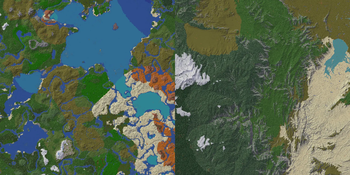
The mod includes a built-in terrain explorer web UI. Run the `/td-explore` command in-game; it will print a clickable link (e.g. `http://localhost:19801`) that opens an interactive map in your browser. Click the map on the left to open a "detailed view". Click the detailed view to get coordinates in the bottom left. You can also filter for certain climates.
Use the explorer to scout continents, mountains, islands, and other interesting terrain before venturing out in Minecraft.
## Configuration
Edit `config/terrain-diffusion-mc.properties` (created automatically on first launch):
``` # Terrain Diffusion MC configuration
# Inference device: "cpu", "gpu", or "auto" (try GPU first then fall back to CPU). # "gpu" uses DirectML on the -windows build, or CUDA on the -cuda build. # GPU builds default to "gpu" so startup fails loudly if no GPU is detected. # CPU build defaults to "auto": uses CoreML on macOS, otherwise CPU. inference.device=gpu
# Offload inactive models from VRAM between pipeline stages. # Keeps peak VRAM to ~1. 5-2 GB. Set to false if you have ~2. 5+ GB free for slightly # faster generation. inference.offload_models=true
# Validate SHA-256 for pre-existing files in .minecraft/terrain-diffusion-models. # Set to false if you want to provide custom models/config files without hash checks. validate_model=true
# Port for the local terrain explorer web UI (/td-explore). explorer.port=19801
# Spawn search: coarse-pixel region sizes for finding a land spawn near (0, 0). # Starts at initial_size x initial_size and expands by 8 each step up to max_size x max_size. # Each coarse pixel covers a large area (hundreds of blocks), so 16–128 is typically sufficient. spawn_search.initial_size=16 spawn_search.max_size=128 ```
### Per-world settings
For Terrain Diffusion worlds, click Customize in world creation and set:
- `World Scale` (integer `1.. 6`)
This value is saved with the world save and affects:
- how many real-world meters each block represents (`scale=1` => `30m/block`, `scale=2` => `15m/block`, etc.)
- world max height for newly created worlds (assumes tallest point is 10000 real-world meters)
- 2 is recommended for a good balance of scale and playability. Use 1 for smaller, more compressed worlds.
- Lower values put more stress on the GPU (Terrain Diffusion runs more often), while higher values put more stress on the CPU (larger world height). Most modern GPUs will be bottlenecked by the CPU around scale 2 or 3.
## Common Issues
A dynamic link library (DLL) initialization routine failed
This can happen for some older Java versions. Please update to the most recent version of Java 21 or higher. The (https://learn.microsoft.com/en-us/java/openjdk/download) version is known to work.
LoadLibrary failed with error 126 (CUDA build only)
This is typically due to an improper CUDA or cuDNN installation. See (CUDA_INSTALL.md) for troubleshooting steps.
java.lang. IllegalStateException: Failed to load terrain-diffusion models
This typically indicates an "out of memory" error (the logs should show this as well). Terrain Diffusion's models take up about 2. 5GB of RAM, so make sure to allocate enough RAM to account for this.
**If your issue is still not resolved, please (https://github.com/xandergos/terrain-diffusion-mc/issues/new).**
📊 Mod Details
- Game
- Minecraft Mods
- Author
- xandergos
- Version
- 2.2.0-windows
- Downloads
- 61,107
- Endorsements
- 371
- Category
- fabric
- Created
- 5/3/2026
- Updated
- 5/12/2026
- Game Versions
- 1.21.1
- Tags
- worldgen
🔧 How to Install Minecraft Mods Mods
Download from Modrinth. Use Prism Launcher or drop into your mods folder.
📖 Full step-by-step install guide for Minecraft Mods →
Visit the official mod page for specific installation instructions for this mod.
🎮 Need cheat codes or console commands? Check ur gaming wiki for Minecraft Mods commands, item IDs, and more.
❓ Frequently Asked Questions
Which Minecraft Mods versions does Terrain Diffusion support?
The author lists 1.21.1. Other versions may work but are untested by the author.
What is the latest version of Terrain Diffusion?
Version 2.2.0-windows, published 2026-05-12 with 61,107 downloads recorded at the source.
Keep browsing — more Minecraft Mods mods await