Take a Seat!
🟡 Updated this year⚠️ Install Order · 2 steps
Install in this order, then this mod last — most mods fail to load without their framework and dependencies in place.
🖼️ Gallery (6 images)
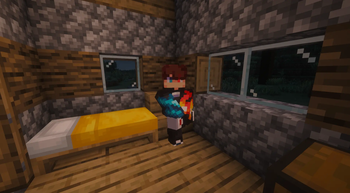
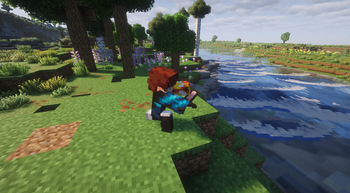
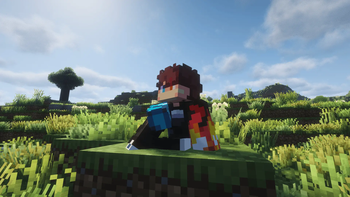
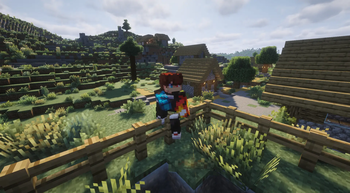
🔍 Analysis
- 👍 0.4% endorsement rate
- 🏆 #260 of 335 decoration mods in this game by downloads
📋 About This Mod
> **⚠️ Player Animation Library is a required dependency for this mod.** # Take a Seat ## Sit, lounge, and relax Press a key and **Take a Seat** plays a **context-aware sitting animation** on your player, it figures out _what_ you're near or holding and picks a fitting pose, then keeps your model in frame with a smooth camera. Other players see you sitting too, when they also have the mod. Take a Seat is a from-scratch rebuild of the discontinued **Sitting Plus**, running on the Player Animation Library backend. > These are _cosmetic_ animations. You don't actually mount the block — your model poses in place, and moving stands you back up. <p align="center" style="text-align:center"><img src="https://raw.githubusercontent.com/Icywhenhot/Icy-s-Better-Horses/26.2-fab/assets/separator.png" alt="" width="663" style="image-rendering: pixelated"></p> ## How to use * Press **`X`** (rebindable in _Options → Controls → Take a Seat_) to sit. * **Press it again while seated** to cycle to the next variation of the current pose. * **Move** (WASD / jump / sneak / sprint) to stand back up. * **Right-click a stair with an empty hand** to snap onto it and sit (can be disabled in the config). * Or use the **`/sit`** command: `/sit` for context detection, `/sit <pose>` to force a pose (e.g. `/sit chair`), or `/sit <pose> <variant>` (e.g. `/sit bed 2`). * You **can't sit while airborne, swimming/underwater, or riding** something. ### How the pose is chosen When you press the key, Take a Seat checks these in order and uses the **first** match: | # | Trigger | Pose | Notes | |:---:|:---|:---|:---| | 1 | **Looking at a campfire** (within ~2 blocks) | `campfiresit` | Looping idle | | 2 | **Looking at a furnace** (furnace / blast furnace / smoker) | `furnacesit` | Looping idle | | 3 | **Holding a sword** | `swordsit`, `swordsit2` | 2 variants | | 4 | **Holding an axe** | `sittingaxe` | 1 variant | | 5 | **Holding a shovel** | `sittingshovel` | 1 variant | | 6 | **Holding a fishing rod** | `fishing` | Looping cast | | 7 | **Standing on stairs** | `chairsitting` 1–4 | "Sit in a chair" — 4 variants | | 8 | **Standing on a fence** | `fencesitting` 1–2 | Perched higher, 2 variants | | 9 | **Standing on a bed** | `bedlyingdown` 1–3 | Lie down, 3 variants | | 10 | **Standing on a bottom slab** | `chairsitting` 1–4 | Treated as a chair | | 11 | **Standing on a carpet** | Ground poses | Treated as floor | | 12 | **Standing on a `#takeaseat:sittable` block** | `chairsitting` 1–4 | Datapack-defined chairs, incl. modded | | 13 | **Anywhere else (ground)** | `kneesitting`, `buttsit`, `buttsit2`, `kneeleaning` | Default, 4 variants | Because the list is checked top-down, **what you're looking at or holding wins over what you're standing on**, holding a sword while standing on stairs gives you the sword pose, not the chair pose. Empty your hand and look away from campfires and furnaces to get the stair, fence, bed and ground poses. That's **20 hand-made animations** in total, cycled per category by tapping the key again. <p align="center" style="text-align:center"><img src="https://raw.githubusercontent.com/Icywhenhot/Icy-s-Better-Horses/26.2-fab/assets/separator.png" alt="" width="663" style="image-rendering: pixelated"></p> ## Camera * **Auto third person** — sitting flips you to third person so you can see the pose (toggle: `enableThirdPersonOnSit`). Standing restores your previous view. * **Focus on the model** — the camera eases downward while seated so the sitting body stays centered (toggle: `enableSitCameraFocus`, distance: `cameraFocusOffset`). * **Your F5 is respected** — once you're seated you can change view freely, and cycling through poses will **not** snap the camera back. <p align="center" style="text-align:center"><img src="https://raw.githubusercontent.com/Icywhenhot/Icy-s-Better-Horses/26.2-fab/assets/separator.png" alt="" width="663" style="image-rendering: pixelated"></p> ## Configuration Edit `config/TakeASeatConfig.json`, created on first launch: | Option | Default | Description | |:---|:---|:---| | `enableClickToSit` | `true` | Right-click stairs with an empty hand to sit on them | | `enableThirdPersonOnSit` | `true` | Switch to third person while sitting | | `enableSitCameraFocus` | `true` | Smoothly lower the camera to focus on the seated model | | `cameraFocusOffset` | `0.55` | How far (in blocks) to lower the camera while sitting | | `onlyLowerCameraInFirstPerson` | `false` | Only apply the camera lowering effect in first person | | `enableAfkSit` | `false` | Auto-sit after being idle — off by default, as it was non-functional in the original Sitting Plus | | `afkSitDelaySeconds` | `60` | Idle seconds before AFK auto-sit triggers | <p align="center" style="text-align:center"><img src="https://raw.githubusercontent.com/Icywhenhot/Icy-s-Better-Horses/26.2-fab/assets/separator.png" alt="" width="663" style="image-rendering: pixelated"></p> ## Multiplayer Take a Seat syncs poses to other players: whe
> ⚠️ Player Animation Library is a required dependency for this mod.
# Take a Seat
## Sit, lounge, and relax
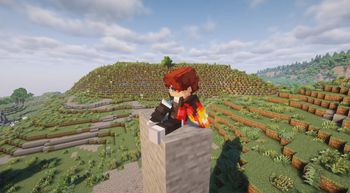
Press a key and Take a Seat plays a context-aware sitting animation on your player, it figures out _what_ you're near or holding and picks a fitting pose, then keeps your model in frame with a smooth camera. Other players see you sitting too, when they also have the mod.
Take a Seat is a from-scratch rebuild of the discontinued Sitting Plus, running on the Player Animation Library backend.
> These are _cosmetic_ animations. You don't actually mount the block — your model poses in place, and moving stands you back up.

## How to use
Press `X` (rebindable in _Options → Controls → Take a Seat_) to sit.
Press it again while seated to cycle to the next variation of the current pose.
Move (WASD / jump / sneak / sprint) to stand back up.
Right-click a stair with an empty hand to snap onto it and sit (can be disabled in the config).
Or use the `/sit` command: `/sit` for context detection, `/sit
### How the pose is chosen
When you press the key, Take a Seat checks these in order and uses the first match:
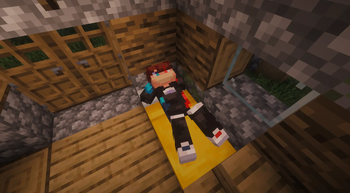
| # | Trigger | Pose | Notes | |:---:|:---|:---|:---| | 1 | Looking at a campfire (within ~2 blocks) | `campfiresit` | Looping idle | | 2 | Looking at a furnace (furnace / blast furnace / smoker) | `furnacesit` | Looping idle | | 3 | Holding a sword | `swordsit`, `swordsit2` | 2 variants | | 4 | Holding an axe | `sittingaxe` | 1 variant | | 5 | Holding a shovel | `sittingshovel` | 1 variant | | 6 | Holding a fishing rod | `fishing` | Looping cast | | 7 | Standing on stairs | `chairsitting` 1–4 | "Sit in a chair" — 4 variants | | 8 | Standing on a fence | `fencesitting` 1–2 | Perched higher, 2 variants | | 9 | Standing on a bed | `bedlyingdown` 1–3 | Lie down, 3 variants | | 10 | Standing on a bottom slab | `chairsitting` 1–4 | Treated as a chair | | 11 | Standing on a carpet | Ground poses | Treated as floor | | 12 | Standing on a `#takeaseat:sittable` block | `chairsitting` 1–4 | Datapack-defined chairs, incl. modded | | 13 | Anywhere else (ground) | `kneesitting`, `buttsit`, `buttsit2`, `kneeleaning` | Default, 4 variants |
Because the list is checked top-down, what you're looking at or holding wins over what you're standing on, holding a sword while standing on stairs gives you the sword pose, not the chair pose. Empty your hand and look away from campfires and furnaces to get the stair, fence, bed and ground poses.
That's 20 hand-made animations in total, cycled per category by tapping the key again.
Auto third person — sitting flips you to third person so you can see the pose (toggle: `enableThirdPersonOnSit`). Standing restores your previous view. Focus on the model — the camera eases downward while seated so the sitting body stays centered (toggle: `enableSitCameraFocus`, distance: `cameraFocusOffset`). * Your F5 is respected — once you're seated you can change view freely, and cycling through poses will not snap the camera back.
## Configuration
Edit `config/TakeASeatConfig.json`, created on first launch:
| Option | Default | Description | |:---|:---|:---| | `enableClickToSit` | `true` | Right-click stairs with an empty hand to sit on them | | `enableThirdPersonOnSit` | `true` | Switch to third person while sitting | | `enableSitCameraFocus` | `true` | Smoothly lower the camera to focus on the seated model | | `cameraFocusOffset` | `0. 55` | How far (in blocks) to lower the camera while sitting | | `onlyLowerCameraInFirstPerson` | `false` | Only apply the camera lowering effect in first person | | `enableAfkSit` | `false` | Auto-sit after being idle — off by default, as it was non-functional in the original Sitting Plus | | `afkSitDelaySeconds` | `60` | Idle seconds before AFK auto-sit triggers |
## Multiplayer
Take a Seat syncs poses to other players: whe
📊 Mod Details
- Game
- Minecraft Mods
- Author
- Icywhenhot
- Version
- 1.0.1
- Downloads
- 20,246
- Endorsements
- 90
- Category
- decoration
- Created
- 6/27/2026
- Updated
- 8/18/2026
- Game Versions
- 1.21.1
- Tags
- decoration, social
🔧 How to Install Minecraft Mods Mods
Download from Modrinth. Use Prism Launcher or drop into your mods folder.
📖 Full step-by-step install guide for Minecraft Mods →
Visit the official mod page for specific installation instructions for this mod.
🎮 Need cheat codes or console commands? Check ur gaming wiki for Minecraft Mods commands, item IDs, and more.
❓ Frequently Asked Questions
Which Minecraft Mods versions does Take a Seat! support?
The author lists 1.21.1. Other versions may work but are untested by the author.
What is the latest version of Take a Seat!?
Version 1.0.1, published 2026-08-18 with 20,246 downloads recorded at the source.
Keep browsing — more Minecraft Mods mods await