Target HUD
🟡 Updated this year⚠️ Install Order · 2 steps
Install in this order, then this mod last — most mods fail to load without their framework and dependencies in place.
🖼️ Gallery (3 images)
🔍 Analysis
- 👍 0.0% endorsement rate
- 🏆 #113 of 894 fabric mods in this game by downloads
📋 About This Mod
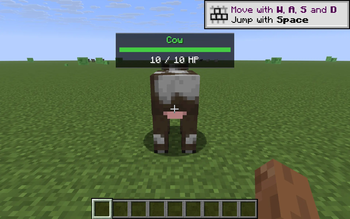
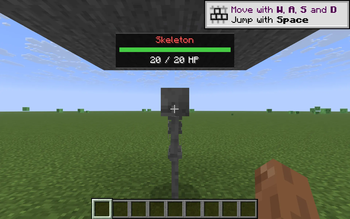
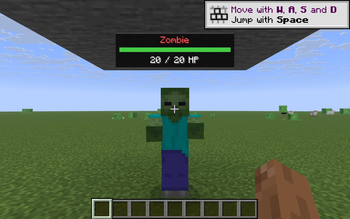
**Target HUD** is a tiny client-side overlay that gives you instant info on whatever your crosshair is pointing at. - Aim at any entity within **6 blocks** and a clean panel appears just above the crosshair. - Shows the entity's **name** and, for named (nametagged) entities, the underlying **type** on a second line. - For mobs/players/animals (anything with HP): a **horizontal health bar** that fills proportionally to current HP, plus exact **numeric HP** ("18 / 20 HP"). - The bar color reflects state of health - green above 66 %, yellow 33-66 %, red below 33 %. - The name is **color-coded** by category: - **red** - hostile mob (zombie, skeleton, creeper, ...) - **yellow** - other players - **green** - passive or neutral living entity (cow, sheep, villager, wolf, ...) - **white** - non-living entity (item frame, painting, boat, minecart, ...) - The panel hides automatically when you look away, open a screen, or press F1 (HUD-hidden). - Toggle the whole feature with **K**. Pure client-side, no server install needed. No mixins, no world rendering - built on the stable `MinecraftClient.crosshairTarget` + Fabric `HudRenderCallback` path, so the same JAR loads on Minecraft 1.21.8 through 1.21.11. ## Compatibility - Minecraft Java: 1.21.8, 1.21.9, 1.21.10, 1.21.11 - Mod loader: Fabric Loader >= 0.16.0 - Java: 21+ - Required mods: Fabric API ## License MIT - do whatever you want, no warranty.
Target HUD is a tiny client-side overlay that gives you instant info on whatever your crosshair is pointing at.
- Aim at any entity within 6 blocks and a clean panel appears just above the crosshair.
- Shows the entity's name and, for named (nametagged) entities, the underlying type on a second line.
- For mobs/players/animals (anything with HP): a horizontal health bar that fills proportionally to current HP, plus exact numeric HP ("18 / 20 HP").
- The bar color reflects state of health - green above 66 %, yellow 33-66 %, red below 33 %.
- The name is color-coded by category:
- - red - hostile mob (zombie, skeleton, creeper, ...)
- - yellow - other players
- - green - passive or neutral living entity (cow, sheep, villager, wolf, ...)
- - white - non-living entity (item frame, painting, boat, minecart, ...)
- The panel hides automatically when you look away, open a screen, or press F1 (HUD-hidden).
- Toggle the whole feature with K.
Pure client-side, no server install needed. No mixins, no world rendering - built on the stable `MinecraftClient.crosshairTarget` + Fabric `HudRenderCallback` path, so the same JAR loads on Minecraft 1. 21. 8 through 1. 21. 11.
## Compatibility
- Minecraft Java: 1. 21. 8, 1. 21. 9, 1. 21. 10, 1. 21. 11
- Mod loader: Fabric Loader >= 0. 16. 0
- Java: 21+
- Required mods: Fabric API
MIT - do whatever you want, no warranty.
📊 Mod Details
- Game
- Minecraft Mods
- Author
- kvapilvaclav0
- Version
- 1.0.0
- Downloads
- 722
- Endorsements
- 0
- Category
- fabric
- Created
- 6/14/2026
- Updated
- 6/2/2026
- Game Versions
- 1.21.8, 1.21.9, 1.21.10, 1.21.11
- Tags
- utility
🔧 How to Install Minecraft Mods Mods
Download from Modrinth. Use Prism Launcher or drop into your mods folder.
📖 Full step-by-step install guide for Minecraft Mods →
Visit the official mod page for specific installation instructions for this mod.
🎮 Need cheat codes or console commands? Check ur gaming wiki for Minecraft Mods commands, item IDs, and more.
❓ Frequently Asked Questions
Which Minecraft Mods versions does Target HUD support?
The author lists 1.21.8, 1.21.9, 1.21.10, 1.21.11. Other versions may work but are untested by the author.
What is the latest version of Target HUD?
Version 1.0.0, published 2026-06-02 with 722 downloads recorded at the source.
Keep browsing — more Minecraft Mods mods await