FpsPing
🟡 Updated this year⚠️ Install Order · 2 steps
Install in this order, then this mod last — most mods fail to load without their framework and dependencies in place.
🖼️ Gallery (1 images)
🔍 Analysis
- 👍 0.1% endorsement rate
- 🏆 #381 of 894 fabric mods in this game by downloads
📋 About This Mod
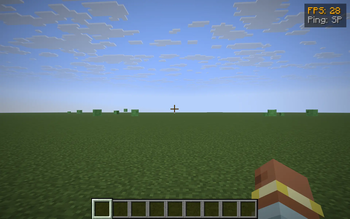
**FpsPing** drops a tiny two-line panel in the top-right corner of the screen with the only two performance numbers most players actually want to glance at: - **FPS** — your current frames-per-second, exactly the number F3 shows in its "fps" line. - **Ping** — your round-trip latency to the server in milliseconds, taken from the same player list the Tab menu uses. In singleplayer it just reads **SP** instead of a meaningless `0 ms`. ### Color-coded thresholds Numbers change color so you don't have to read them — you glance: - **Green** — FPS ≥ 60 / ping ≤ 60 ms (silky) - **Yellow** — FPS ≥ 30 / ping ≤ 150 ms (fine) - **Orange** — FPS ≥ 15 / ping ≤ 300 ms (struggling) - **Red** — anything worse (something is wrong) ### Features - One key to toggle the HUD (default **G**, raw GLFW polling so it works on every supported MC version — no rebind UI needed). - Hides automatically when you press **F1** to hide the rest of the HUD. - Pure client-side — install on the client only, works on any server, no game-state changes. - Tiny render cost — two lines of text and a translucent backdrop, no per-frame allocations. ### Compatibility Works on **Minecraft 1.21.8, 1.21.9, 1.21.10, and 1.21.11** (Fabric Loader 0.16+). One JAR for all four — install via Fabric, drop into your `mods/` folder. ### Why another FPS/ping HUD? Because most "performance HUD" mods are part of huge utility packs that draw 12 other widgets you didn't ask for. FpsPing does only this one job, in <100 lines of code, with no config files and no dependencies beyond Fabric API. If you just want a glanceable pulse on how the client and the connection are doing, this is the smallest possible answer.
FpsPing drops a tiny two-line panel in the top-right corner of the screen with the only two performance numbers most players actually want to glance at:
- FPS — your current frames-per-second, exactly the number F3 shows in its "fps" line.
- Ping — your round-trip latency to the server in milliseconds, taken from the same player list the Tab menu uses. In singleplayer it just reads SP instead of a meaningless `0 ms`.
### Color-coded thresholds Numbers change color so you don't have to read them — you glance:
- Green — FPS ≥ 60 / ping ≤ 60 ms (silky)
- Yellow — FPS ≥ 30 / ping ≤ 150 ms (fine)
- Orange — FPS ≥ 15 / ping ≤ 300 ms (struggling)
- Red — anything worse (something is wrong)
### Features - One key to toggle the HUD (default G, raw GLFW polling so it works on every supported MC version — no rebind UI needed). - Hides automatically when you press F1 to hide the rest of the HUD. - Pure client-side — install on the client only, works on any server, no game-state changes. - Tiny render cost — two lines of text and a translucent backdrop, no per-frame allocations.
### Compatibility Works on Minecraft 1. 21. 8, 1. 21. 9, 1. 21. 10, and 1. 21. 11 (Fabric Loader 0. 16+). One JAR for all four — install via Fabric, drop into your `mods/` folder.
### Why another FPS/ping HUD? Because most "performance HUD" mods are part of huge utility packs that draw 12 other widgets you didn't ask for. FpsPing does only this one job, in <100 lines of code, with no config files and no dependencies beyond Fabric API. If you just want a glanceable pulse on how the client and the connection are doing, this is the smallest possible answer.
📊 Mod Details
- Game
- Minecraft Mods
- Author
- kvapilvaclav0
- Version
- 1.0.0
- Downloads
- 671
- Endorsements
- 1
- Category
- fabric
- Created
- 6/3/2026
- Updated
- 5/29/2026
- Game Versions
- 1.21.8, 1.21.9, 1.21.10, 1.21.11
- Tags
- utility
🔧 How to Install Minecraft Mods Mods
Download from Modrinth. Use Prism Launcher or drop into your mods folder.
📖 Full step-by-step install guide for Minecraft Mods →
Visit the official mod page for specific installation instructions for this mod.
🎮 Need cheat codes or console commands? Check ur gaming wiki for Minecraft Mods commands, item IDs, and more.
❓ Frequently Asked Questions
Which Minecraft Mods versions does FpsPing support?
The author lists 1.21.8, 1.21.9, 1.21.10, 1.21.11. Other versions may work but are untested by the author.
What is the latest version of FpsPing?
Version 1.0.0, published 2026-05-29 with 671 downloads recorded at the source.
Keep browsing — more Minecraft Mods mods await