Suggestions API
⚪ Last updated 2024⚠️ Install Order · 2 steps
Install in this order, then this mod last — most mods fail to load without their framework and dependencies in place.
🖼️ Gallery (1 images)
🔍 Analysis
- 👍 0.1% endorsement rate
- 🏆 #233 of 945 fabric mods in this game by downloads
📋 About This Mod
# Suggestions API v1.0.5 This library is injected into the Minecraft source code, which is responsible for the logic of Minecraft suggestions in chat, in order to provide a more convenient wrapper for adding or changing suggestions. Currently, the library contains interfaces for: - adding suggestions synchronous/asynchronous based on the text entered by the user in the text input field - changing suggestions render - processing events related to suggestions: - on session inited - on suggestion selected - replacing suggestions created by non Suggestions API for which the library provides ready-made implementations in the form of: - always shown suggestion (texted suggestion with condition to always show it) - simple suggestion (texted suggestion with default or custom showing condition) - icon suggestion (texted suggestion with icon on the left or on the right with default or custom showing condition) - synchronous/asynchronous suggestions injector (dynamically adding suggestions when entering text into the input field based on matching the specified pattern of regex) ### Which mods use the Suggestions API? These mods use the Suggestions API: - (https://modrinth.com/mod/emogg) - (https://modrinth.com/mod/jime) ### Getting started Merge the following with your. Below is an example with a version for Fabric or Quit. If you are developing for Forge or Neoforge, then replace `fabric` with `forge` (works this way since Suggestions API v1.0.4) <details><summary><code>build.gradle</code></summary> ```groovy repositories { maven { url = "https://api.modrinth.com/maven" } } dependencies { modImplementation "maven.modrinth:suggestions-api:1.0.6+fabric" } ``` </details> <details><summary><code>build.gradle.kts</code></summary> ```groovy repositories { maven("https://api.modrinth.com/maven") } dependencies { modImplementation("maven.modrinth", "suggestions-api", "1.0.6+fabric") } ``` </details> # Quick DOCS Quick documentation that includes the basics of the library. ### What types of embedded suggestions are there? The `Suggestion` interface is located in `io.github.aratakileo.suggestionsapi.suggestion`. The library has two built-in types of suggestions. Below are the functions for their initialization: - `Suggestion.simple(...)` - simple (just text) - `Suggestion.withIcon(...)` - with an icon (will be rendered on the left) The main argument for the initialization function of a simple suggestion will be the text of this suggestion. For example: ```java final var simpleSuggestion = Suggestion.simple("bonjour!"); ``` To initialize a suggestion with an icon, you will need to specify two main arguments: the text of the suggestion and the resource of the icon. This function must be called strictly after loading all the textures of the game, otherwise the game will crash. The barrier texture is taken as an example: ```java final var suggestionWithIcon = Suggestion.withIcon("barrier", new ResourceLocation("minecraft", "textures/item/barrier.png")); ``` By default, suggestions begin to be shown after the start of entering the text of the suggestion. You can specify your own mapping condition as a lambda function as the last argument. The first argument of the lambda is the text of the suggestion, the second argument is the current expression (the text in the input field between the nearest left space and the cursor). In the example below, the suggestion will be shown if the user fully enters the text of the suggestion: ```java final var anotherSimpleSuggetion = Suggestion.simple( "bonjour!", (suggestionText, currentExpression) -> suggestionText.toLowerCase().equals(currentExpression.toLowerCase()) ); ``` or ```java final var anotherSimpleSuggetion = Suggestion.simple("bonjour!", String::equalsIgnoreCase); ``` The default condition for functions `Suggestion.simple(...)` and `Suggestion.withIcon(...)` is `(suggestionText, currentExpression) -> suggestionText.toLowerCase().startsWith(currentExpression.toLowerCase())` or `Suggestion::DEFAULT_CONDITION`. If you want the suggestions to be displayed always, regardless of the entered text, you can specify condition `(suggestionText, currentExpression) -> true` or `Suggestion::ALWAYS_SHOW_CONDITION` that is used by default when initializing suggestions in functions `Suggestion.alwaysShown(...)` (as an alternative to the function `Suggestion.simple(...)`) and `Suggestion.alwaysShownWithIcon(...)` (as an alternative to the function `Suggestion.withIcon(...)`): ```java final var alwaysShownSuggestion = Suggestion.alwaysShown("bonjour!"); ``` ### How to add new suggestions to the game? You can add new suggestions to the game using the `Injector` interface that is located in `io.github.aratakileo.suggestionsapi.injector`. There are two basic types of injectors: simple and asynchronous. To initialize them, the library also provides functions. The first argument of which will be a regex pattern. To regi
# Suggestions API v1. 0. 5 This library is injected into the Minecraft source code, which is responsible for the logic of Minecraft suggestions in chat, in order to provide a more convenient wrapper for adding or changing suggestions. Currently, the library contains interfaces for: - adding suggestions synchronous/asynchronous based on the text entered by the user in the text input field - changing suggestions render - processing events related to suggestions: - on session inited - on suggestion selected - replacing suggestions created by non Suggestions API
for which the library provides ready-made implementations in the form of: - always shown suggestion (texted suggestion with condition to always show it) - simple suggestion (texted suggestion with default or custom showing condition) - icon suggestion (texted suggestion with icon on the left or on the right with default or custom showing condition) - synchronous/asynchronous suggestions injector (dynamically adding suggestions when entering text into the input field based on matching the specified pattern of regex)
### Which mods use the Suggestions API? These mods use the Suggestions API: - (https://modrinth.com/mod/emogg) - (https://modrinth.com/mod/jime)
### Getting started Merge the following with your. Below is an example with a version for Fabric or Quit. If you are developing for Forge or Neoforge, then replace `fabric` with `forge` (works this way since Suggestions API v1. 0. 4)
build.gradle
```groovy repositories { maven { url = "https://api.modrinth.com/maven" } }
dependencies { modImplementation "maven.modrinth:suggestions-api:1. 0. 6+fabric" } ```
build.gradle.kts
```groovy repositories { maven("https://api.modrinth.com/maven") }
dependencies { modImplementation("maven.modrinth", "suggestions-api", "1. 0. 6+fabric") } ```
# Quick DOCS Quick documentation that includes the basics of the library.
### What types of embedded suggestions are there? The `Suggestion` interface is located in `io.github.aratakileo.suggestionsapi.suggestion`.
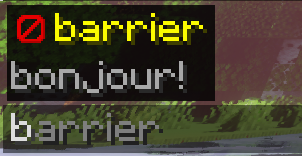
The library has two built-in types of suggestions. Below are the functions for their initialization: - `Suggestion.simple(...)` - simple (just text) - `Suggestion.withIcon(...)` - with an icon (will be rendered on the left)
The main argument for the initialization function of a simple suggestion will be the text of this suggestion. For example:
```java final var simpleSuggestion = Suggestion.simple("bonjour!"); ```
To initialize a suggestion with an icon, you will need to specify two main arguments: the text of the suggestion and the resource of the icon. This function must be called strictly after loading all the textures of the game, otherwise the game will crash. The barrier texture is taken as an example:
```java final var suggestionWithIcon = Suggestion.withIcon("barrier", new ResourceLocation("minecraft", "textures/item/barrier.png")); ```
By default, suggestions begin to be shown after the start of entering the text of the suggestion. You can specify your own mapping condition as a lambda function as the last argument. The first argument of the lambda is the text of the suggestion, the second argument is the current expression (the text in the input field between the nearest left space and the cursor). In the example below, the suggestion will be shown if the user fully enters the text of the suggestion:
```java final var anotherSimpleSuggetion = Suggestion.simple( "bonjour!", (suggestionText, currentExpression) -> suggestionText.toLowerCase().equals(currentExpression.toLowerCase()) ); ```
```java final var anotherSimpleSuggetion = Suggestion.simple("bonjour!", String::equalsIgnoreCase); ```
The default condition for functions `Suggestion.simple(...)` and `Suggestion.withIcon(...)` is `(suggestionText, currentExpression) -> suggestionText.toLowerCase().startsWith(currentExpression.toLowerCase())` or `Suggestion::DEFAULT_CONDITION`.
If you want the suggestions to be displayed always, regardless of the entered text, you can specify condition `(suggestionText, currentExpression) -> true` or `Suggestion::ALWAYS_SHOW_CONDITION` that is used by default when initializing suggestions in functions `Suggestion.alwaysShown(...)` (as an alternative to the function `Suggestion.simple(...)`) and `Suggestion.alwaysShownWithIcon(...)` (as an alternative to the function `Suggestion.withIcon(...)`):
```java final var alwaysShownSuggestion = Suggestion.alwaysShown("bonjour!"); ```
### How to add new suggestions to the game? You can add new suggestions to the game using the `Injector` interface that is located in `io.github.aratakileo.suggestionsapi.injector`.
There are two basic types of injectors: simple and asynchronous. To initialize them, the library also provides functions. The first argument of which will be a regex pattern.
📊 Mod Details
- Game
- Minecraft Mods
- Author
- aratakileo
- Version
- 1.0.6+forge
- Downloads
- 2,686
- Endorsements
- 3
- Category
- fabric
- Created
- 9/5/2023
- Updated
- 2/21/2024
- Game Versions
- 1.20, 1.20.1, 1.20.2, 1.20.3, 1.20.4
- Tags
- library, social
🔧 How to Install Minecraft Mods Mods
Download from Modrinth. Use Prism Launcher or drop into your mods folder.
📖 Full step-by-step install guide for Minecraft Mods →
Visit the official mod page for specific installation instructions for this mod.
🎮 Need cheat codes or console commands? Check ur gaming wiki for Minecraft Mods commands, item IDs, and more.
❓ Frequently Asked Questions
Which Minecraft Mods versions does Suggestions API support?
The author lists 1.20, 1.20.1, 1.20.2, 1.20.3, 1.20.4. Other versions may work but are untested by the author.
What is the latest version of Suggestions API?
Version 1.0.6+forge, published 2024-02-21 with 2,686 downloads recorded at the source.
Keep browsing — more Minecraft Mods mods await