SimpleChat fork++
🟡 Updated this year⚠️ Install Order · 2 steps
Install in this order, then this mod last — most mods fail to load without their framework and dependencies in place.
🖼️ Gallery (1 images)
🔍 Analysis
- 👍 0.1% endorsement rate
- 🏆 #29 of 945 fabric mods in this game by downloads
📋 About This Mod
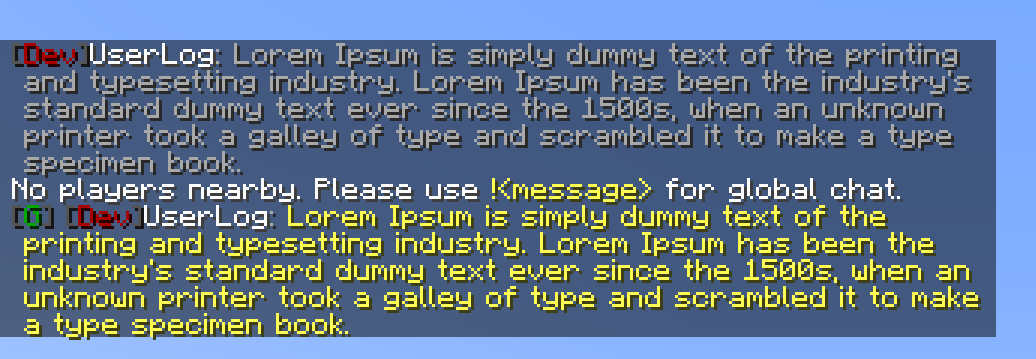
# SimpleChat (fork++) 2.3.0 !(https://img.shields.io/modrinth/dt/PXaxqCH3) !(https://img.shields.io/modrinth/game-versions/PXaxqCH3) !(https://img.shields.io/badge/java-21+-orange?logo=java) ### This fork was created because the main project is (https://github.com/cayennemc/SimpleChat/issues/11). ### Log: "This is a fork of the SimpleChat mod by (https://github.com/cayennemc/SimpleChat) and its fork by (https://github.com/stanlystark/SimpleChat) for 1.21" _A simple chat mod for your server._ Doesn't work in single player. Just use `!<message>` for global chat or `#<message>` for world chat! !(https://i.imgur.com/aWeZ1DV.png) ## Features - LuckPerms integration _(tested 5.4)_ - Vanish integration _(tested 1.5.7)_ - Global, world and local chat (you can turn it off) - Color chat (you can turn it off) - Reloading the configuration with the command - Command to clear chat history - Command or text that suggests when you click on the player's name. ## Configuration The configuration is located in `<game or server directory>/config/simplechat.json`. | Name | Description | Type | |-|-|-| | enable_chat_mod | Enables (true) or disables (false) chat handling by the mod. | boolean | | enable_global_chat | Enables (true) or disables (false) the global chat. | boolean | | enable_world_chat | Enables (true) or disables (false) the world chat. | boolean | | enable_chat_colors | Enables (true) or disables (false) the use of color codes in the chat. | boolean | | local_chat_format | Defines the appearance of the local chat. | String | | global_chat_format | Defines the appearance of the global chat. | String | | no_players_nearby_text | Defines a message for local chat when there are no players nearby. | String | | no_players_nearby_action_bar | Enables (true) or disables (false) action bar message. | boolean | | chat_range | Specifies the distance after which local chat messages will not be visible (if global chat is enabled). | int | | suggests_when_you_click_on_the_player_name | Command or text that suggests when you click on the player's name. (Support **Placeholder API** and `%player%`) | String | ```json { "enable_chat_mod": true, "enable_global_chat": true, "enable_world_chat": false, "enable_chat_colors": false, "local_chat_format": "&7%lp_prefix%&r%player%&7:&r &7%message%", "global_chat_format": "&8 &7%lp_prefix%&r%player%&7:&r &e%message%", "world_chat_format": "&8 &7%lp_prefix%&r%player%&7:&r &e%message%", "no_players_nearby_text": "&fNo players nearby. Please use &e!<message> &ffor global chat.", "no_players_nearby_action_bar": false, "suggests_when_you_click_on_the_player_name": "/msg %player% ", "chat_range": 100 } ``` You can use the placeholder `%player%` to specify the player's nickname and the placeholder `%message%` to specify their message in the chat. - `%lp_group%` LuckPerms - display player group. - `%lp_prefix%` LuckPerms - display player prefix. - `%lp_suffix%` LuckPerms - display player suffix. You can reload the configuration without restarting the server or the game using the `/simplechat` command (requires (https://minecraft.fandom.com/wiki/Server.properties#op-permission-level) 1 or more). ## Command - `/simplechat` - reload configuration - `/simplechat clear` - clear history chat (all players) ## NO API I am removing `me.vetustus.server.simplechat.api.event.PlayerChatCallback` as I didn't see the need for it, and instead of porting it to 1.21, I am using the standard event `net.fabricmc.fabric.api.message.v1.ServerMessageEvents` `ALLOW_CHAT_MESSAGE`. ## License The MIT license is used.
# SimpleChat (fork++) 2. 3. 0
!(https://img.shields.io/modrinth/dt/PXaxqCH3) !(https://img.shields.io/modrinth/game-versions/PXaxqCH3) !(https://img.shields.io/badge/java-21+-orange?logo=java)
### This fork was created because the main project is (https://github.com/cayennemc/SimpleChat/issues/11).
### Log: "This is a fork of the SimpleChat mod by (https://github.com/cayennemc/SimpleChat) and its fork by (https://github.com/stanlystark/SimpleChat) for 1. 21"
_A simple chat mod for your server._
Doesn't work in single player.
Just use `!
!(https://i.imgur.com/aWeZ1DV.png) ## Features - LuckPerms integration _(tested 5. 4)_ - Vanish integration _(tested 1. 5. 7)_ - Global, world and local chat (you can turn it off) - Color chat (you can turn it off) - Reloading the configuration with the command - Command to clear chat history - Command or text that suggests when you click on the player's name.
## Configuration
The configuration is located in `
```json
{
"enable_chat_mod": true,
"enable_global_chat": true,
"enable_world_chat": false,
"enable_chat_colors": false,
"local_chat_format": "&7%lp_prefix%&r%player%&7:&r &7%message%",
"global_chat_format": "&8[&2G&8] &7%lp_prefix%&r%player%&7:&r &e%message%",
"world_chat_format": "&8[&9W&8] &7%lp_prefix%&r%player%&7:&r &e%message%",
"no_players_nearby_text": "&fNo players nearby. Please use &e!
- `%lp_group%` LuckPerms - display player group.
- `%lp_prefix%` LuckPerms - display player prefix.
- `%lp_suffix%` LuckPerms - display player suffix.
You can reload the configuration without restarting the server or the game using the `/simplechat` command (requires (https://minecraft.fandom.com/wiki/Server.properties#op-permission-level) 1 or more).
## Command - `/simplechat` - reload configuration - `/simplechat clear` - clear history chat (all players)
## NO API I am removing `me.vetustus.server.simplechat.api.event. PlayerChatCallback` as I didn't see the need for it, and instead of porting it to 1. 21, I am using the standard event `net.fabricmc.fabric.api.message.v1. ServerMessageEvents` `ALLOW_CHAT_MESSAGE`.
## License The MIT license is used.
📊 Mod Details
- Game
- Minecraft Mods
- Author
- UserLog
- Version
- 2.4.5
- Downloads
- 2,865
- Endorsements
- 4
- Category
- fabric
- Created
- 11/19/2024
- Updated
- 1/9/2026
- Game Versions
- 1.20, 1.20.1, 1.20.2, 1.20.3, 1.20.4
- Tags
- social, utility
🔧 How to Install Minecraft Mods Mods
Download from Modrinth. Use Prism Launcher or drop into your mods folder.
📖 Full step-by-step install guide for Minecraft Mods →
Visit the official mod page for specific installation instructions for this mod.
🎮 Need cheat codes or console commands? Check ur gaming wiki for Minecraft Mods commands, item IDs, and more.
❓ Frequently Asked Questions
Which Minecraft Mods versions does SimpleChat fork++ support?
The author lists 1.20, 1.20.1, 1.20.2, 1.20.3, 1.20.4, 1.20.5. Other versions may work but are untested by the author.
What is the latest version of SimpleChat fork++?
Version 2.4.5, published 2026-01-09 with 2,865 downloads recorded at the source.
Keep browsing — more Minecraft Mods mods await