Simple Panic Button
🟡 Updated this year⚠️ Install Order · 2 steps
Install in this order, then this mod last — most mods fail to load without their framework and dependencies in place.
🖼️ Gallery (2 images)

🔍 Analysis
- 🏆 #693 of 896 fabric mods in this game by downloads
📋 About This Mod
# 🚨 Panic Button > **Hide selected mods and keybinds instantly with one key press.** --- ## 📖 What Is Panic Button? Panic Button is a lightweight client-side Fabric mod that lets you hide selected mods from Mod Menu and selected keybinds from Minecraft's Controls menu. No uninstalling, disabling, or restarting is required. Press your Panic key once to activate Panic Mode. Press it three times quickly to restore everything. Perfect for harmless trolling or whenever you need to hide selected UI entries quickly. --- ## ✨ Features - 🔴 **Panic Mode** – press once to hide selected mods and keybinds - 🟢 **Quick Restore** – press three times quickly to show everything again - ⌨️ **Custom Keybind** – assign any key to toggle Panic Mode - 🗂️ **Mod Hiding** – choose which mods remain visible in Mod Menu - 🎮 **Keybind Hiding** – hide selected keybinds from Minecraft's Controls menu - 📂 **Category Hiding** – empty keybind categories disappear automatically - 🔗 **Multi Key Bindings Support** – additional Multi Key Bindings entries can also be hidden - 🔍 **Search Bars** – quickly find mods and keybinds - 👁️ **Shown Filter** – display only entries currently marked as shown - 💾 **Persistent Config** – your settings remain saved after restarting - 🖥️ **Optional HUD Indicator** – shows when Panic Mode is active - ⚙️ **Clean Configuration Menu** – separate sections for mod and keybind hiding --- !(https://cdn.modrinth.com/data/cached_images/dcec9002285de82089d385eed4d50f6a29b5e3b9.png) ## ⚙️ How Does It Work? ### 1. Bind Your Keys Go to: `Options → Controls → Panic Button` Assign a key for activating Panic Mode. You can also assign a separate key for opening the configuration menu. ### 2. Configure Mod Hiding Open the Panic Button configuration and select **Hide from Mod Menu**. Click a mod to switch between: | Status | Meaning | |--------|---------| | 🟢 **Shown** | The mod stays visible during Panic Mode | | 🔴 **Not Shown** | The mod disappears during Panic Mode | Use the search bar to find mods quickly or enable **Shown Only** to review everything that remains visible. ### 3. Configure Keybind Hiding Select **Hide Keybinds** in the Panic Button configuration. Keybinds are organized into clear categories. Click a keybind to switch between: | Status | Meaning | |--------|---------| | 🟢 **Shown** | The keybind stays visible during Panic Mode | | 🔴 **Not Shown** | The keybind disappears from the Controls menu | If every keybind inside a category is hidden, the entire category disappears too. ### 4. Activate Panic Mode - Press the Panic key **once** to activate Panic Mode - Selected mods disappear from Mod Menu - Selected keybinds disappear from the Controls menu - Press the Panic key **three times quickly** to deactivate Panic Mode - All mods, keybinds, and categories become visible again --- ## 🛠️ Technical Details Panic Button uses Fabric Mixins to filter UI entries while Panic Mode is active. ### Mod Menu Filtering A Mixin filters the Mod Menu list before it is displayed. Only mods included in your personal `visibleMods` list remain visible. ### Keybind Filtering A separate Mixin filters Minecraft's Controls list using your `hiddenKeybinds` configuration. The keybind filter also performs a second cleanup after the Controls list has been created. This allows Panic Button to remove additional entries inserted by compatible mods such as Multi Key Bindings. When all keybinds belonging to a category are hidden, its empty category header is removed automatically. > **Nothing is deleted, disabled, unbound, or uninstalled.** > Panic Button only hides selected entries from the user interface. All mods and keybinds continue working normally. ### Config File Location ```text .minecraft/config/panic_button.json ``` ### Config Structure ```json { "configVersion": 2, "keybinding": "key.keyboard.p", "configKeybinding": "NONE", "panicModeActive": false, "showPanicHudIndicator": true, "visibleMods": , "hiddenKeybinds": } ``` --- ## 📦 Installation 1. Install (https://fabricmc.net/) 2. Install (https://modrinth.com/mod/fabric-api) 3. Install (https://modrinth.com/mod/modmenu) 4. Place `panic_button.jar` inside your `.minecraft/mods` folder 5. Launch Minecraft 6. Open `Options → Controls → Panic Button` and assign your keys --- ## 🔧 Compatibility | Minecraft | Fabric API | Mod Menu | Status | |-----------|------------|----------|--------| | 1.21.x | ✅ | ✅ | ✅ Supported | | 26.1.x | ✅ | ✅ | ✅ Supported | > ⚠️ Mod Menu is required for mod-list hiding and the full configuration integration. --- ## ⚠️ Fair Use **Respect the rules of every server you play on. If this mod is not permitted, do not use it. Panic Button is intended for harmless trolling and UI customization.** --- #fabric #utility #
# 🚨 Panic Button
> Hide selected mods and keybinds instantly with one key press.
## 📖 What Is Panic Button?
Panic Button is a lightweight client-side Fabric mod that lets you hide selected mods from Mod Menu and selected keybinds from Minecraft's Controls menu.
No uninstalling, disabling, or restarting is required. Press your Panic key once to activate Panic Mode. Press it three times quickly to restore everything.
Perfect for harmless trolling or whenever you need to hide selected UI entries quickly.
## ✨ Features
- 🔴 Panic Mode – press once to hide selected mods and keybinds
- 🟢 Quick Restore – press three times quickly to show everything again
- ⌨️ Custom Keybind – assign any key to toggle Panic Mode
- 🗂️ Mod Hiding – choose which mods remain visible in Mod Menu
- 🎮 Keybind Hiding – hide selected keybinds from Minecraft's Controls menu
- 📂 Category Hiding – empty keybind categories disappear automatically
- 🔗 Multi Key Bindings Support – additional Multi Key Bindings entries can also be hidden
- 🔍 Search Bars – quickly find mods and keybinds
- 👁️ Shown Filter – display only entries currently marked as shown
- 💾 Persistent Config – your settings remain saved after restarting
- 🖥️ Optional HUD Indicator – shows when Panic Mode is active
- ⚙️ Clean Configuration Menu – separate sections for mod and keybind hiding
- --
- !(https://cdn.modrinth.com/data/cached_images/dcec9002285de82089d385eed4d50f6a29b5e3b9.png)
- ## ⚙️ How Does It Work?
### 1. Bind Your Keys
`Options → Controls → Panic Button`
Assign a key for activating Panic Mode. You can also assign a separate key for opening the configuration menu.
### 2. Configure Mod Hiding
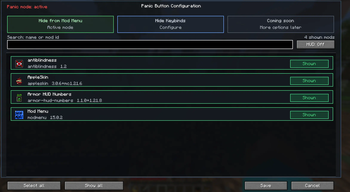
Open the Panic Button configuration and select Hide from Mod Menu.
Click a mod to switch between:
| Status | Meaning | |--------|---------| | 🟢 Shown | The mod stays visible during Panic Mode | | 🔴 Not Shown | The mod disappears during Panic Mode |
Use the search bar to find mods quickly or enable Shown Only to review everything that remains visible.
### 3. Configure Keybind Hiding
Select Hide Keybinds in the Panic Button configuration.
Keybinds are organized into clear categories. Click a keybind to switch between:
| Status | Meaning | |--------|---------| | 🟢 Shown | The keybind stays visible during Panic Mode | | 🔴 Not Shown | The keybind disappears from the Controls menu |
If every keybind inside a category is hidden, the entire category disappears too.
### 4. Activate Panic Mode
- Press the Panic key once to activate Panic Mode
- Selected mods disappear from Mod Menu
- Selected keybinds disappear from the Controls menu
- Press the Panic key three times quickly to deactivate Panic Mode
- All mods, keybinds, and categories become visible again
## 🛠️ Technical Details
Panic Button uses Fabric Mixins to filter UI entries while Panic Mode is active.
### Mod Menu Filtering
A Mixin filters the Mod Menu list before it is displayed. Only mods included in your personal `visibleMods` list remain visible.
### Keybind Filtering
A separate Mixin filters Minecraft's Controls list using your `hiddenKeybinds` configuration.
The keybind filter also performs a second cleanup after the Controls list has been created. This allows Panic Button to remove additional entries inserted by compatible mods such as Multi Key Bindings.
When all keybinds belonging to a category are hidden, its empty category header is removed automatically.
> Nothing is deleted, disabled, unbound, or uninstalled. > Panic Button only hides selected entries from the user interface. All mods and keybinds continue working normally.
### Config File Location
```text .minecraft/config/panic_button.json ```
### Config Structure
```json { "configVersion": 2, "keybinding": "key.keyboard.p", "configKeybinding": "NONE", "panicModeActive": false, "showPanicHudIndicator": true, "visibleMods": [ "fabric-api", "minecraft", "modmenu", "sodium" ], "hiddenKeybinds": [ "key.freecam.toggle", "key.example.action" ] } ```
## 📦 Installation
1. Install (https://fabricmc.net/) 2. Install (https://modrinth.com/mod/fabric-api) 3. Install (https://modrinth.com/mod/modmenu) 4. Place `panic_button.jar` inside your `.minecraft/mods` folder 5. Launch Minecraft 6. Open `Options → Controls → Panic Button` and assign your keys
## 🔧 Compatibility
| Minecraft | Fabric API | Mod Menu | Status | |-----------|------------|----------|--------| | 1. 21.x | ✅ | ✅ | ✅ Supported | | 26. 1.x | ✅ | ✅ | ✅ Supported |
> ⚠️ Mod Menu is required for mod-list hiding and the full configuration integration.
## ⚠️ Fair Use
Respect the rules of every server you play on. If this mod is not permitted, do not use it. Panic Button is intended for harmless trolling and UI customization.
#fabric #utility #
📊 Mod Details
- Game
- Minecraft Mods
- Author
- nika22a
- Version
- 3.1
- Downloads
- 497
- Endorsements
- 5
- Category
- fabric
- Created
- 6/13/2026
- Updated
- 6/28/2026
- Game Versions
- 26.1.2
- Tags
- management, technology
🔧 How to Install Minecraft Mods Mods
Download from Modrinth. Use Prism Launcher or drop into your mods folder.
📖 Full step-by-step install guide for Minecraft Mods →
Visit the official mod page for specific installation instructions for this mod.
🎮 Need cheat codes or console commands? Check ur gaming wiki for Minecraft Mods commands, item IDs, and more.
❓ Frequently Asked Questions
Which Minecraft Mods versions does Simple Panic Button support?
The author lists 26.1.2. Other versions may work but are untested by the author.
What is the latest version of Simple Panic Button?
Version 3.1, published 2026-06-28 with 497 downloads recorded at the source.
Keep browsing — more Minecraft Mods mods await