Shield Statuses
🟡 Updated this year⚠️ Install Order · 2 steps
Install in this order, then this mod last — most mods fail to load without their framework and dependencies in place.
🖼️ Gallery (2 images)
🔍 Analysis
- 👍 0.0% endorsement rate
- 🏆 #36 of 196 equipment mods in this game by downloads
📋 About This Mod
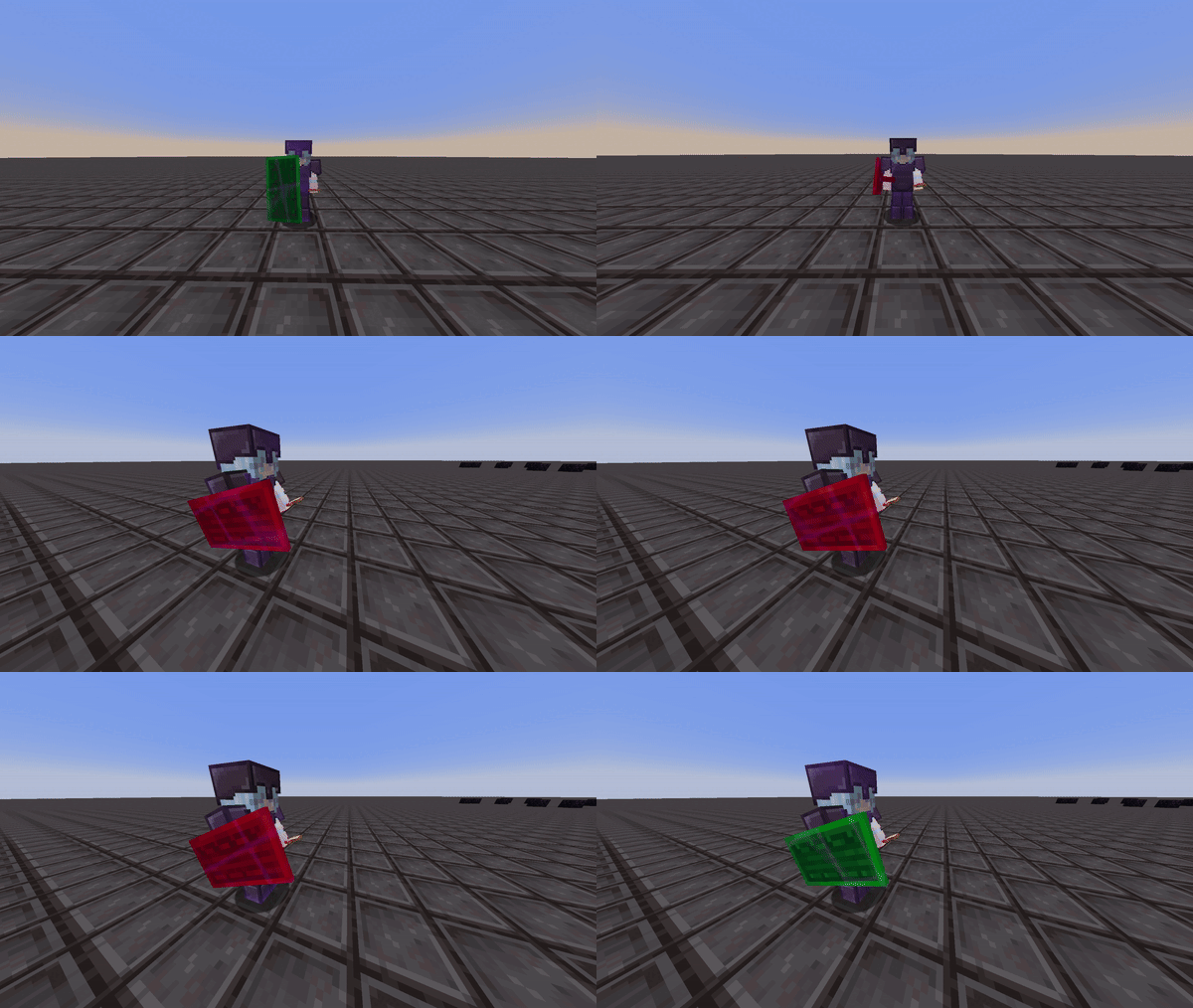
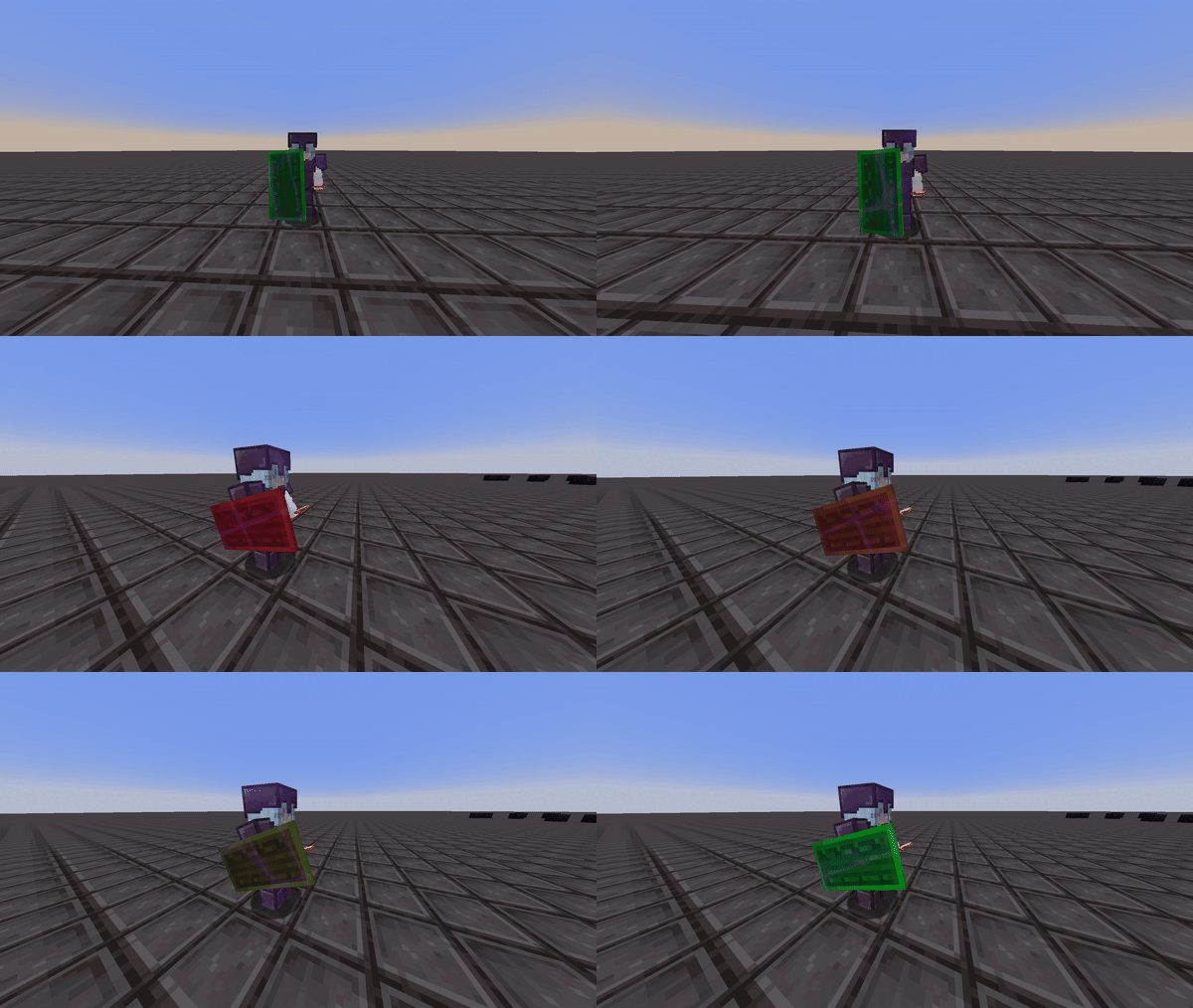
<h1>Shield Statuses!</h1> This mod renders color overlays on player's shields to determine whether that shield is disabled or not. --- ### Information: **Colors** This mod allows you to customize and choose the shield's disabled and enabled color via the mod's config screen. You must have mod menu to access this. **Config** !(https://i.ibb.co/GQbjx5Yp/2025-12-04-14-05-45.png) The interpolation option gives you the choice to set the shield to either display two static colors or to have the disabled color gradually transition to the enabled color. This way, you can estimate when the shield will be reactivated. This can be seen in the two videos below: Interpolation Enabled: !(https://cdn.modrinth.com/data/GfoMZ9Ly/images/cc69cc08e3fb96bb9b7624303893790a11a1f867.gif) Interpolation Disabled: !(https://cdn.modrinth.com/data/GfoMZ9Ly/images/bc17b904cf4562e19bf4480020000c0bfa6a882b.gif) **Compatibility & Improvements** With this version of shield statuses, it ensures to not mess with the actual minecraft textures of the shield itself, but instead renders the colors as an overlay in game to ensure the mod doesn't override custom shield textues from different resource packs. This version of shield statuses fixes a bug from the original mod, where the shield would incorrectly display as disabled (orange state) even after it had been re-enabled. --- **Credits** - Mod: Walksy - Icon: SakuraFX
Shield Statuses!
This mod renders color overlays on player's shields to determine whether that shield is disabled or not.
- --
- ### Information:
- Colors
This mod allows you to customize and choose the shield's disabled and enabled color via the mod's config screen. You must have mod menu to access this.
Config
!(https://i.ibb.co/GQbjx5Yp/2025-12-04-14-05-45.png)
The interpolation option gives you the choice to set the shield to either display two static colors or to have the disabled color gradually transition to the enabled color. This way, you can estimate when the shield will be reactivated. This can be seen in the two videos below:
Interpolation Enabled:
!(https://cdn.modrinth.com/data/GfoMZ9Ly/images/cc69cc08e3fb96bb9b7624303893790a11a1f867.gif)
Interpolation Disabled:
!(https://cdn.modrinth.com/data/GfoMZ9Ly/images/bc17b904cf4562e19bf4480020000c0bfa6a882b.gif)
Compatibility & Improvements
With this version of shield statuses, it ensures to not mess with the actual minecraft textures of the shield itself, but instead renders the colors as an overlay in game to ensure the mod doesn't override custom shield textues from different resource packs.
This version of shield statuses fixes a bug from the original mod, where the shield would incorrectly display as disabled (orange state) even after it had been re-enabled.
- --
- Credits
- Mod: Walksy
- Icon: SakuraFX
📊 Mod Details
- Game
- Minecraft Mods
- Author
- Walksy
- Version
- 4.1.8+26.2
- Downloads
- 3,511,654
- Endorsements
- 530
- Category
- equipment
- Created
- 7/29/2024
- Updated
- 6/26/2026
- Game Versions
- 26.2
- Tags
- equipment, game-mechanics, utility
🔧 How to Install Minecraft Mods Mods
Download from Modrinth. Use Prism Launcher or drop into your mods folder.
📖 Full step-by-step install guide for Minecraft Mods →
Visit the official mod page for specific installation instructions for this mod.
🎮 Need cheat codes or console commands? Check ur gaming wiki for Minecraft Mods commands, item IDs, and more.
❓ Frequently Asked Questions
Which Minecraft Mods versions does Shield Statuses support?
The author lists 26.2. Other versions may work but are untested by the author.
What is the latest version of Shield Statuses?
Version 4.1.8+26.2, published 2026-06-26 with 3.5M downloads recorded at the source.
Keep browsing — more Minecraft Mods mods await