Server Storage
🟠 Updated over a year ago⚠️ Install Order · 2 steps
Install in this order, then this mod last — most mods fail to load without their framework and dependencies in place.
🖼️ Gallery (12 images)
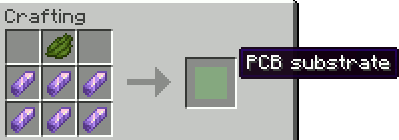
🔍 Analysis
- 👍 0.4% endorsement rate
- 🏆 #119 of 162 cursed mods in this game by downloads
📋 About This Mod
# **THE BEST SOLUTION TO STORAGE** ## Completely server side This mod adds a storage controller that scans the attached storage bus and displays the items. To search, click on the search button and then write the query into the dialog and press escape to close it. _**WARNING**_, every operation reindexes the bus, which is recursive, so large storage systems might lag the server. The title shows available slots/all slots(used slots) If you shift right click it with a written book, it will overwrite the book with the contents of the storage sorted alphabetically. The true item count can be seen in the lore by hovering over that ItemStack. **Blocks**: - _Hard drive container_ - block where you put the drives !(https://cdn.modrinth.com/data/dVYUf2B4/images/10de57e38d1b0a7330e91b7d001abbccfd4a861c.png) !(https://cdn.modrinth.com/data/dVYUf2B4/images/c266747fbf1f8203a543d8f576245bb285d3322e.png) - _Networked inventory interface_ - block that can connect inventories as inputs or outputs to the network !(https://cdn.modrinth.com/data/dVYUf2B4/images/1295e08d4dc8d99bdde251556d126ecac7cb3751.png) !(https://cdn.modrinth.com/data/dVYUf2B4/images/e3a4cbba5a15b055377e813a362cb01b09b043b6.png) - _Networked storage interface_ - block you interact with the most !(https://cdn.modrinth.com/data/dVYUf2B4/images/cbbf95132caad65610d1441e34497a22ebabb016.png) To get something out you can: - Left click it to get a stack - Left click it with shift to get as much as fits into your inventory - Right click it to get half a stack To put something in you can: - Shift click it from your inventory - Use a hopper to insert something - Right click with shift an item in the storage to put all of that item inside - Click on the up arrow to store all items in your inventory !(https://cdn.modrinth.com/data/dVYUf2B4/images/7fc970d9db74d495c4a87c85e618231ea8c3931f.png) !(https://cdn.modrinth.com/data/dVYUf2B4/images/9ecdedbc0476305bce0c8ee423e5d2fe58556135.png) - _Storage network connector_ - block which connects your network together !(https://cdn.modrinth.com/data/dVYUf2B4/images/efd8886f18c143693b190ef4e12c815dc0717c6e.png) ## **Hard drives**: ### **Iron** - _Iron hard drive_ !(https://cdn.modrinth.com/data/dVYUf2B4/images/acc807c2faa35bd68d01ec36a39982dcbe45f4d0.png) - _Iron hard drive platter_ !(https://cdn.modrinth.com/data/dVYUf2B4/images/0acffc74e1ecb12727566c9fea3c2b72601f9074.png) - _Iron hard drive head_ !(https://cdn.modrinth.com/data/dVYUf2B4/images/e069b277dad953c6954af8c583ddd1a4193b6b37.png) - _Hard drive casing_ !(https://cdn.modrinth.com/data/dVYUf2B4/images/2c4e428e2c690631a92c8288d1492bd63f9d82b4.png) - _Drive controller_ !(https://cdn.modrinth.com/data/dVYUf2B4/images/6ad1670ae153a0240649922b7bfa7f5cc71d34e7.png) ### **Golden** - _Golden hard drive_ !(https://cdn.modrinth.com/data/dVYUf2B4/images/ea53da7297c76640708e74b068701f700fcde578.png) - _Golden hard drive platter_ !(https://cdn.modrinth.com/data/dVYUf2B4/images/552150dbcc8a4701afd6906ef3b06def5c4b193f.png) - _Golden hard drive head_ !(https://cdn.modrinth.com/data/dVYUf2B4/images/9a55ef4866a3c2ffa16065b5214e7335dc894b2f.png) - _Hard drive casing_ !(https://cdn.modrinth.com/data/dVYUf2B4/images/2c4e428e2c690631a92c8288d1492bd63f9d82b4.png) - _Drive controller_ !(https://cdn.modrinth.com/data/dVYUf2B4/images/6ad1670ae153a0240649922b7bfa7f5cc71d34e7.png) ### **Diamond** - _Diamond hard drive_ !(https://cdn.modrinth.com/data/dVYUf2B4/images/f1b4ad21cc1a48905db1fa00df72c4e1c84e9d3f.png) - _Diamond hard drive platter_ !(https://cdn.modrinth.com/data/dVYUf2B4/images/8ac1a657177dc246bc411875ec9534479e598940.png) - _Diamond hard drive head_ !(https://cdn.modrinth.com/data/dVYUf2B4/images/4e4b84789f79bf5fff75778b6d05347a4d956574.png) - _Hard drive casing_ !(https://cdn.modrinth.com/data/dVYUf2B4/images/2c4e428e2c690631a92c8288d1492bd63f9d82b4.png) - _Drive controller_ !(https://cdn.modrinth.com/data/dVYUf2B4/images/6ad1670ae153a0240649922b7bfa7f5cc71d34e7.png) ### **Netherite** - _Netherite hard drive_ !(https://cdn.modrinth.com/data/dVYUf2B4/images/5a1544dcc7b5a91ba2a528569184083cb6a47e5f.png) - _Netherite hard drive platter_ !(https://cdn.modrinth.com/data/dVYUf2B4/images/e84f455c710df867de03dc
# THE BEST SOLUTION TO STORAGE ## Completely server side
This mod adds a storage controller that scans the attached storage bus and displays the items.
To search, click on the search button and then write the query into the dialog and press escape to close it.
_WARNING_, every operation reindexes the bus, which is recursive, so large storage systems might lag the server.
The title shows available slots/all slots(used slots)
If you shift right click it with a written book, it will overwrite the book with the contents of the storage sorted alphabetically.
The true item count can be seen in the lore by hovering over that ItemStack.
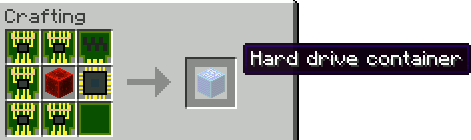
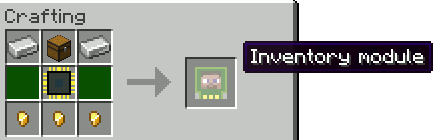
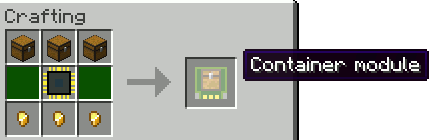
Blocks: - _Hard drive container_ - block where you put the drives
!(https://cdn.modrinth.com/data/dVYUf2B4/images/10de57e38d1b0a7330e91b7d001abbccfd4a861c.png)
!(https://cdn.modrinth.com/data/dVYUf2B4/images/c266747fbf1f8203a543d8f576245bb285d3322e.png)
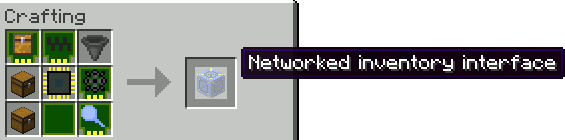
- _Networked inventory interface_ - block that can connect inventories as inputs or outputs to the network
!(https://cdn.modrinth.com/data/dVYUf2B4/images/1295e08d4dc8d99bdde251556d126ecac7cb3751.png)
!(https://cdn.modrinth.com/data/dVYUf2B4/images/e3a4cbba5a15b055377e813a362cb01b09b043b6.png)
- _Networked storage interface_ - block you interact with the most
!(https://cdn.modrinth.com/data/dVYUf2B4/images/cbbf95132caad65610d1441e34497a22ebabb016.png)
To get something out you can: - Left click it to get a stack - Left click it with shift to get as much as fits into your inventory - Right click it to get half a stack
To put something in you can: - Shift click it from your inventory - Use a hopper to insert something - Right click with shift an item in the storage to put all of that item inside - Click on the up arrow to store all items in your inventory
!(https://cdn.modrinth.com/data/dVYUf2B4/images/7fc970d9db74d495c4a87c85e618231ea8c3931f.png)
!(https://cdn.modrinth.com/data/dVYUf2B4/images/9ecdedbc0476305bce0c8ee423e5d2fe58556135.png)
- _Storage network connector_ - block which connects your network together
!(https://cdn.modrinth.com/data/dVYUf2B4/images/efd8886f18c143693b190ef4e12c815dc0717c6e.png)
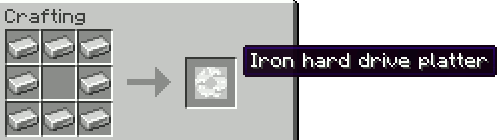
## Hard drives: ### Iron - _Iron hard drive_
!(https://cdn.modrinth.com/data/dVYUf2B4/images/acc807c2faa35bd68d01ec36a39982dcbe45f4d0.png) - _Iron hard drive platter_
!(https://cdn.modrinth.com/data/dVYUf2B4/images/0acffc74e1ecb12727566c9fea3c2b72601f9074.png) - _Iron hard drive head_
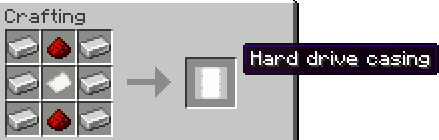
!(https://cdn.modrinth.com/data/dVYUf2B4/images/e069b277dad953c6954af8c583ddd1a4193b6b37.png) - _Hard drive casing_
!(https://cdn.modrinth.com/data/dVYUf2B4/images/2c4e428e2c690631a92c8288d1492bd63f9d82b4.png) - _Drive controller_
!(https://cdn.modrinth.com/data/dVYUf2B4/images/6ad1670ae153a0240649922b7bfa7f5cc71d34e7.png)
### Golden - _Golden hard drive_
!(https://cdn.modrinth.com/data/dVYUf2B4/images/ea53da7297c76640708e74b068701f700fcde578.png) - _Golden hard drive platter_
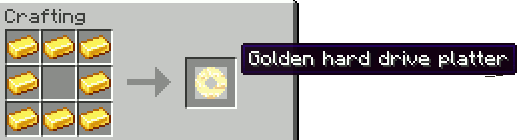
!(https://cdn.modrinth.com/data/dVYUf2B4/images/552150dbcc8a4701afd6906ef3b06def5c4b193f.png) - _Golden hard drive head_
!(https://cdn.modrinth.com/data/dVYUf2B4/images/9a55ef4866a3c2ffa16065b5214e7335dc894b2f.png) - _Hard drive casing_
!(https://cdn.modrinth.com/data/dVYUf2B4/images/2c4e428e2c690631a92c8288d1492bd63f9d82b4.png) - _Drive controller_
!(https://cdn.modrinth.com/data/dVYUf2B4/images/6ad1670ae153a0240649922b7bfa7f5cc71d34e7.png)
### Diamond - _Diamond hard drive_
!(https://cdn.modrinth.com/data/dVYUf2B4/images/f1b4ad21cc1a48905db1fa00df72c4e1c84e9d3f.png) - _Diamond hard drive platter_
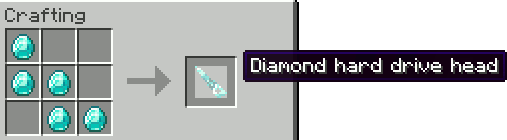
!(https://cdn.modrinth.com/data/dVYUf2B4/images/8ac1a657177dc246bc411875ec9534479e598940.png) - _Diamond hard drive head_
!(https://cdn.modrinth.com/data/dVYUf2B4/images/4e4b84789f79bf5fff75778b6d05347a4d956574.png) - _Hard drive casing_
!(https://cdn.modrinth.com/data/dVYUf2B4/images/2c4e428e2c690631a92c8288d1492bd63f9d82b4.png) - _Drive controller_
!(https://cdn.modrinth.com/data/dVYUf2B4/images/6ad1670ae153a0240649922b7bfa7f5cc71d34e7.png)
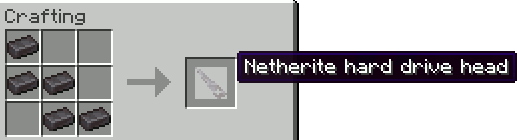
### Netherite - _Netherite hard drive_
!(https://cdn.modrinth.com/data/dVYUf2B4/images/5a1544dcc7b5a91ba2a528569184083cb6a47e5f.png) - _Netherite hard drive platter_
!(https://cdn.modrinth.com/data/dVYUf2B4/images/e84f455c710df867de03dc
📊 Mod Details
- Game
- Minecraft Mods
- Author
- BRNSystems
- Version
- 3.3.7
- Downloads
- 6,653
- Endorsements
- 26
- Category
- cursed
- Created
- 5/26/2024
- Updated
- 7/20/2025
- Game Versions
- 1.21.8
- Tags
- cursed, storage, technology
🔧 How to Install Minecraft Mods Mods
Download from Modrinth. Use Prism Launcher or drop into your mods folder.
📖 Full step-by-step install guide for Minecraft Mods →
Visit the official mod page for specific installation instructions for this mod.
🎮 Need cheat codes or console commands? Check ur gaming wiki for Minecraft Mods commands, item IDs, and more.
❓ Frequently Asked Questions
Which Minecraft Mods versions does Server Storage support?
The author lists 1.21.8. Other versions may work but are untested by the author.
What is the latest version of Server Storage?
Version 3.3.7, published 2025-07-20 with 6,653 downloads recorded at the source.
Keep browsing — more Minecraft Mods mods await