scarpet-webserver
🟡 Updated this year⚠️ Install Order · 2 steps
Install in this order, then this mod last — most mods fail to load without their framework and dependencies in place.
🖼️ Gallery (1 images)
🔍 Analysis
- 👍 0.5% endorsement rate
- 🏆 #7 of 885 fabric mods in this game by downloads
📋 About This Mod
# scarpet-webserver (https://fabricmc.net/) (https://github.com/replaceitem) (https://modrinth.com/mod/scarpet-webserver) (https://discord.gg/etTDQAVSgt) ## A (https://modrinth.com/mod/carpet) extension for running webservers with scarpet **Requires (https://modrinth.com/mod/carpet)** *Warning: Only use this mod with scripts you trust or made yourself. Use this at your own risk.* This project uses and includes (https://eclipse.dev/jetty/) in builds for the webserver ((https://github.com/jetty/jetty.project/blob/jetty-12.0.x/LICENSE)) ## Usage To use a webserver in scarpet, it has to be defined in the `scarpet-webserver.json` config file first. When the mod first loads, it creates a sample config, where you can define multiple webservers. Each one has a unique `id` and a `port`. An example config could look like this: ```json { "webservers": } ``` This server can then be used in a script. ### Example syntax You can take a look at the full working example with the html files (https://github.com/replaceitem/scarpet-webserver/tree/master/examples). The example also contains more routes and a simple templating mechanism. ```js // Initialize the webserver with id 'test' (Defined in the config) ws = ws_init('test'); // Handle the root path (Callback given as a function name) ws_add_route(ws, 'get', '/', 'on_root'); // Changing content type for an api ws_add_route(ws, 'get', '/api/players', _(request, response) -> ( ws_response_set_content_type(response, 'application/json'); encode_json({'players'->player('all')}); )); // Example for redirecting /redirect to / ws_add_route(ws, 'get', '/redirect', _(request, response) -> ( ws_response_set_status(response, 301); ws_response_add_header(response, 'Location', '/'); '' )); // Using route patterns to make a player parameter in the url ws_add_route(ws, 'get', '/api/getplayerdata/{player}', _(request, response) -> ( playername = request~'pathParams':'player'; p = player(playername); ws_response_set_content_type(response, 'application/json'); if(p == null, ws_response_set_status(response, 400); return(encode_json({'error'->'Invalid player'})); ); return(encode_json(parse_nbt(p~'nbt'))); )); // Returns the request data directly for testing/debugging ws_add_route(ws, 'get', '/requestdump', _(request, response) -> ( ws_response_set_content_type(response, 'application/json'); request_data = {}; for(global_request_fields, request_data:_ = request~_); return(encode_json(request_data)); )); // Custom 404 page ws_not_found(ws, _(request, response) -> global_404_page); ``` ### Route callback The callback function for routes should have this signature: ```js _(request, response) -> ( // do stuff return('html body...') ) ``` The `request` parameter provides a (#request) of all the request details. You can also use the (#example-syntax) for testing, which has a `/requestdump` route that sends all the request data as json back. The `response` is a (#response). The value returned by the function will be the response body (in most cases the html page) to be sent. ### Values This mod adds two new value types: #### `webserver` This is a handle to the running webserver, which use to create routes. This can be retrieved using (#ws_initid). #### `request` This value is provided in route callbacks, and is used to retrieve various request data. Note that retrieving values from this value needs to be done using the `~` query operator, but some of those values are maps, which are accessed using `:`. You can run the example script and send a request to `/requestdump` to get all request data returned for testing. ##### `request~'headers'` Returns a map with string keys (header names) and string values. If a header has multiple values, it is a list of strings. For example, the `Referer` header can be accessed with `request~'headers':'Referer'` Example header map: ```js { 'Accept'-> , 'Connection' -> 'keep-alive', 'User-Agent' -> 'Mozilla/5.0 (Windows NT 10.0;Win64;x64;rv:138.0) Gecko/20100101 Fi
# scarpet-webserver
[ ](https://fabricmc.net/)
[
](https://fabricmc.net/)
[ ](https://github.com/replaceitem)
[
](https://github.com/replaceitem)
[ ](https://modrinth.com/mod/scarpet-webserver)
[
](https://modrinth.com/mod/scarpet-webserver)
[ ](https://discord.gg/etTDQAVSgt)
## A (https://modrinth.com/mod/carpet) extension for running webservers with scarpet
*Requires (https://modrinth.com/mod/carpet)**
This project uses and includes (https://eclipse.dev/jetty/) in builds for the webserver ((https://github.com/jetty/jetty.project/blob/jetty-12. 0.x/LICENSE))
To use a webserver in scarpet, it has to be defined in the `scarpet-webserver.json` config file first. When the mod first loads, it creates a sample config, where you can define multiple webservers. Each one has a unique `id` and a `port`. An example config could look like this:
```json { "webservers": [ { "id": "myserver", "port": 80 } ] } ```
This server can then be used in a script.
### Example syntax
You can take a look at the full working example with the html files (https://github.com/replaceitem/scarpet-webserver/tree/master/examples). The example also contains more routes and a simple templating mechanism.
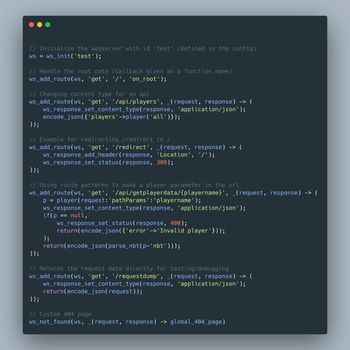
```js // Initialize the webserver with id 'test' (Defined in the config) ws = ws_init('test');
// Handle the root path (Callback given as a function name) ws_add_route(ws, 'get', '/', 'on_root');
// Changing content type for an api ws_add_route(ws, 'get', '/api/players', _(request, response) -> ( ws_response_set_content_type(response, 'application/json'); encode_json({'players'->player('all')}); ));
// Example for redirecting /redirect to / ws_add_route(ws, 'get', '/redirect', _(request, response) -> ( ws_response_set_status(response, 301); ws_response_add_header(response, 'Location', '/'); '' ));
// Using route patterns to make a player parameter in the url ws_add_route(ws, 'get', '/api/getplayerdata/{player}', _(request, response) -> ( playername = request~'pathParams':'player'; p = player(playername); ws_response_set_content_type(response, 'application/json'); if(p == null, ws_response_set_status(response, 400); return(encode_json({'error'->'Invalid player'})); ); return(encode_json(parse_nbt(p~'nbt'))); ));
// Returns the request data directly for testing/debugging ws_add_route(ws, 'get', '/requestdump', _(request, response) -> ( ws_response_set_content_type(response, 'application/json'); request_data = {}; for(global_request_fields, request_data:_ = request~_); return(encode_json(request_data)); ));
// Custom 404 page ws_not_found(ws, _(request, response) -> global_404_page); ```
### Route callback
The callback function for routes should have this signature:
```js _(request, response) -> ( // do stuff return('html body...') ) ```
The `request` parameter provides a (#request) of all the request details. You can also use the (#example-syntax) for testing, which has a `/requestdump` route that sends all the request data as json back.
The `response` is a (#response).
The value returned by the function will be the response body (in most cases the html page) to be sent.
This mod adds two new value types:
#### `webserver`
This is a handle to the running webserver, which use to create routes. This can be retrieved using [`ws_init(id)`](#ws_initid).
#### `request`
This value is provided in route callbacks, and is used to retrieve various request data. Note that retrieving values from this value needs to be done using the `~` query operator, but some of those values are maps, which are accessed using `:`. You can run the example script and send a request to `/requestdump` to get all request data returned for testing.
##### `request~'headers'`
Returns a map with string keys (header names) and string values. If a header has multiple values, it is a list of strings.
For example, the `Referer` header can be accessed with `request~'headers':'Referer'`
Example header map:
```js { 'Accept'-> [ 'text/html', 'application/xhtml+xml', 'application/xml;q=0. 9', '/*;q=0. 8' ], 'Connection' -> 'keep-alive', 'User-Agent' -> 'Mozilla/5. 0 (Windows NT 10. 0;Win64;x64;rv:138. 0) Gecko/20100101 Fi
📊 Mod Details
- Game
- Minecraft Mods
- Author
- replaceitem
- Version
- 0.2.1
- Downloads
- 1,214
- Endorsements
- 6
- Category
- fabric
- Created
- 1/28/2024
- Updated
- 6/16/2026
- Game Versions
- 26.1, 26.1.1-rc-1, 26.1.1, 26w14a, 26.2-snapshot-1
- Tags
- library, management
🔧 How to Install Minecraft Mods Mods
Download from Modrinth. Use Prism Launcher or drop into your mods folder.
📖 Full step-by-step install guide for Minecraft Mods →
Visit the official mod page for specific installation instructions for this mod.
🎮 Need cheat codes or console commands? Check ur gaming wiki for Minecraft Mods commands, item IDs, and more.
❓ Frequently Asked Questions
Which Minecraft Mods versions does scarpet-webserver support?
The author lists 26.1, 26.1.1-rc-1, 26.1.1, 26w14a, 26.2-snapshot-1, 26.1.2-rc-1. Other versions may work but are untested by the author.
What is the latest version of scarpet-webserver?
Version 0.2.1, published 2026-06-16 with 1,214 downloads recorded at the source.
Keep browsing — more Minecraft Mods mods await