SearchWorldEnhance
🟠 Updated over a year ago⚠️ Install Order · 2 steps
Install in this order, then this mod last — most mods fail to load without their framework and dependencies in place.
Preview
🔍 Analysis
- 👍 0.2% endorsement rate
- 🏆 #7 of 7 legacy-fabric mods in this game by downloads
📋 About This Mod
# Mod Synopsis This is a lightweight mod run on client-side, which brings a “Search World” box to world selection screens(prior MC 1.13) and enhance the searching behaviour by using key-value pair arguments. # How to Use This Mod This mod adds a “Search World” box to the world select screen(prior MC 1.13), and the searching behaviour is now like this: `worlddirname-=foo` - Search for worlds whose directory names contain `foo`, case-sensitive `worldname/="^New World$"` - Search for worlds whose names exactly are `New World`, case-insensitive `gamemode=S,commands=true` - Search for worlds whose default game modes are Survival and commands are enabled # Format of Arguments Each two key-value pairs are separated by `,`(which means `&&`(`and`), and trailing `,` is allowed once). In contrast, a key-value pair is like this: `<key_name><relationship_symbol><value>`. For regex keys, available relationship symbols are: * `=` - left contains right, case-insensitive * `!=` - left does not contain right, case-insensitive * `-=` - left contains right, case-sensitive * `!-=` - left does not contain right, case-sensitive * `/=` - left matches right, case-insensitive * `!/=` - left does not match right, case-insensitive * `/-=` - left matches right, case-sensitive * `!/-=` - left does not match right, case-sensitive Values are strings like this: * `foo` - resolved as `foo` * `"Foo Bar"` - resolved as `Foo Bar` * `"One says \"\\s are useful\""` - resolved as `One says "\s are useful"` For long keys, available relationship symbols are: * `=` and `==` - left equals right * `<` - left is less than right * `<=` - left is less than or equal to right * `>` - left is greater than right * `>=` - left is greater than or equal to right * `!=` - left does not equal right Values are long integers like this: * `0` * `1234567` * `-98765432109999` For enum keys, available relationship symbols are: * `=` - left is right * `!=` - left is not right Values are all enums defined by the enum class and `null`. For boolean keys, there is only one available relationship symbol `=`(means left is right). Values are like this: * `true`, `t`, `yes`, `y`, `1` - for true * `false`, `f`, `no`, `n`, `0` - for false If the format of arguments is valid, expected search result will be shown. Note that results of original search behaviour will be shown together, e.g. if there is a world named `gamemode=C` whose default gamemode is Survival, when you type `gamemode=C` in the box, this world will still be shown as a part of the result. If you want to avoid this, you can type `worldname!="gamemode=C",gamemode=C` in the box. # All Key-value Pair Parameters Added by This Mod `worldname`(Regex) - Match world names `worlddirname`(Regex) - Match world directory names `lastplayed`(Long) - Match last played time `gamemode`(Enum made up by `S`, `C`, `A`, `SP`) - Match default game modes `commands`(Boolean) - Match commands enabling statuses `hardcore`(Boolean) - Match whether the worlds are hardcore # I Want to Add My Key-value Pair Parameters! There is a class `rege.rege.minecraftmod.searchworldenhance.util.SearchKeyRegistry` in this mod, you should register yours using this class's static methods. All valid keys are non-empty strings without `-`, ` `, `=`, `!`, `>`, `<`, `,`, `/`, `"`, `\`. An example is in the `static` block of `rege.rege.minecraftmod.searchworldenhance.SearchWorldEnhanceMain`'s source code.
# Mod Synopsis
This is a lightweight mod run on client-side, which brings a “Search World” box to world selection screens(prior MC 1. 13) and enhance the searching behaviour by using key-value pair arguments.
# How to Use This Mod
This mod adds a “Search World” box to the world select screen(prior MC 1. 13), and the searching behaviour is now like this:
`worlddirname-=foo` - Search for worlds whose directory names contain `foo`, case-sensitive
`worldname/="^New World$"` - Search for worlds whose names exactly are `New World`, case-insensitive
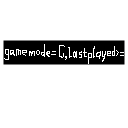
`gamemode=S,commands=true` - Search for worlds whose default game modes are Survival and commands are enabled
# Format of Arguments
Each two key-value pairs are separated by `,`(which means `&&`(`and`), and trailing `,` is allowed once). In contrast, a key-value pair is like this: `
Values are strings like this: `foo` - resolved as `foo` `"Foo Bar"` - resolved as `Foo Bar` `"One says \"\\s are useful\""` - resolved as `One says "\s are useful"`
For long keys, available relationship symbols are: `=` and `==` - left equals right `<` - left is less than right `<=` - left is less than or equal to right `>` - left is greater than right `>=` - left is greater than or equal to right `!=` - left does not equal right
Values are long integers like this: `0` `1234567` `-98765432109999`
For enum keys, available relationship symbols are: `=` - left is right `!=` - left is not right
Values are all enums defined by the enum class and `null`.
For boolean keys, there is only one available relationship symbol `=`(means left is right).
Values are like this: `true`, `t`, `yes`, `y`, `1` - for true `false`, `f`, `no`, `n`, `0` - for false
If the format of arguments is valid, expected search result will be shown. Note that results of original search behaviour will be shown together, e.g. if there is a world named `gamemode=C` whose default gamemode is Survival, when you type `gamemode=C` in the box, this world will still be shown as a part of the result. If you want to avoid this, you can type `worldname!="gamemode=C",gamemode=C` in the box. # All Key-value Pair Parameters Added by This Mod `worldname`(Regex) - Match world names `worlddirname`(Regex) - Match world directory names `lastplayed`(Long) - Match last played time `gamemode`(Enum made up by `S`, `C`, `A`, `SP`) - Match default game modes `commands`(Boolean) - Match commands enabling statuses `hardcore`(Boolean) - Match whether the worlds are hardcore # I Want to Add My Key-value Pair Parameters! There is a class `rege.rege.minecraftmod.searchworldenhance.util. SearchKeyRegistry` in this mod, you should register yours using this class's static methods. All valid keys are non-empty strings without `-`, ` `, `=`, `!`, `>`, `<`, `,`, `/`, `"`, `\`. An example is in the `static` block of `rege.rege.minecraftmod.searchworldenhance. SearchWorldEnhanceMain`'s source code.
📊 Mod Details
- Game
- Minecraft Mods
- Author
- IAmREGE
- Version
- 0.0.1
- Downloads
- 964
- Endorsements
- 2
- Category
- legacy-fabric
- Created
- 1/18/2025
- Updated
- 1/23/2025
- Game Versions
- 1.7.10
- Tags
- library, management, utility
🔧 How to Install Minecraft Mods Mods
Download from Modrinth. Use Prism Launcher or drop into your mods folder.
📖 Full step-by-step install guide for Minecraft Mods →
Visit the official mod page for specific installation instructions for this mod.
🎮 Need cheat codes or console commands? Check ur gaming wiki for Minecraft Mods commands, item IDs, and more.
❓ Frequently Asked Questions
Which Minecraft Mods versions does SearchWorldEnhance support?
The author lists 1.7.10. Other versions may work but are untested by the author.
What is the latest version of SearchWorldEnhance?
Version 0.0.1, published 2025-01-23 with 964 downloads recorded at the source.
Keep browsing — more Minecraft Mods mods await