ResourcesTrees
🟡 Updated this year⚠️ Install Order · 2 steps
Install in this order, then this mod last — most mods fail to load without their framework and dependencies in place.
🖼️ Gallery (3 images)
🔍 Analysis
- 👍 0.1% endorsement rate
- 🏆 #17 of 21 economy mods in this game by downloads
📋 About This Mod
# 🌳 ResourcesTrees **Grow your resources — no mining required.** ResourcesTrees adds resource-producing trees to Minecraft. Plant specialized saplings, tend your farm, and harvest valuable materials — from iron and diamonds to mob drops, essences, and more. Every combination of a **resource type** and a **tree shape** generates its own unique sapling, leaves, and leaf fragments. ## ⚡ Features - 🌱 **47+ Resource Types** — Iron, diamond, netherite, coal, gold, sculk, mob essences, dyes, and many more. - 🌲 **8 Tree Shapes** — Oak, Spruce, Birch, Jungle, Acacia, Dark Oak, Cherry, and Pale Oak. Each resource type grows as every tree shape. - 🛠 **Fully Config-Driven** — Add your own custom resource types and tree types by dropping JSON files into the config folder. No datapacks or coding required. - 🪓 **Tree Simulator** — Automate resource production without planting trees in the world. Insert a sapling and an axe, and let it run. - 🧩 **Plugin API** — Mod developers can register custom resource types and tree types in code via the `IResourcesTreesPlugin` interface. - 🌍 **Seamless Integration** — Works in vanilla survival, modpacks, and skyblock-style worlds. ## 📖 How It Works 1. **Craft a resource sapling** — surround a vanilla sapling with the resource material in a `+` pattern at a crafting table. 2. **Plant it** on grass or dirt, just like a normal sapling. 3. **Let it grow** — it uses the vanilla tree structure for its tree type. 4. **Break the leaves** to collect **Leaf Fragments** and occasionally a new sapling. 5. **Craft leaf fragments** back into raw resources using shaped recipes. 6. **(Optional) Use the Tree Simulator** to automate the whole process with no trees needed. ## 🪓 Tree Simulator The **Tree Simulator** block automates resource production. Place a resource sapling in the input slot and an axe in the axe slot — it will produce resources on a timer. The axe type determines the speed multiplier: | Axe | Speed Multiplier | |---|---| | Wooden | 1× | | Stone | 2× | | Iron | 3× | | Diamond | 4× | | Netherite | 5× | | Golden | 6× | Axe speed values are fully configurable in `config/resourcestrees/axe.json`. ## 🧩 For Modpack Makers — Custom Types Drop JSON files into your config folder to register new resource types or tree types — no code required. **`config/resourcestrees/resources_type/ruby.json`** ```json { "name": "ruby", "material": "minecraft:redstone", "color": -3342336, "saplingDropChance": 0.1, "leafDropChance": 0.2, "treeSimulatorTicks": 1400 } ``` **`config/resourcestrees/tree_type/oak.json`** ```json { "name": "oak", "treeGrowerName": "oak", "saplingTexture": "minecraft:block/oak_sapling", "leavesTexture": "minecraft:block/oak_leaves", "originalSapling": "minecraft:oak_sapling", "originalLeaves": "minecraft:oak_leaves", "log": "minecraft:oak_log" } ``` ## 🔧 For Mod Developers — Plugin API Implement `IResourcesTreesPlugin` and register it via `ServiceLoader` to add resource types and tree types in code. ```java public class MyPlugin implements IResourcesTreesPlugin { @Override public void registerResourcesType(IResourcesTypeRegistry registry) { registry.register(new ResourcesType.Builder("ruby", Items.REDSTONE, 0xFFCC0000) .saplingDropChance(0.1f) .leafDropChance(0.2f) .treeSimulatorTicks(1400)); } } ``` > ⚠️ The Plugin API is experimental. Use config files for stability. ## 🔗 Links - 📚 **Wiki:** (https://resourcestrees.coolerpromc.com/) - 🐛 **Issues & Suggestions:** (https://github.com/CoolerProYT/Resources-Trees/issues) - 💻 **Source Code:** (https://github.com/CoolerProYT/Resources-Trees) - 💬 **Community & Support:** (https://discord.gg/hvFfqsqQm8)
# 🌳 ResourcesTrees
Grow your resources — no mining required.
ResourcesTrees adds resource-producing trees to Minecraft. Plant specialized saplings, tend your farm, and harvest valuable materials — from iron and diamonds to mob drops, essences, and more. Every combination of a resource type and a tree shape generates its own unique sapling, leaves, and leaf fragments.
## ⚡ Features
- 🌱 47+ Resource Types — Iron, diamond, netherite, coal, gold, sculk, mob essences, dyes, and many more.
- 🌲 8 Tree Shapes — Oak, Spruce, Birch, Jungle, Acacia, Dark Oak, Cherry, and Pale Oak. Each resource type grows as every tree shape.
- 🛠 Fully Config-Driven — Add your own custom resource types and tree types by dropping JSON files into the config folder. No datapacks or coding required.
- 🪓 Tree Simulator — Automate resource production without planting trees in the world. Insert a sapling and an axe, and let it run.
- 🧩 Plugin API — Mod developers can register custom resource types and tree types in code via the `IResourcesTreesPlugin` interface.
- 🌍 Seamless Integration — Works in vanilla survival, modpacks, and skyblock-style worlds.
## 📖 How It Works
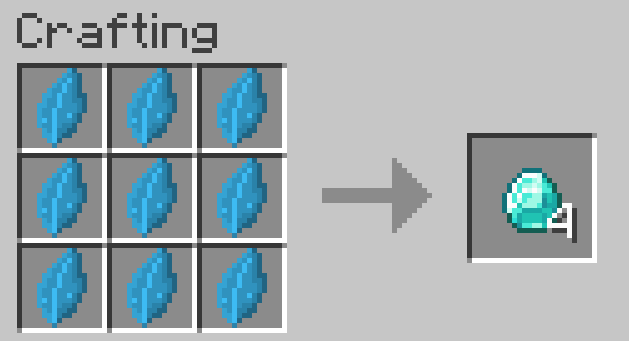
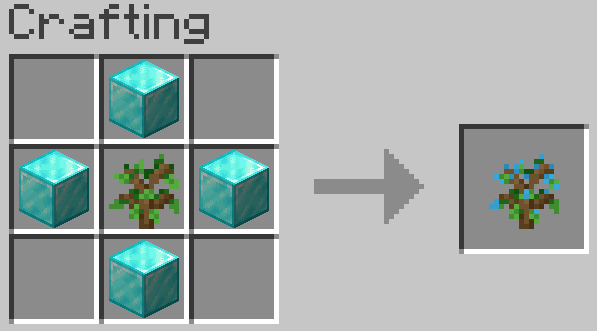
1. Craft a resource sapling — surround a vanilla sapling with the resource material in a `+` pattern at a crafting table. 2. Plant it on grass or dirt, just like a normal sapling. 3. Let it grow — it uses the vanilla tree structure for its tree type. 4. Break the leaves to collect Leaf Fragments and occasionally a new sapling. 5. Craft leaf fragments back into raw resources using shaped recipes. 6. (Optional) Use the Tree Simulator to automate the whole process with no trees needed.
## 🪓 Tree Simulator
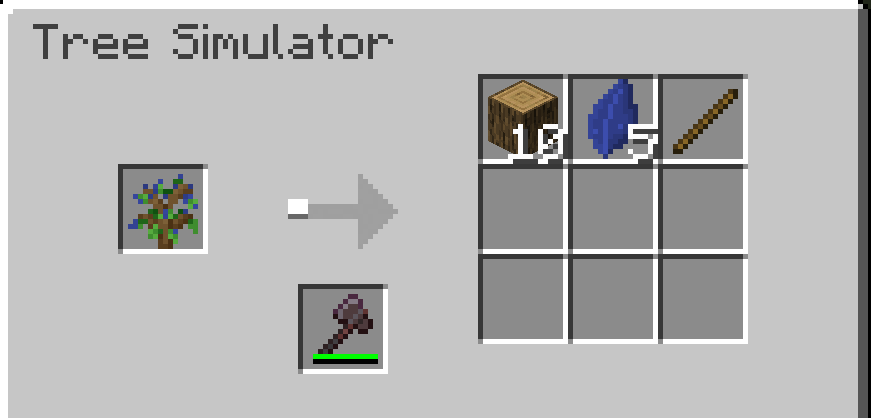
The Tree Simulator block automates resource production. Place a resource sapling in the input slot and an axe in the axe slot — it will produce resources on a timer. The axe type determines the speed multiplier:
| Axe | Speed Multiplier | |---|---| | Wooden | 1× | | Stone | 2× | | Iron | 3× | | Diamond | 4× | | Netherite | 5× | | Golden | 6× |
Axe speed values are fully configurable in `config/resourcestrees/axe.json`.
## 🧩 For Modpack Makers — Custom Types
Drop JSON files into your config folder to register new resource types or tree types — no code required.
`config/resourcestrees/resources_type/ruby.json` ```json { "name": "ruby", "material": "minecraft:redstone", "color": -3342336, "saplingDropChance": 0. 1, "leafDropChance": 0. 2, "treeSimulatorTicks": 1400 } ```
`config/resourcestrees/tree_type/oak.json` ```json { "name": "oak", "treeGrowerName": "oak", "saplingTexture": "minecraft:block/oak_sapling", "leavesTexture": "minecraft:block/oak_leaves", "originalSapling": "minecraft:oak_sapling", "originalLeaves": "minecraft:oak_leaves", "log": "minecraft:oak_log" } ```
## 🔧 For Mod Developers — Plugin API
Implement `IResourcesTreesPlugin` and register it via `ServiceLoader` to add resource types and tree types in code.
```java public class MyPlugin implements IResourcesTreesPlugin { @Override public void registerResourcesType(IResourcesTypeRegistry registry) { registry.register(new ResourcesType. Builder("ruby", Items. REDSTONE, 0xFFCC0000) .saplingDropChance(0. 1f) .leafDropChance(0. 2f) .treeSimulatorTicks(1400)); } } ```
> ⚠️ The Plugin API is experimental. Use config files for stability.
## 🔗 Links
- 📚 Wiki: (https://resourcestrees.coolerpromc.com/)
- 🐛 Issues & Suggestions: (https://github.com/CoolerProYT/Resources-Trees/issues)
- 💻 Source Code: (https://github.com/CoolerProYT/Resources-Trees)
- 💬 Community & Support: (https://discord.gg/hvFfqsqQm8)
📊 Mod Details
- Game
- Minecraft Mods
- Author
- CoolerProYT
- Version
- 26.2.0.1
- Downloads
- 21,512
- Endorsements
- 16
- Category
- economy
- Created
- 9/28/2025
- Updated
- 7/9/2026
- Game Versions
- 26.2
- Tags
- economy, game-mechanics
🔧 How to Install Minecraft Mods Mods
Download from Modrinth. Use Prism Launcher or drop into your mods folder.
📖 Full step-by-step install guide for Minecraft Mods →
Visit the official mod page for specific installation instructions for this mod.
🎮 Need cheat codes or console commands? Check ur gaming wiki for Minecraft Mods commands, item IDs, and more.
❓ Frequently Asked Questions
Which Minecraft Mods versions does ResourcesTrees support?
The author lists 26.2. Other versions may work but are untested by the author.
What is the latest version of ResourcesTrees?
Version 26.2.0.1, published 2026-07-09 with 21,512 downloads recorded at the source.
Keep browsing — more Minecraft Mods mods await