Redstone Essentials
🟠 Updated over a year ago⚠️ Install Order · 2 steps
Install in this order, then this mod last — most mods fail to load without their framework and dependencies in place.
🖼️ Gallery (5 images)

🔍 Analysis
- 👍 0.5% endorsement rate
- 🏆 #15 of 874 fabric mods in this game by downloads
📋 About This Mod
(https://i.imgur.com/LR7NbVd.png)](https://bit.ly/3FodDXy) # Mod information Redstone Essentials is a server and client-side mod that adds a lot of quality of life features, enhancements, and debugging features to the game. All features are made to fully work in multiplayer!!! ## Why does this mod exist? I reeaaaaallly love the mod _Redstone Tools_ by _Mattbatwings_. (Seriously, its amazing check it out (https://modrinth.com/mod/redstone-tools)) There were however a few issues i had with the mod, which i will list here: - As of now it does not support multiplayer - It is centered around worldedit, whereas i prefer axiom - I wanted some more debugging features So i decided to make my own redstone utility mod, which has: - Full multiplayer support - Adds features to axiom (WIP) - Has a lot of features used for debugging redstone (WIP) ## Here are some of the most significant features as of version 1.0.6 ### Dust Place This works by pressing a keybind to toggle the ability. When the ability is toggled on, placing any full block will place a redstone dust on top, as shown below. <details> <summary>Dust Place Demonstration</summary> !(https://i.giphy.com/media/v1.Y2lkPTc5MGI3NjExMHR3NzZxd29hZXl3dWRmdXpkOTluZmg3ajRvdjlyYTF3YTBnMnczdCZlcD12MV9pbnRlcm5hbF9naWZfYnlfaWQmY3Q9Zw/qR1VlFbOc0uqyhkHrU/giphy.gif) </details> ### Swap Block This is another ability that works by swapping the block in your hand with another. The default mode is concrete mode, so if you are holding white concrete and press the keybind, it will swap to white stained glass. Pressing the keybind again will swap it back to white concrete. When wool mode is enabled, having white concrete will swap to white stained glass, and then when pressing the keybind again, it will swap to white wool. Now it will swap between wool and glass when pressing the keybind. This behaviour is demonstrated below. <details> <summary>Swap Block Demonstration</summary> !(https://i.giphy.com/media/v1.Y2lkPTc5MGI3NjExZzRydDRnbnFzNDBvNDJpdTNmdTM0Y2dicGVudnNuZTZzNDhpOWw4MiZlcD12MV9pbnRlcm5hbF9naWZfYnlfaWQmY3Q9Zw/AuoYOeXRfMgGlZc2ix/giphy.gif) </details> ### Dynamic keys This feature allows you to add custom keybinds to the game that allow you to run commands with modifiers like run intervals and much more. The full documentation for this can be found on the (https://github.com/JTechGaming/Redstone-Essentials/wiki/Dynamic-Keybinds). ### Pings The ping system allows you to highlight blocks with a keybind, and give different ping colors to different players. This can be useful for keeping track of certain areas, or drawing attention to certain blocks. Pings render beyond render distance, so it can also be used for locating builds you previously highlighted. Pings do not render through blocks. The documentation for the ping system can be found on its (https://github.com/JTechGaming/Redstone-Essentials/wiki/Pings). The ping system is demonstrated below. <details> <summary>Ping System Demo</summary> !(https://i.giphy.com/media/v1.Y2lkPTc5MGI3NjExZDh4NmVmdnZib295MWF3djE0MTh0YTUwbzQzZnJoaTV2ZXh0MTd4dyZlcD12MV9pbnRlcm5hbF9naWZfYnlfaWQmY3Q9Zw/iwzHlkaurWPQGm8fDn/giphy-downsized-large.gif) </details> ### Realtime Byte Output Realtime byte output, or RTBO for short allows you to make a selection with a label, which will read a binary value from that area and display it on your hud as seen in the demonstration below. This is really usefull for debugging multiple binary inputs and outputs, especially in compact builds. You can also configure the output base for the display. The full RTBO documentation van be found (https://github.com/JTechGaming/Redstone-Essentials/wiki/Realtime-Byte-Output). <details> <summary>Realtime Byte Output</summary> !(https://i.giphy.com/media/v1.Y2lkPTc5MGI3NjExanBrNDAxbWd6ZHM1cGhjdW5yeWdxcXUxY243MXZwZG5hdjNqaHM5eCZlcD12MV9pbnRlcm5hbF9naWZfYnlfaWQmY3Q9Zw/C6vBEZTSDgW9IkV6Xw/giphy-downsized-large.gif) </details> ### Bitmap Printer This feature has a niche usecase, but can be adapted for other uses as well. It supports printing out bitmap images as x and y coordinates, and is intended for use on screens with frame buffers. This could also be usefull for encoding binary values on the x, and their adresses on the y to quickly write to a ram for example. This feature is really complex and is better explained on the (https://github.com/JTechGaming/Redstone-Essentials/wiki/Bitmap-Printer). ### Singal Strength Giver This is another ability with two keybinds that allows you to get a barrel or shulkerbox containing any signal strength. For example, if you hold the barrel keybind and press 5, you will get a barrel with signal strength 5. If you press the shulker keybind, hold shift and press 3, you will get a shulkerbox containing signal strength 13. An example of this working can be seen below. <details> <summary>Signal St
[!(https://i.imgur.com/LR7NbVd.png)](https://bit.ly/3FodDXy) # Mod information Redstone Essentials is a server and client-side mod that adds a lot of quality of life features, enhancements, and debugging features to the game. All features are made to fully work in multiplayer!!!
## Why does this mod exist? I reeaaaaallly love the mod _Redstone Tools_ by _Mattbatwings_. (Seriously, its amazing check it out (https://modrinth.com/mod/redstone-tools))
There were however a few issues i had with the mod, which i will list here: - As of now it does not support multiplayer - It is centered around worldedit, whereas i prefer axiom - I wanted some more debugging features
So i decided to make my own redstone utility mod, which has: - Full multiplayer support - Adds features to axiom (WIP) - Has a lot of features used for debugging redstone (WIP)
## Here are some of the most significant features as of version 1. 0. 6
### Dust Place This works by pressing a keybind to toggle the ability. When the ability is toggled on, placing any full block will place a redstone dust on top, as shown below.
Dust Place Demonstration
!(https://i.giphy.com/media/v1. Y2lkPTc5MGI3NjExMHR3NzZxd29hZXl3dWRmdXpkOTluZmg3ajRvdjlyYTF3YTBnMnczdCZlcD12MV9pbnRlcm5hbF9naWZfYnlfaWQmY3Q9Zw/qR1VlFbOc0uqyhkHrU/giphy.gif)
### Swap Block This is another ability that works by swapping the block in your hand with another. The default mode is concrete mode, so if you are holding white concrete and press the keybind, it will swap to white stained glass. Pressing the keybind again will swap it back to white concrete. When wool mode is enabled, having white concrete will swap to white stained glass, and then when pressing the keybind again, it will swap to white wool. Now it will swap between wool and glass when pressing the keybind. This behaviour is demonstrated below.
Swap Block Demonstration
!(https://i.giphy.com/media/v1. Y2lkPTc5MGI3NjExZzRydDRnbnFzNDBvNDJpdTNmdTM0Y2dicGVudnNuZTZzNDhpOWw4MiZlcD12MV9pbnRlcm5hbF9naWZfYnlfaWQmY3Q9Zw/AuoYOeXRfMgGlZc2ix/giphy.gif)
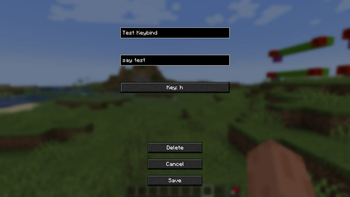
### Dynamic keys This feature allows you to add custom keybinds to the game that allow you to run commands with modifiers like run intervals and much more. The full documentation for this can be found on the (https://github.com/JTechGaming/Redstone-Essentials/wiki/Dynamic-Keybinds).
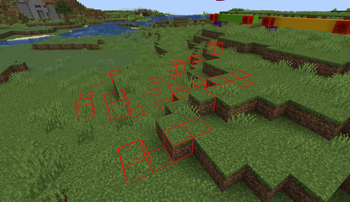
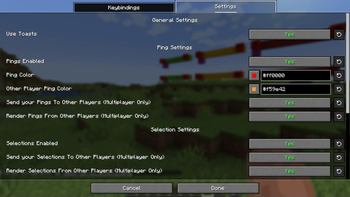
### Pings The ping system allows you to highlight blocks with a keybind, and give different ping colors to different players. This can be useful for keeping track of certain areas, or drawing attention to certain blocks. Pings render beyond render distance, so it can also be used for locating builds you previously highlighted. Pings do not render through blocks. The documentation for the ping system can be found on its (https://github.com/JTechGaming/Redstone-Essentials/wiki/Pings). The ping system is demonstrated below.
Ping System Demo
!(https://i.giphy.com/media/v1. Y2lkPTc5MGI3NjExZDh4NmVmdnZib295MWF3djE0MTh0YTUwbzQzZnJoaTV2ZXh0MTd4dyZlcD12MV9pbnRlcm5hbF9naWZfYnlfaWQmY3Q9Zw/iwzHlkaurWPQGm8fDn/giphy-downsized-large.gif)
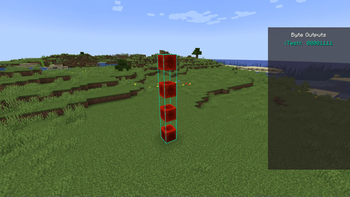
### Realtime Byte Output Realtime byte output, or RTBO for short allows you to make a selection with a label, which will read a binary value from that area and display it on your hud as seen in the demonstration below. This is really usefull for debugging multiple binary inputs and outputs, especially in compact builds. You can also configure the output base for the display. The full RTBO documentation van be found (https://github.com/JTechGaming/Redstone-Essentials/wiki/Realtime-Byte-Output).
Realtime Byte Output
!(https://i.giphy.com/media/v1. Y2lkPTc5MGI3NjExanBrNDAxbWd6ZHM1cGhjdW5yeWdxcXUxY243MXZwZG5hdjNqaHM5eCZlcD12MV9pbnRlcm5hbF9naWZfYnlfaWQmY3Q9Zw/C6vBEZTSDgW9IkV6Xw/giphy-downsized-large.gif)
### Bitmap Printer This feature has a niche usecase, but can be adapted for other uses as well. It supports printing out bitmap images as x and y coordinates, and is intended for use on screens with frame buffers. This could also be usefull for encoding binary values on the x, and their adresses on the y to quickly write to a ram for example. This feature is really complex and is better explained on the (https://github.com/JTechGaming/Redstone-Essentials/wiki/Bitmap-Printer).
### Singal Strength Giver This is another ability with two keybinds that allows you to get a barrel or shulkerbox containing any signal strength. For example, if you hold the barrel keybind and press 5, you will get a barrel with signal strength 5. If you press the shulker keybind, hold shift and press 3, you will get a shulkerbox containing signal strength 13. An example of this working can be seen below.
Signal St
📊 Mod Details
- Game
- Minecraft Mods
- Author
- JTech
- Version
- 1.1
- Downloads
- 2,100
- Endorsements
- 10
- Category
- fabric
- Created
- 10/25/2024
- Updated
- 8/30/2025
- Game Versions
- 1.21.7
- Tags
- game-mechanics, management, utility
🔧 How to Install Minecraft Mods Mods
Download from Modrinth. Use Prism Launcher or drop into your mods folder.
📖 Full step-by-step install guide for Minecraft Mods →
Visit the official mod page for specific installation instructions for this mod.
🎮 Need cheat codes or console commands? Check ur gaming wiki for Minecraft Mods commands, item IDs, and more.
❓ Frequently Asked Questions
Which Minecraft Mods versions does Redstone Essentials support?
The author lists 1.21.7. Other versions may work but are untested by the author.
What is the latest version of Redstone Essentials?
Version 1.1, published 2025-08-30 with 2,100 downloads recorded at the source.
Keep browsing — more Minecraft Mods mods await