Player Head Wizard
⚪ Last updated 2024⚠️ Install Order · 2 steps
Install in this order, then this mod last — most mods fail to load without their framework and dependencies in place.
🖼️ Gallery (1 images)
🔍 Analysis
- 👍 0.2% endorsement rate
- 🏆 #322 of 945 fabric mods in this game by downloads
📋 About This Mod
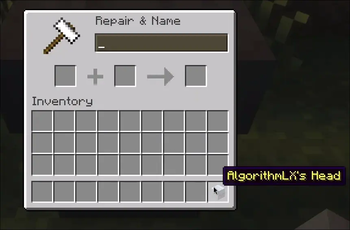
# PlayerHeadWizard Change head texture easily! ## How to use? You take the player's head, put it in the anvil and give it a name `profile=<Insert your player nickname>`. Does not require any commands/active cheats. Mod is Server-side. Client side is optional! ## Showcase !(https://0mods.team/data/phw_preview.gif)
Auto Torch English | 简体中文 An automatic torch placement and light level overlay mod for Minecraft 1. 7. 10~26. 2 on NeoForge, Forge, and Fabric. Motivation Digging out a perimeter is tedious, and placing torches by hand makes it easy to miss spots. Existing light level overlays also do not account for the special spawning conditions of drowned and swamp slimes, which makes building swamp mob farms or lighting riverbeds inconvenient. That is why this mod was created. Overview Press G by default to open the selection panel and configure automatic torch placement within a selected area or near the player. Press F7 by default to toggle the light level overlay, including special checks for drowned and swamp slimes. Nearby Torch Placement Light Level Overlay Area Torch Placement Client-side only Client-side only Client and server Screenshots Usage Press G by default to open the selection panel and F7 to toggle the light level overlay. Both key bindings can be changed. Light level overlay: Supports X markers and numeric block light levels, with a display range of 1-64 blocks (performance optimized). Color Meaning Red Mobs can spawn at any time Yellow Mobs can spawn at night Green Mobs cannot spawn Purple Swamp slimes can spawn at night Cyan Drowned can spawn Nearby automatic torch placement: Searches for valid positions within two blocks of the player and uses vanilla right-click interaction to place torches from the player's inventory. A torch is placed only when the light level is below the configured threshold, with an option to include sky light in the calculation. Area automatic torch placement: Select points A and B to define a cuboid (opposite corners) or sphere (center/radius), with wooden axe selection support. Set the selection as the lighting area (green) or an exclusion area (red), then click "Start Task." One lighting area and multiple exclusion areas are supported. (Lighting a maximum-size area of ordinary natural terrain generally takes about half an inventory, or roughly 1,000 torches, with the default settings.) All features are available in the settings panel shown above. Features Nearby Automatic Torch Placement This feature is entirely client-side; the server does not need the mod installed. When enabled, it scans every 10 ticks within a horizontal radius of 2 blocks and a vertical range of -2 to +1 blocks around the player, prioritizing the nearest dark position. Torches are placed only in air blocks with no fluid, where a torch can remain in place and will not collide with the player. It uses regular torches from the offhand or hotbar and places them through vanilla right-click interaction. Placement therefore remains subject to server rules such as Adventure mode restrictions, land protection, and interaction range. The light threshold that triggers placement can be set from 1 to 16. You can also choose whether sky light is included when evaluating the light level. When sky light is excluded, outdoor areas are evaluated using block li
📊 Mod Details
- Game
- Minecraft Mods
- Author
- AlgorithmLX
- Version
- 1.21_1.1.1
- Downloads
- 2,609
- Endorsements
- 6
- Category
- fabric
- Created
- 8/22/2024
- Updated
- 8/25/2024
- Game Versions
- 1.21, 1.21.1
- Tags
- utility
🔧 How to Install Minecraft Mods Mods
Download from Modrinth. Use Prism Launcher or drop into your mods folder.
📖 Full step-by-step install guide for Minecraft Mods →
Visit the official mod page for specific installation instructions for this mod.
🎮 Need cheat codes or console commands? Check ur gaming wiki for Minecraft Mods commands, item IDs, and more.
❓ Frequently Asked Questions
Which Minecraft Mods versions does Player Head Wizard support?
The author lists 1.21, 1.21.1. Other versions may work but are untested by the author.
What is the latest version of Player Head Wizard?
Version 1.21_1.1.1, published 2024-08-25 with 2,609 downloads recorded at the source.
Keep browsing — more Minecraft Mods mods await