Ouch!
🟡 Updated this year⚠️ Install Order · 2 steps
Install in this order, then this mod last — most mods fail to load without their framework and dependencies in place.
🖼️ Gallery (4 images)
🔍 Analysis
- 👍 0.3% endorsement rate
- 🏆 #198 of 940 fabric mods in this game by downloads
📋 About This Mod
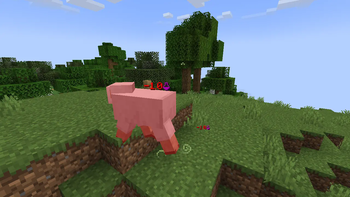
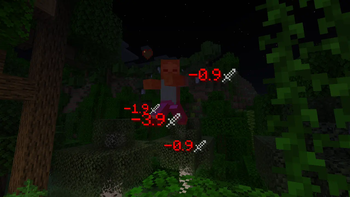
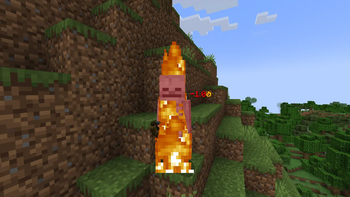
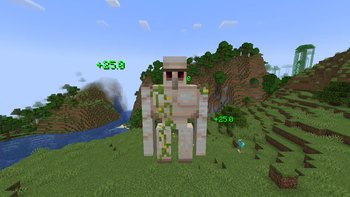
# Ouch! Tired of guessing how much damage entity you attacked took? Or maybe you just wanted to make fights look bit fancier? Then this mod is for you! Ouch! is Fabric (and Quilt) server side modification powered by (https://modrinth.com/mod/polymer) which adds number/text particle effect activated after entity getting damaged, dying or getting healed (by default only damage/healing is visible)! This mod is also fully configurable allowing to change the text (color and display), size, movement and visibility time, depending on predicates testing for damage type, victim (damaged entity), source (attacker or projectile) and attacker (attacker). It can also display multiple particles with different setting for same damage, allowing for extra fun messages and alike. !(https://cdn.modrinth.com/data/nbxqFJCy/images/2d55baa0886deb83010bdc3a2b0a88f9efdc82ca.png) ## (https://modrinth.com/mod/ouch) # Configuration. This mod config file is stored as `./config/ouch.json`. ## Preset selection config. By default, config is in a format of preset selection, allowing you to choose default style/look that's built into the mod. ```json5 { "preset": "default" } ``` Available presets: `default`, `minimal` ## Full config. This config allows you to change any text and it's behaviour. Can be used for advanced configuration. Default values used by presets can be found here: https://github.com/Patbox/ouch/tree/master/preset All custom text within it uses the (https://placeholders.pb4.eu/user/quicktext/). All predicates use are supplied by (https://github.com/Patbox/PredicateAPI/blob/1.21/BUILTIN.md). Lines prefixed with `//` aren't part of real config and are here just to explain it. ```json5 { // All display values for damage. "damage": Matches damage by type, being either a single entry ("minecraft:generic") // a tag ("#minecraft:is_fire") or list of entries () // By default (not set), it matches everything. "type": "...", // Predicate checking for victim (damaged entity). // By default, always succeeds. "victim": { "type": "..." }, // Predicate checking for attacker (entity which attacked entity). // By default, always succeeds. "attacker": { "type": "..." }, // Predicate checking for source (projectile or attacker). // By default, always succeeds. "source": { "type": "..." }, // A minimal amount of damage required for this to display. // By default, not set. "min_value": 0, // A maximal amount of damage allowed for this to display. // By default, not set. "max_value": 999999, // A floating point number from 0 to 1 (inclusive) describing change // this message is selected. 1 means it's always selected if other properties match, // 0.5 is 50% and 0 is never. // By default, it's set to 1. "chance": 1, // Sets value velocity of particle is multiplied by every tick. // It needs to be a number between 0 and 1 // Default value: 0.7 "per_tick_velocity_multiplier": 0.7, // Sets value of (downwards) gravity particle is effected by. // It needs to be a number between -1 and 1 // Default value: 0.05 "gravity": 0.05, // Sets the time (in ticks, 20 ticks is a second), the particle is // visible for. It needs to be a number larger than 0. // Default value: 20 "staying_time": 20, // Sets the scale/size of the particle. // It needs to be a number between 0 and 5 // Default value: 0.8 "text_scale": 0.8, // Overrides calculated velocity with a static one. // Default value: not set / uses calculated one. "velocity_override": , // Text used for damage particle. Has placeholders: // ${value} - shows rounded damage with 1 number as decimal part. // ${value_rounded} - shows rounded damage rounded to integer. // ${value_raw} - shows raw damage value. "text": "<red>-${value}" } ] ], // All display values for death text. "death": Matches damage by ty
# Ouch! Tired of guessing how much damage entity you attacked took? Or maybe you just wanted to make fights look bit fancier? Then this mod is for you!
Ouch! is Fabric (and Quilt) server side modification powered by (https://modrinth.com/mod/polymer) which adds number/text particle effect activated after entity getting damaged, dying or getting healed (by default only damage/healing is visible)! This mod is also fully configurable allowing to change the text (color and display), size, movement and visibility time, depending on predicates testing for damage type, victim (damaged entity), source (attacker or projectile) and attacker (attacker). It can also display multiple particles with different setting for same damage, allowing for extra fun messages and alike.
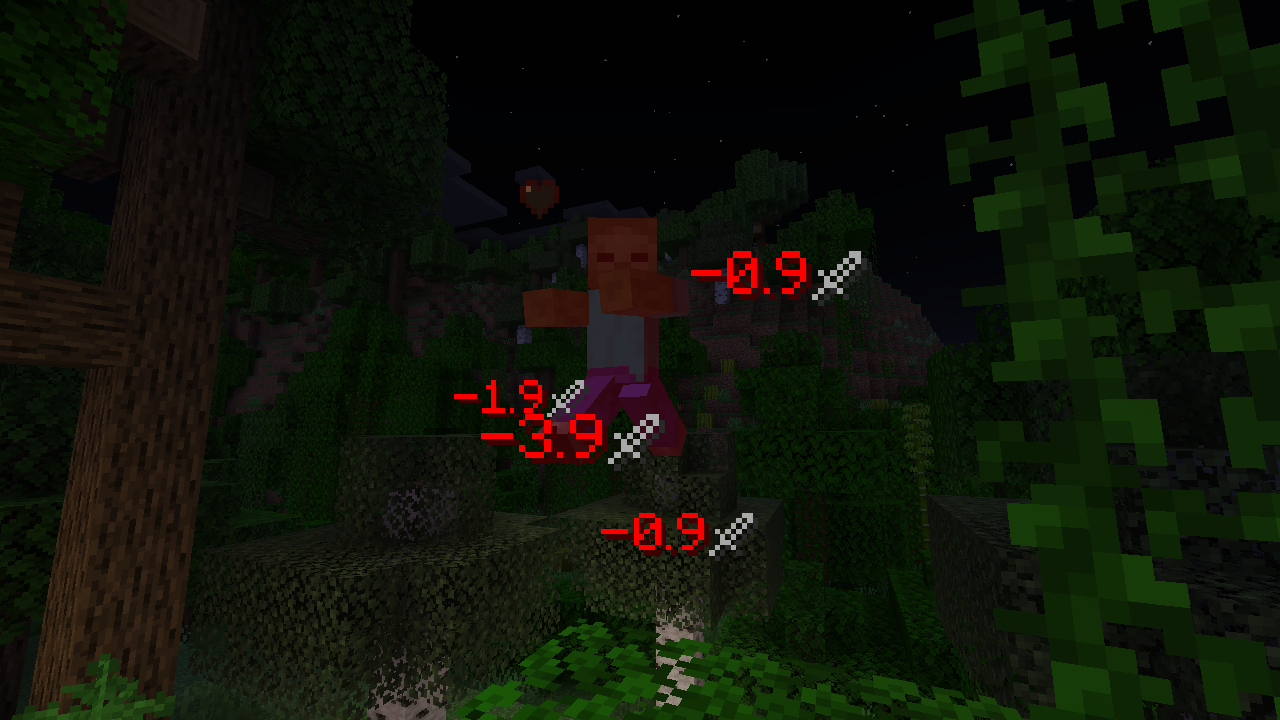
## [== Download on Modrinth ==](https://modrinth.com/mod/ouch)
# Configuration.
This mod config file is stored as `./config/ouch.json`.
## Preset selection config.
By default, config is in a format of preset selection, allowing you to choose default style/look that's built into the mod.
```json5
{
"preset": "default"
}
```
Available presets: `default`, `minimal`
## Full config.
This config allows you to change any text and it's behaviour. Can be used for advanced configuration.
Default values used by presets can be found here: https://github.com/Patbox/ouch/tree/master/preset
All custom text within it uses the (https://placeholders.pb4.eu/user/quicktext/).
All predicates use are supplied by (https://github.com/Patbox/PredicateAPI/blob/1. 21/BUILTIN.md).
Lines prefixed with `//` aren't part of real config and are here just to explain it.
```json5
{
// All display values for damage.
"damage": [
// Top layer array defines lists in which text/settings will be found.
// Only single definition from each included array is used. They are matched from top to bottom.
[
// Text/Display definition.
{
// Matches damage by type, being either a single entry ("minecraft:generic")
// a tag ("#minecraft:is_fire") or list of entries (["minecraft:mob_attack", "minecraft:player_attack"])
// By default (not set), it matches everything.
"type": "...",
// Predicate checking for victim (damaged entity).
// By default, always succeeds.
"victim": {
"type": "..."
},
// Predicate checking for attacker (entity which attacked entity).
// By default, always succeeds.
"attacker": {
"type": "..."
},
// Predicate checking for source (projectile or attacker).
// By default, always succeeds.
"source": {
"type": "..."
},
// A minimal amount of damage required for this to display.
// By default, not set.
"min_value": 0,
// A maximal amount of damage allowed for this to display.
// By default, not set.
"max_value": 999999,
// A floating point number from 0 to 1 (inclusive) describing change
// this message is selected. 1 means it's always selected if other properties match,
// 0. 5 is 50% and 0 is never.
// By default, it's set to 1.
"chance": 1,
// Sets value velocity of particle is multiplied by every tick.
// It needs to be a number between 0 and 1
// Default value: 0. 7
"per_tick_velocity_multiplier": 0. 7,
// Sets value of (downwards) gravity particle is effected by.
// It needs to be a number between -1 and 1
// Default value: 0. 05
"gravity": 0. 05,
// Sets the time (in ticks, 20 ticks is a second), the particle is
// visible for. It needs to be a number larger than 0.
// Default value: 20
"staying_time": 20,
// Sets the scale/size of the particle.
// It needs to be a number between 0 and 5
// Default value: 0. 8
"text_scale": 0. 8,
// Overrides calculated velocity with a static one.
// Default value: not set / uses calculated one.
"velocity_override": ,
// Text used for damage particle. Has placeholders:
// ${value} - shows rounded damage with 1 number as decimal part.
// ${value_rounded} - shows rounded damage rounded to integer.
// ${value_raw} - shows raw damage value.
"text": "
📊 Mod Details
- Game
- Minecraft Mods
- Author
- Patbox
- Version
- 1.9.0+26.2
- Downloads
- 30,181
- Endorsements
- 95
- Category
- fabric
- Created
- 6/23/2024
- Updated
- 6/17/2026
- Game Versions
- 26.2
- Tags
- utility
🔧 How to Install Minecraft Mods Mods
Download from Modrinth. Use Prism Launcher or drop into your mods folder.
📖 Full step-by-step install guide for Minecraft Mods →
Visit the official mod page for specific installation instructions for this mod.
🎮 Need cheat codes or console commands? Check ur gaming wiki for Minecraft Mods commands, item IDs, and more.
❓ Frequently Asked Questions
Which Minecraft Mods versions does Ouch! support?
The author lists 26.2. Other versions may work but are untested by the author.
What is the latest version of Ouch!?
Version 1.9.0+26.2, published 2026-06-17 with 30,181 downloads recorded at the source.
Keep browsing — more Minecraft Mods mods await