OptiPainting
⚪ Last updated 2024⚠️ Install Order · 2 steps
Install in this order, then this mod last — most mods fail to load without their framework and dependencies in place.
🖼️ Gallery (2 images)
🔍 Analysis
- 👍 0.2% endorsement rate
- 🏆 #781 of 940 fabric mods in this game by downloads
📋 About This Mod
# OptiPainting _Optimized painting rendering_ ## What's this mod do? - This mod optimizes the rendering of paintings, by not rendering the sides of the painting that are never visible. - In 24w18a, Mojang added data-driven paintings, which allows for custom paintings to be added to the game, up to 16x16 in size. This mod removes that limit and allows you to have paintings of any size. ## How's it optimized? If you have a look at a painting, you'll notice that on the sides there is a 2px indented frame, so it sticks out from the wall. In vanilla, these faces are rendered for every single block that the painting is made of. This is a waste of resources, as the faces are never visible. This mod fixes that by not rendering these faces. This may seem like a small optimization, but these tiny faces are equivalent to the full block face, so: - Front - 4 vertices - Back - 4 vertices - ~~Top - 4 vertices~~ - ~~Bottom - 4 vertices~~ - ~~Left - 4 vertices~~ - ~~Right - 4 vertices~~ Makes a total of 24 vertices per block on vanilla. And 8 vertices per block on OptiPainting. **That's a 66% reduction in vertices!** - If you have a 16x16 painting, that's 256 blocks, which is 6144 vertices in vanilla, and 2048 vertices in OptiPainting. - If you have a super-large 64x64 painting, that's 4096 blocks, which is 98304 vertices in vanilla, and 32768 vertices in OptiPainting. | With OptiPainting | Without OptiPainting | |--------------------------------------------------------------------------------------------------------------------------------|-----------------------------------------------------------------------------------------------------------------------------------| | !(https://cdn.modrinth.com/data/EYUuZlGR/images/81a562cd40da0fe5fdbbdbf32ba666d67fc61917.webp) | !(https://cdn.modrinth.com/data/EYUuZlGR/images/cd958a7c9c2064e970db96d42bc603730284d1c7.webp) | _This example is rendered without the back face to demonstrate what the mod does. You can see the back of the painting in vanilla and with the mod. (For now!!)_ Obviously, if you only have the occasional painting in your world, you won't notice much of a difference, but it is free optimization none-the-less!
# OptiPainting
_Optimized painting rendering_
## What's this mod do?
- This mod optimizes the rendering of paintings, by not rendering the sides of the painting that are never visible.
- In 24w18a, Mojang added data-driven paintings, which allows for custom paintings to be added to the game, up to 16x16 in size.
- This mod removes that limit and allows you to have paintings of any size.
## How's it optimized?
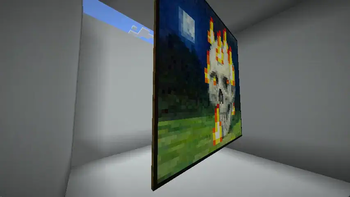
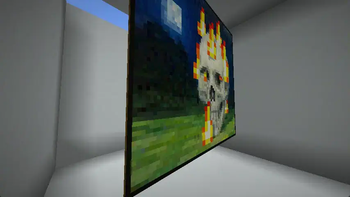
If you have a look at a painting, you'll notice that on the sides there is a 2px indented frame, so it sticks out from the wall. In vanilla, these faces are rendered for every single block that the painting is made of. This is a waste of resources, as the faces are never visible. This mod fixes that by not rendering these faces.
This may seem like a small optimization, but these tiny faces are equivalent to the full block face, so:
- Front - 4 vertices
- Back - 4 vertices
- ~~Top - 4 vertices~~
- ~~Bottom - 4 vertices~~
- ~~Left - 4 vertices~~
- ~~Right - 4 vertices~~
Makes a total of 24 vertices per block on vanilla. And 8 vertices per block on OptiPainting.
That's a 66% reduction in vertices!
- If you have a 16x16 painting, that's 256 blocks, which is 6144 vertices in vanilla, and 2048 vertices in OptiPainting.
- If you have a super-large 64x64 painting, that's 4096 blocks, which is 98304 vertices in vanilla, and 32768 vertices in OptiPainting.
| With OptiPainting | Without OptiPainting | |--------------------------------------------------------------------------------------------------------------------------------|-----------------------------------------------------------------------------------------------------------------------------------| | !(https://cdn.modrinth.com/data/EYUuZlGR/images/81a562cd40da0fe5fdbbdbf32ba666d67fc61917.webp) | !(https://cdn.modrinth.com/data/EYUuZlGR/images/cd958a7c9c2064e970db96d42bc603730284d1c7.webp) |
_This example is rendered without the back face to demonstrate what the mod does. You can see the back of the painting in vanilla and with the mod. (For now!!)_
Obviously, if you only have the occasional painting in your world, you won't notice much of a difference, but it is free optimization none-the-less!
📊 Mod Details
- Game
- Minecraft Mods
- Author
- isxander
- Version
- 1.0.0+1.19.2
- Downloads
- 18,873
- Endorsements
- 44
- Category
- fabric
- Created
- 5/13/2024
- Updated
- 5/11/2024
- Game Versions
- 1.19, 1.19.1, 1.19.2
- Tags
- optimization
🔧 How to Install Minecraft Mods Mods
Download from Modrinth. Use Prism Launcher or drop into your mods folder.
📖 Full step-by-step install guide for Minecraft Mods →
Visit the official mod page for specific installation instructions for this mod.
🎮 Need cheat codes or console commands? Check ur gaming wiki for Minecraft Mods commands, item IDs, and more.
❓ Frequently Asked Questions
Which Minecraft Mods versions does OptiPainting support?
The author lists 1.19, 1.19.1, 1.19.2. Other versions may work but are untested by the author.
What is the latest version of OptiPainting?
Version 1.0.0+1.19.2, published 2024-05-11 with 18,873 downloads recorded at the source.
Keep browsing — more Minecraft Mods mods await