OnTime
🟡 Updated this year⚠️ Install Order · 2 steps
Install in this order, then this mod last — most mods fail to load without their framework and dependencies in place.
🖼️ Gallery (1 images)
🔍 Analysis
- 👍 0.3% endorsement rate
- 🏆 #286 of 892 fabric mods in this game by downloads
📋 About This Mod
<div align="center"> # OnTime ⏱️ A powerful and flexible timer mod for Minecraft. Run countdowns and count-ups on screen, give every player their own, start and stop them from what happens in the world, and manage the lot from an in-game panel or your browser — ideal for minigames, events, modpacks and automated server tasks. (https://img.shields.io/modrinth/dt/ontime?style=for-the-badge&logo=modrinth&label=Modrinth&color=00AF5C&logoColor=white)](https://modrinth.com/mod/ontime) (https://img.shields.io/curseforge/dt/1478348?style=for-the-badge&logo=curseforge&label=CurseForge&color=f16a20&logoColor=white)](https://www.curseforge.com/minecraft/mc-mods/ontime) (https://img.shields.io/badge/Fabric-1.20.1%20%7C%201.21.1--1.21.11%20%7C%2026.1--26.2-dbd0b4?style=for-the-badge)](https://fabricmc.net/) (https://img.shields.io/badge/NeoForge-1.21.1--1.21.11%20%7C%2026.1--26.2-f16a20?style=for-the-badge)](https://neoforged.net/) (https://img.shields.io/badge/Forge-1.20.1-e04e14?style=for-the-badge)](https://minecraftforge.net/) (https://img.shields.io/badge/Env-Client%20%26%20Server-4a90d9?style=for-the-badge)](https://modrinth.com/mod/ontime) (https://img.shields.io/badge/Docs-Wiki-0969da?style=for-the-badge&logo=github&logoColor=white)](https://github.com/MateoF024/OnTime/wiki) (https://img.shields.io/badge/Report-Issues-red?style=for-the-badge&logo=github&logoColor=white)](https://github.com/MateoF024/OnTime/issues) </div> *** ## What it does A timer in OnTime is a thing you set up once — how long it lasts, where it sits on screen, what colour it turns as it runs down, what it does when it ends — and then run as many times as you like. - **Run it for everyone or for one player each.** A round timer can be one clock the whole server watches, or a personal clock per player, all counting at once. - **Choose who sees it.** Everybody, a list of names, or a selector like `@a`. - **Let the world start it.** A timer can begin or end when somebody dies, reaches a dimension, earns an advancement, hits a score, or completes an FTB quest — and you can ask for several of those at once. - **Make it do something.** Run commands at the end, or at any point along the way, each with its own pause before the next. - **Put it where you want it.** Above the hotbar, as a boss bar, in the action bar, or anywhere you like by dragging it into place. ## Getting started 1. Drop the jar into `mods/`. Nothing else is required. 2. In game, run `/timer gui`. That opens the panel: your timers, whatever is running right now, and every setting. Everything you can do there you can also do by command, and from a browser. Prefer commands? `/timer create <name> <hours> <minutes> <seconds>` makes one, `/timer start <name>` runs it, and `/timer help` walks you through the rest. ## From your browser `/timer webpanel start` gives you a link. Open it and you get the same panel — timers, executions and settings — with a light and a dark theme, in English or Spanish. It is served by the mod itself, so it works on a machine with no internet access. ## Also worth knowing - **Jade** and **FTB Quests** are supported when they are installed, and ignored when they are not. - **PlaceholderAPI** placeholders are provided for other mods and plugins to read. - Other mods can drive OnTime through its API, and replace how the counter is drawn. - Available in **English** and **Spanish (AR / ES / MX)**. *** ## 📖 Documentation Everything above in full — every command, every setting, the API, the WebSocket feed and the integrations — lives in the wiki. (https://img.shields.io/badge/Docs-Wiki-0969da?style=for-the-badge&logo=github&logoColor=white)](https://github.com/MateoF024/OnTime/wiki) (https://img.shields.io/badge/Report-Issues-red?style=for-the-badge&logo=github&logoColor=white)](https://github.com/MateoF024/OnTime/issues) *** Created by **MateoF24** — Licensed under MIT
# OnTime ⏱️
A powerful and flexible timer mod for Minecraft. Run countdowns and count-ups on screen, give every player their own, start and stop them from what happens in the world, and manage the lot from an in-game panel or your browser — ideal for minigames, events, modpacks and automated server tasks.
[!(https://img.shields.io/modrinth/dt/ontime?style=for-the-badge&logo=modrinth&label=Modrinth&color=00AF5C&logoColor=white)](https://modrinth.com/mod/ontime) [!(https://img.shields.io/curseforge/dt/1478348?style=for-the-badge&logo=curseforge&label=CurseForge&color=f16a20&logoColor=white)](https://www.curseforge.com/minecraft/mc-mods/ontime)
[!(https://img.shields.io/badge/Fabric-1. 20. 1%20%7C%201. 21. 1--1. 21. 11%20%7C%2026. 1--26. 2-dbd0b4?style=for-the-badge)](https://fabricmc.net/) [!(https://img.shields.io/badge/NeoForge-1. 21. 1--1. 21. 11%20%7C%2026. 1--26. 2-f16a20?style=for-the-badge)](https://neoforged.net/) [!(https://img.shields.io/badge/Forge-1. 20. 1-e04e14?style=for-the-badge)](https://minecraftforge.net/) [!(https://img.shields.io/badge/Env-Client%20%26%20Server-4a90d9?style=for-the-badge)](https://modrinth.com/mod/ontime) [!(https://img.shields.io/badge/Docs-Wiki-0969da?style=for-the-badge&logo=github&logoColor=white)](https://github.com/MateoF024/OnTime/wiki) [!(https://img.shields.io/badge/Report-Issues-red?style=for-the-badge&logo=github&logoColor=white)](https://github.com/MateoF024/OnTime/issues)
## What it does
A timer in OnTime is a thing you set up once — how long it lasts, where it sits on screen, what colour it turns as it runs down, what it does when it ends — and then run as many times as you like.
- Run it for everyone or for one player each. A round timer can be one clock the whole server watches, or a personal clock per player, all counting at once.
- Choose who sees it. Everybody, a list of names, or a selector like `@a`.
- Let the world start it. A timer can begin or end when somebody dies, reaches a dimension, earns an advancement, hits a score, or completes an FTB quest — and you can ask for several of those at once.
- Make it do something. Run commands at the end, or at any point along the way, each with its own pause before the next.
- Put it where you want it. Above the hotbar, as a boss bar, in the action bar, or anywhere you like by dragging it into place.
## Getting started
1. Drop the jar into `mods/`. Nothing else is required. 2. In game, run `/timer gui`.
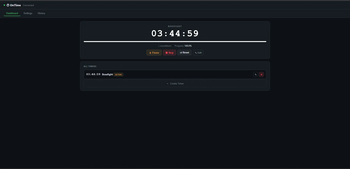
That opens the panel: your timers, whatever is running right now, and every setting. Everything you can do there you can also do by command, and from a browser.
Prefer commands? `/timer create
## From your browser
`/timer webpanel start` gives you a link. Open it and you get the same panel — timers, executions and settings — with a light and a dark theme, in English or Spanish. It is served by the mod itself, so it works on a machine with no internet access.
## Also worth knowing
- Jade and FTB Quests are supported when they are installed, and ignored when they are not.
- PlaceholderAPI placeholders are provided for other mods and plugins to read.
- Other mods can drive OnTime through its API, and replace how the counter is drawn.
- Available in English and Spanish (AR / ES / MX).
## 📖 Documentation
Everything above in full — every command, every setting, the API, the WebSocket feed and the integrations — lives in the wiki.
[!(https://img.shields.io/badge/Docs-Wiki-0969da?style=for-the-badge&logo=github&logoColor=white)](https://github.com/MateoF024/OnTime/wiki) [!(https://img.shields.io/badge/Report-Issues-red?style=for-the-badge&logo=github&logoColor=white)](https://github.com/MateoF024/OnTime/issues)
Created by MateoF24* — Licensed under MIT
📊 Mod Details
- Game
- Minecraft Mods
- Author
- MateoF024
- Version
- 5.0.1
- Downloads
- 1,478
- Endorsements
- 5
- Category
- fabric
- Created
- 1/8/2026
- Updated
- 8/18/2026
- Game Versions
- 1.20.1
- Tags
- library, management, utility
🔧 How to Install Minecraft Mods Mods
Download from Modrinth. Use Prism Launcher or drop into your mods folder.
📖 Full step-by-step install guide for Minecraft Mods →
Visit the official mod page for specific installation instructions for this mod.
🎮 Need cheat codes or console commands? Check ur gaming wiki for Minecraft Mods commands, item IDs, and more.
❓ Frequently Asked Questions
Which Minecraft Mods versions does OnTime support?
The author lists 1.20.1. Other versions may work but are untested by the author.
What is the latest version of OnTime?
Version 5.0.1, published 2026-08-18 with 1,478 downloads recorded at the source.
Keep browsing — more Minecraft Mods mods await