Cutscene Engine
🟡 Updated this year⚠️ Install Order · 2 steps
Install in this order, then this mod last — most mods fail to load without their framework and dependencies in place.
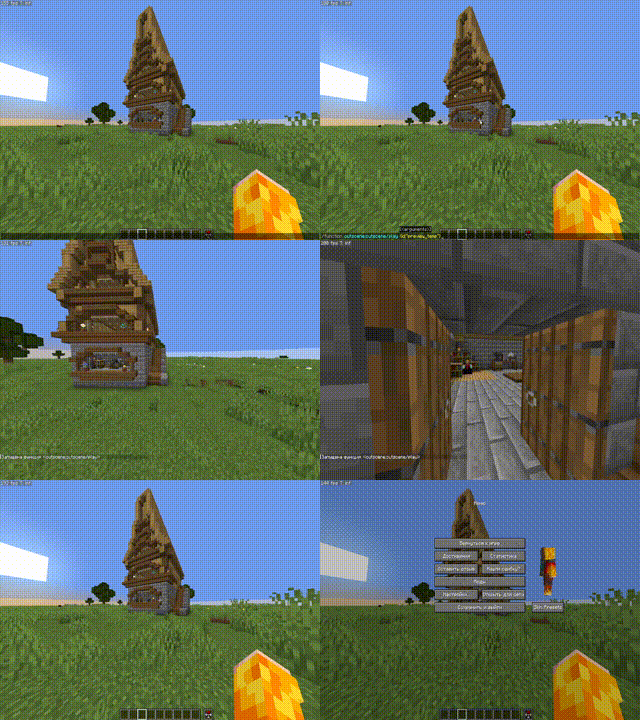
🖼️ Gallery (5 images)




🔍 Analysis
- 👍 0.6% endorsement rate
- 🏆 #14 of 188 datapack mods in this game by downloads
📋 About This Mod
# 🎬 Cutscene Engine **Professional cinematic scene creation system for Minecraft** ## 📖 Description Cutscene Engine is an advanced data pack that allows you to create smooth cinematic scenes directly in-game without the need for external tools. Ideal for creators of adventure maps, RPG servers, and story-driven projects. ## ✨ Main Features ### 🛠️ Visual Editor - **Intuitive Interface** — Control with the mouse wheel and right-click - **Add Camera Points** — Create a camera path directly in the game - **Preview** — Instantly check the result - **Motion Interpolation** — Automatically create smooth transitions between points ### 🎥 Camera System - **Smooth Motion** — Interpolation between keypoints - **Duration Adjustment** — From 10 ticks to any value - **Spectator Mode** — Automatic control of the player's camera - **Save State** — Restore position and game mode after a cutscene ### 💬 Message System (in dev) - **Title/Subtitle** — Large titles on the screen - **Actionbar** — Text above the hotbar - **Chat** — Messages in Chat - **Font Settings** — full support for JSON formatting (color, bold, italic, underline) - **Point Snapping** — automatically displays text at the right moment ### ⚙️ Ending Settings - **Teleportation** — player movement after a cutscene - **Game Mode** — automatic mode change - **Final Title** — ending message ### 🌐 Localization - **Russian and English** — full bilingual support - **Dynamic Switching** — change languages at any time ### 💾 Save System - **Workspace** — temporary workspace for editing - **Save Cutscenes** — export finished scenes with a unique ID - **Load** — import saved cutscenes for editing - **Autosave** — data loss protection ## 🎮 How to use ### Creating a cutscene 1. **Open the editor:** ```mcfunction /function _cutscene:editor_on ``` 2. **Add camera points:** - Position yourself in the desired position - Scroll the wheel to "➕ Add point" - Right-click 3. **Adjust the settings:** - Select "⚙ Settings" in the menu - Set the cutscene length - Adjust the ending (teleport, game mode, title) 4. **Add messages:** - Select "💬 Messages" in the menu - Adjust the Title, Subtitle, Actionbar, or Chat - Apply text to the nearest point 5. **Render:** - Select "🎬 Render" to generate frames - Use "▶ Preview" for verification 6. **Save:** - Open "⚙ Settings" → "💾 Save" - Enter a unique ID for the cutscene ### Play a cutscene ```mcfunction /function _cutscene:play_cutscene {id:"your_cutscene_id"} ``` ## 🔧 Specifications - **Minecraft Versions:** 1.21.8 - 1.21.10 - **Performance:** Optimized for minimal impact on TPS ## 🎯 Usage Examples - **Adventure Maps** — intro and outro cutscenes - **RPG Servers** — quest cutscenes - **Tutorial Maps** — mechanic demonstrations - **Story Projects** — cinematic cutscenes ## 📝 Commands | Command | Description | |---------|----------| | `/function _cutscene:editor_on` | Open the editor | | `/function _cutscene:play_cutscene {id:"..."}` | Play a cutscene | | `/function cutscene:cutscene/list` | List of saved cutscenes | | `/trigger cutscene_engine_localization set 1` | Russian language | | `/trigger cutscene_engine_localization set 2` | English language | ## 🤝 Compatibility - ✅ Works with other datapacks - ✅ Does not require mods - ✅ Multiplayer support - ✅ Compatible with command blocks ## 🐛 Support Found a bug or have a suggestion? Create an issue in the project repository! --- **Create cinematic masterpieces right in Minecraft! 🎬✨**
# 🎬 Cutscene Engine
Professional cinematic scene creation system for Minecraft
## 📖 Description
Cutscene Engine is an advanced data pack that allows you to create smooth cinematic scenes directly in-game without the need for external tools. Ideal for creators of adventure maps, RPG servers, and story-driven projects.
## ✨ Main Features
### 🛠️ Visual Editor - Intuitive Interface — Control with the mouse wheel and right-click - Add Camera Points — Create a camera path directly in the game - Preview — Instantly check the result - Motion Interpolation — Automatically create smooth transitions between points
### 🎥 Camera System - Smooth Motion — Interpolation between keypoints - Duration Adjustment — From 10 ticks to any value - Spectator Mode — Automatic control of the player's camera - Save State — Restore position and game mode after a cutscene
### 💬 Message System (in dev) - Title/Subtitle — Large titles on the screen - Actionbar — Text above the hotbar - Chat — Messages in Chat - Font Settings — full support for JSON formatting (color, bold, italic, underline) - Point Snapping — automatically displays text at the right moment
### ⚙️ Ending Settings - Teleportation — player movement after a cutscene - Game Mode — automatic mode change - Final Title — ending message
### 🌐 Localization - Russian and English — full bilingual support - Dynamic Switching — change languages at any time
### 💾 Save System - Workspace — temporary workspace for editing - Save Cutscenes — export finished scenes with a unique ID - Load — import saved cutscenes for editing - Autosave — data loss protection
## 🎮 How to use
### Creating a cutscene
1. Open the editor: ```mcfunction /function _cutscene:editor_on ```
2. Add camera points: - Position yourself in the desired position - Scroll the wheel to "➕ Add point" - Right-click
3. Adjust the settings: - Select "⚙ Settings" in the menu - Set the cutscene length - Adjust the ending (teleport, game mode, title)
4. Add messages: - Select "💬 Messages" in the menu - Adjust the Title, Subtitle, Actionbar, or Chat - Apply text to the nearest point
5. Render: - Select "🎬 Render" to generate frames - Use "▶ Preview" for verification
6. Save: - Open "⚙ Settings" → "💾 Save" - Enter a unique ID for the cutscene
### Play a cutscene
```mcfunction /function _cutscene:play_cutscene {id:"your_cutscene_id"} ```
## 🔧 Specifications
- Minecraft Versions: 1. 21. 8 - 1. 21. 10
- Performance: Optimized for minimal impact on TPS
## 🎯 Usage Examples
- Adventure Maps — intro and outro cutscenes
- RPG Servers — quest cutscenes
- Tutorial Maps — mechanic demonstrations
- Story Projects — cinematic cutscenes
## 📝 Commands
| Command | Description | |---------|----------| | `/function _cutscene:editor_on` | Open the editor | | `/function _cutscene:play_cutscene {id:"..."}` | Play a cutscene | | `/function cutscene:cutscene/list` | List of saved cutscenes | | `/trigger cutscene_engine_localization set 1` | Russian language | | `/trigger cutscene_engine_localization set 2` | English language |
## 🤝 Compatibility
- ✅ Works with other datapacks
- ✅ Does not require mods
- ✅ Multiplayer support
- ✅ Compatible with command blocks
## 🐛 Support
Found a bug or have a suggestion? Create an issue in the project repository!
Create cinematic masterpieces right in Minecraft! 🎬✨
📊 Mod Details
- Game
- Minecraft Mods
- Author
- Stepan1411
- Version
- v0.2+mod
- Downloads
- 1,556
- Endorsements
- 9
- Category
- datapack
- Created
- 11/23/2025
- Updated
- 4/22/2026
- Game Versions
- 1.21.6, 1.21.7, 1.21.8, 1.21.9, 1.21.10
- Tags
- library, management, utility
🔧 How to Install Minecraft Mods Mods
Download from Modrinth. Use Prism Launcher or drop into your mods folder.
📖 Full step-by-step install guide for Minecraft Mods →
Visit the official mod page for specific installation instructions for this mod.
🎮 Need cheat codes or console commands? Check ur gaming wiki for Minecraft Mods commands, item IDs, and more.
❓ Frequently Asked Questions
Which Minecraft Mods versions does Cutscene Engine support?
The author lists 1.21.6, 1.21.7, 1.21.8, 1.21.9, 1.21.10, 1.21.11. Other versions may work but are untested by the author.
What is the latest version of Cutscene Engine?
Version v0.2+mod, published 2026-04-22 with 1,556 downloads recorded at the source.
Keep browsing — more Minecraft Mods mods await