OnlyKeys
🟠 Updated over a year ago⚠️ Install Order · 2 steps
Install in this order, then this mod last — most mods fail to load without their framework and dependencies in place.
🖼️ Gallery (3 images)
🔍 Analysis
- 👍 0.6% endorsement rate
- 🏆 #224 of 945 fabric mods in this game by downloads
📋 About This Mod
# OnlyKeys OnlyKeys is a Minecraft Fabric Mod that allows you to play minecraft using only your keyboard. \ The mod is still very early in development and will very likely have some bugs. If you encounter any please let me (https://github.com/jaszlo/OnlyKeys/issues). \ It is important to note that the (https://modrinth.com/mod/fabric-api) is required for this mod to work. It does so by moving the cameara via `u h j k`, left clicking via `z` and right clicking via `i`. The inventory is controlled via a selected slot that is marked and can be moved with the camera key bindings. \ Additionally for faster slot movement there is a quick slot selection that can be opened using `l`. It allows you to enter the id of the slot and instantly select it. Here is a short demo of the mod where you can see the game is controlled using the keyboard only. Also the goal of crafting a *wodden hoe* is completed successfully. The Keyboard Visualizer used can be found (https://github.com/jaszlo/KeyboardVisualizer) is Open Source and very basic. <iframe frameborder="0" allowfullscreen="true" src=https://www.youtube.com/embed/74zgApcBPYs></iframe> ## Default Controlls By default the following are the key bindings. Feel free to change them. You can also have Camera and Slot movement on different keys if you like. If you want to get rid of the warning for the overlap in key bindings with no conflict I recommend (https://modrinth.com/mod/nokeybindwarnings) mod that allows you to turn them off. To change the sensitivy just change the regular mouse sensitivity in the vanilla minecraft settings - `F4` Enable/Disable OnlyKeys - `u` Camera Up & Slot Up - `j` Camera Down & Slot Down - `h` Camera Left & Slot Left - `k` Camera Right & Slot Right - `z` Left Click - `i` Right Click - `l` Open Quick Slot Selection - `TAB` Change Creative Inventory Tab - `Page Up` Scroll Up in Creative Inventory - `Page Down` Scroll Down in Creative Inventory
OnlyKeys is a Minecraft Fabric Mod that allows you to play minecraft using only your keyboard. \ The mod is still very early in development and will very likely have some bugs. If you encounter any please let me (https://github.com/jaszlo/OnlyKeys/issues). \ It is important to note that the (https://modrinth.com/mod/fabric-api) is required for this mod to work.
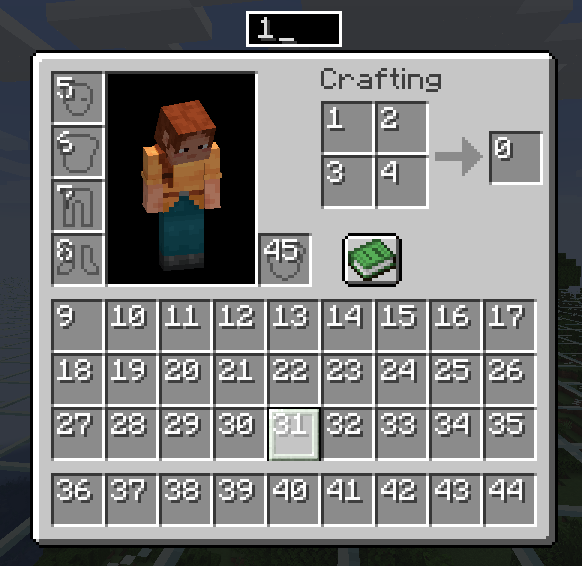
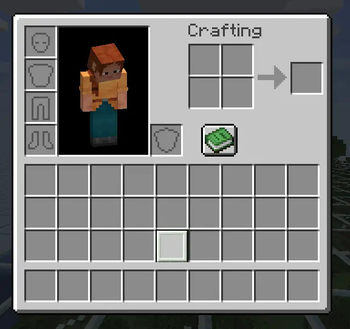
It does so by moving the cameara via `u h j k`, left clicking via `z` and right clicking via `i`. The inventory is controlled via a selected slot that is marked and can be moved with the camera key bindings. \ Additionally for faster slot movement there is a quick slot selection that can be opened using `l`. It allows you to enter the id of the slot and instantly select it.
Here is a short demo of the mod where you can see the game is controlled using the keyboard only. Also the goal of crafting a wodden hoe is completed successfully. The Keyboard Visualizer used can be found (https://github.com/jaszlo/KeyboardVisualizer) is Open Source and very basic.
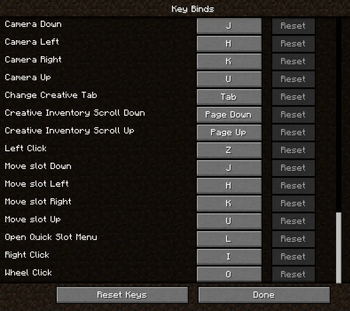
## Default Controlls By default the following are the key bindings. Feel free to change them. You can also have Camera and Slot movement on different keys if you like. If you want to get rid of the warning for the overlap in key bindings with no conflict I recommend (https://modrinth.com/mod/nokeybindwarnings) mod that allows you to turn them off. To change the sensitivy just change the regular mouse sensitivity in the vanilla minecraft settings
- `F4` Enable/Disable OnlyKeys
- `u` Camera Up & Slot Up
- `j` Camera Down & Slot Down
- `h` Camera Left & Slot Left
- `k` Camera Right & Slot Right
- `z` Left Click
- `i` Right Click
- `l` Open Quick Slot Selection
- `TAB` Change Creative Inventory Tab
- `Page Up` Scroll Up in Creative Inventory
- `Page Down` Scroll Down in Creative Inventory
📊 Mod Details
- Game
- Minecraft Mods
- Author
- jaszlo
- Version
- v0.0.2+1.21
- Downloads
- 2,693
- Endorsements
- 17
- Category
- fabric
- Created
- 2/22/2024
- Updated
- 8/22/2025
- Game Versions
- 1.21.6
- Tags
- game-mechanics, utility
🔧 How to Install Minecraft Mods Mods
Download from Modrinth. Use Prism Launcher or drop into your mods folder.
📖 Full step-by-step install guide for Minecraft Mods →
Visit the official mod page for specific installation instructions for this mod.
🎮 Need cheat codes or console commands? Check ur gaming wiki for Minecraft Mods commands, item IDs, and more.
❓ Frequently Asked Questions
Which Minecraft Mods versions does OnlyKeys support?
The author lists 1.21.6. Other versions may work but are untested by the author.
What is the latest version of OnlyKeys?
Version v0.0.2+1.21, published 2025-08-22 with 2,693 downloads recorded at the source.
Keep browsing — more Minecraft Mods mods await