NovoAtlas
🟡 Updated this year⚠️ Install Order · 2 steps
Install in this order, then this mod last — most mods fail to load without their framework and dependencies in place.
🖼️ Gallery (5 images)
🔍 Analysis
- 👍 1.4% endorsement rate — high engagement, a strong quality signal
- 🏆 #259 of 945 fabric mods in this game by downloads
📋 About This Mod
# NovoAtlas A data-driven image based world generator for Minecraft. This mod allows you to paint a world's height map and biome map, and then import that to a datapack and allow the Minecraft world generator to fill in the rest of the details! NovoAtlas is based on (https://www.modrinth.com/mod/atlas/) by itsmiir, used under its CC0 license and with permission from the original author. It features several improvements including: Updated for 1.21+, NeoForge support, improved structure-terrain blending, improved underwater cave generation, cave biome maps, and a few other minor tweaks and additions. !(https://media.githubusercontent.com/media/TheDeathlyCow/minecraft-mod-pages/main/novoatlas/assets/mountain.jpg) # How to Use The (https://github.com/TheDeathlyCow/novoatlas/wiki) describes in detail how to use this mod to create your own worlds/dimensions. But, heres the quick rundown: 1. Create or find a grayscale `.png` height map. To create maps, I would highly recommend using (https://www.worldpainter.net/), as it is purpose-built for Minecraft map making and has an option to export a height map. You can also get heightmaps of Earth from a variety of websites, here's a few that I've found (though not tested with NovoAtlas): * https://tangrams.github.io/heightmapper/ * https://visibleearth.nasa.gov/images/73934/topography * https://heightmap.skydark.pl/ (Requires a Mapbox API key) 2. Create a copy of the map and paint over it with whatever colours you like. Each colour corresponds to a different biome. Do not mix or blend the colours. Save this image as a `.png` with 8-bit RGBA encoding. For cave biomes, you can create separate maps for each "layer" of the world. 3. Create a datapack and add these images to it, you can either copy the example datapack or make one from scratch yourself. Example datapacks are builtin with the mod, but can also be downloaded separately from the (https://github.com/TheDeathlyCow/novoatlas/releases). # Compatibility NovoAtlas supports the use of custom biomes in its generated dimensions. **This mod will not affect dimensions that are not created using the NovoAtlas generator.** However, some world generation features utilized by other mods may not be fully compatible with NovoAtlas dimensions. By nature, NovoAtlas replaces the terrain shape and biome placement logic of the world generator with its own image-supplied logic. Most biomes decorations (including structures, features, and surface rules) should work with NovoAtlas dimensions without any problem, though some noise features, like custom terrain and cave shapes, may not. Specific mod compatibility notes from mods that I have tested: * **Terrablender:** NovoAtlas has a builtin patch to work with for Terrablender surface rules to work with NovoAtlas dimensions, however biome placement features will be disabled. * **Lithostitched:** Surface rule modifiers Lithostitched work with NovoAtlas dimensions. * **Terralith:** All features except some related to noise work with NovoAtlas dimensions. * **Tectonic:** Most of what this mod does is noise related, and, as far as I can tell, does *not* work with NovoAtlas dimensions. * **Geophilic:** All features work with NovoAtlas dimensions. * **Biomes O'Plenty:** Biomes may be used in NovoAtlas dimensions and should generate appropriately. # Help and Support If you're having trouble with the mod, you can join (https://discord.thedeathlycow.com) and make a post in the `#help-and-support` forum. # Looking for 1.19 or 1.20? I do not have time or capacity to develop new features or fix issues for old versions myself; any backports of the mod will only be supported by community contribution. If you want a feature or fix backported, please submit a PR on GitHub (or create a fork). You can also get 1.19 and 1.20.1 versions of the (https://www.modrinth.com/mod/atlas/) by itsmiir (Fabric only).
# NovoAtlas
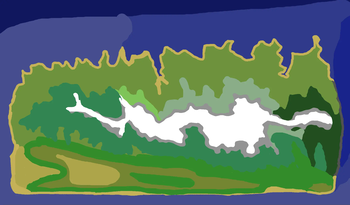
A data-driven image based world generator for Minecraft. This mod allows you to paint a world's height map and biome map, and then import that to a datapack and allow the Minecraft world generator to fill in the rest of the details!
NovoAtlas is based on (https://www.modrinth.com/mod/atlas/) by itsmiir, used under its CC0 license and with permission from the original author. It features several improvements including: Updated for 1. 21+, NeoForge support, improved structure-terrain blending, improved underwater cave generation, cave biome maps, and a few other minor tweaks and additions.
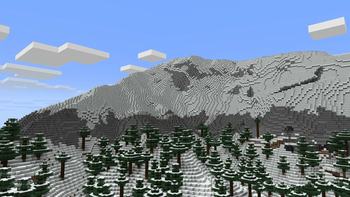
!(https://media.githubusercontent.com/media/TheDeathlyCow/minecraft-mod-pages/main/novoatlas/assets/mountain.jpg)
# How to Use
The (https://github.com/TheDeathlyCow/novoatlas/wiki) describes in detail how to use this mod to create your own worlds/dimensions. But, heres the quick rundown:
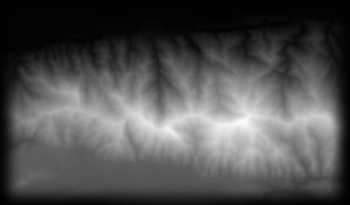
1. Create or find a grayscale `.png` height map. To create maps, I would highly recommend using (https://www.worldpainter.net/), as it is purpose-built for Minecraft map making and has an option to export a height map. You can also get heightmaps of Earth from a variety of websites, here's a few that I've found (though not tested with NovoAtlas): https://tangrams.github.io/heightmapper/ https://visibleearth.nasa.gov/images/73934/topography https://heightmap.skydark.pl/ (Requires a Mapbox API key) 2. Create a copy of the map and paint over it with whatever colours you like. Each colour corresponds to a different biome. Do not mix or blend the colours. Save this image as a `.png` with 8-bit RGBA encoding. For cave biomes, you can create separate maps for each "layer" of the world. 3. Create a datapack and add these images to it, you can either copy the example datapack or make one from scratch yourself.
Example datapacks are builtin with the mod, but can also be downloaded separately from the (https://github.com/TheDeathlyCow/novoatlas/releases).
# Compatibility
NovoAtlas supports the use of custom biomes in its generated dimensions.
This mod will not affect dimensions that are not created using the NovoAtlas generator. However, some world generation features utilized by other mods may not be fully compatible with NovoAtlas dimensions. By nature, NovoAtlas replaces the terrain shape and biome placement logic of the world generator with its own image-supplied logic. Most biomes decorations (including structures, features, and surface rules) should work with NovoAtlas dimensions without any problem, though some noise features, like custom terrain and cave shapes, may not.
Specific mod compatibility notes from mods that I have tested:
Terrablender: NovoAtlas has a builtin patch to work with for Terrablender surface rules to work with NovoAtlas dimensions, however biome placement features will be disabled. Lithostitched: Surface rule modifiers Lithostitched work with NovoAtlas dimensions. Terralith: All features except some related to noise work with NovoAtlas dimensions. Tectonic: Most of what this mod does is noise related, and, as far as I can tell, does not work with NovoAtlas dimensions. Geophilic: All features work with NovoAtlas dimensions. * Biomes O'Plenty: Biomes may be used in NovoAtlas dimensions and should generate appropriately.
# Help and Support
If you're having trouble with the mod, you can join (https://discord.thedeathlycow.com) and make a post in the `#help-and-support` forum.
# Looking for 1. 19 or 1. 20?
I do not have time or capacity to develop new features or fix issues for old versions myself; any backports of the mod will only be supported by community contribution. If you want a feature or fix backported, please submit a PR on GitHub (or create a fork). You can also get 1. 19 and 1. 20. 1 versions of the (https://www.modrinth.com/mod/atlas/) by itsmiir (Fabric only).
📊 Mod Details
- Game
- Minecraft Mods
- Author
- TheDeathlyCow
- Version
- 1.5.1+1.21.11
- Downloads
- 2,663
- Endorsements
- 38
- Category
- fabric
- Created
- 7/11/2025
- Updated
- 7/2/2026
- Game Versions
- 1.21.9, 1.21.10, 1.21.11
- Tags
- management, utility, worldgen
🔧 How to Install Minecraft Mods Mods
Download from Modrinth. Use Prism Launcher or drop into your mods folder.
📖 Full step-by-step install guide for Minecraft Mods →
Visit the official mod page for specific installation instructions for this mod.
🎮 Need cheat codes or console commands? Check ur gaming wiki for Minecraft Mods commands, item IDs, and more.
❓ Frequently Asked Questions
Which Minecraft Mods versions does NovoAtlas support?
The author lists 1.21.9, 1.21.10, 1.21.11. Other versions may work but are untested by the author.
What is the latest version of NovoAtlas?
Version 1.5.1+1.21.11, published 2026-07-02 with 2,663 downloads recorded at the source.
Keep browsing — more Minecraft Mods mods await