NoFireOverlay
🟡 Updated this year⚠️ Install Order · 2 steps
Install in this order, then this mod last — most mods fail to load without their framework and dependencies in place.
🖼️ Gallery (2 images)
🔍 Analysis
- 👍 0.0% endorsement rate
- 🏆 #209 of 335 decoration mods in this game by downloads
📋 About This Mod
[!(https://img.shields.io/badge/JOIN%20OUR%20DISCORD-5865F2?style=for-the-badge&logo=discord&logoColor=white)](https://discord.gg/HTkn94BXmA) [!(https://img.shields.io/badge/CURSEFORGE-F16436?style=for-the-badge&logo=curseforge&logoColor=white)](https://www.curseforge.com/minecraft/mc-mods/nofireoverlay)
Client-side utility mod that replaces Minecraft's default fire overlay with a cleaner and much less obstructive version. You still get a clear visual warning that you are burning, but it no longer covers large parts of the screen or gets in the way of combat, movement, or UI visibility.
!(https://cdn.modrinth.com/data/cached_images/7320653628cf755aff77a7d47c145bf7add902a7_0.webp)
Client-side only (no server installation required). Fully compatible with singleplayer.
📦 Free to use in any modpack — public or private, no permission needed.
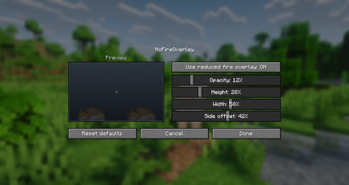
🔥 What it does: - Replaces the vanilla on-fire overlay with a compact low-profile warning. - Keeps the effect visible enough to clearly show that the player is burning. - Greatly reduces interference with the HUD, hotbar, crosshair, and general visibility. - Lets you adjust the overlay directly from the in-game mod config screen.
⚙️ Configuration: You can customize the overlay through the mod configuration screen in the mod list menu.
!(https://cdn.modrinth.com/data/cached_images/17b8b9c53dd90a715ae61f6332b297b3c30e2c1f_0.webp)
📋 Details: - Client-side only. - All settings are stored locally in your game config folder. - Fully translated into 10 languages: English, Russian, Simplified Chinese, Spanish, French, German, Japanese, Brazilian Portuguese, Korean, and Italian.
🐞 Please report any bugs, errors, or feature suggestions on Discord: https://discord.gg/HTkn94BXmA
More mods by Nikrecs: (https://modrinth.com/project/JPip03vS) · (https://modrinth.com/project/gDlNzeRh)
📊 Mod Details
- Game
- Minecraft Mods
- Author
- Nikrecs
- Version
- 1.1.0
- Downloads
- 23,082
- Endorsements
- 2
- Category
- decoration
- Created
- 3/8/2026
- Updated
- 6/22/2026
- Game Versions
- 26.2
- Tags
- decoration, management, utility
🔧 How to Install Minecraft Mods Mods
Download from Modrinth. Use Prism Launcher or drop into your mods folder.
📖 Full step-by-step install guide for Minecraft Mods →
Visit the official mod page for specific installation instructions for this mod.
🎮 Need cheat codes or console commands? Check ur gaming wiki for Minecraft Mods commands, item IDs, and more.
❓ Frequently Asked Questions
Which Minecraft Mods versions does NoFireOverlay support?
The author lists 26.2. Other versions may work but are untested by the author.
What is the latest version of NoFireOverlay?
Version 1.1.0, published 2026-06-22 with 23,082 downloads recorded at the source.
Keep browsing — more Minecraft Mods mods await