Neko UI
🟡 Updated this year⚠️ Install Order · 2 steps
Install in this order, then this mod last — most mods fail to load without their framework and dependencies in place.
🖼️ Gallery (8 images)
🔍 Analysis
- 👍 0.1% endorsement rate
- 🏆 #74 of 335 forge mods in this game by downloads
📋 About This Mod
# <center>Neko UI</center> ## Introduction _Neko UI enhances your gaming experience by modifying the original HUD and adding a range of practical interfaces._ ## Important Notes - **Cores Mod Users:** If you have the `Cores` mod installed, please download the file without the "all" suffix to avoid conflicts. - **JS Code Support:** If you need to use JavaScript code to customize the interface, please additionally download and install the (https://modrinth.com/mod/graaljs) mod.(Run with Nashorn when the graaljs mod is not present) ## Usage Guide > ### General Usage > Neko UI offers extensive customization options. If you're not satisfied with the default interface, you can modify the configuration files to customize the HUD display to your liking. > > If you encounter any issues during customization, please refer to the WIKI documentation or contact me using the contact information below. > > *** > ### JS Code Example > With JavaScript code, you can draw custom UI elements on the screen, such as two elliptical health bars. > > **Example:** (https://github.com/An-Mao/NekoUI/wiki/js-example#center-health-bar) > > !(https://cdn.modrinth.com/data/cached_images/23d857ad050f74f2fc95be48668c0a0f8514b785.png) ## Interface Preview > Here are some interface previews of Neko UI, showcasing its features and customization options. > **Custom HUD:** The health bar, hunger bar, experience bar, and hotbar have been redesigned and can be enabled or disabled individually. > > !(https://cdn.modrinth.com/data/9yP76gQL/images/1e5a39d331fff83e20eb5e9eac19eeba233112fd.png) > **Creature Direction Indicator:** Real-time display of creatures relative to your position, with dynamic scaling of icons based on distance for easy tracking. > > !(https://cdn.modrinth.com/data/9yP76gQL/images/7b80a50de8153a4f8fd762a01be9e80ac500fa47.gif) > **Quick Menu:** Hold down the `TAB` key to open the quick menu, switch interfaces with the left and right mouse buttons, slide to the desired option, and release `TAB` to trigger. > > !(https://cdn.modrinth.com/data/9yP76gQL/images/e16080ae0297c6adb97b30aaec63cfbc8082e4e8.gif) ## More Information If you have any questions, suggestions, or feedback, please feel free to contact me through the following methods. Happy gaming! ## Contact Information - (https://url.anye.dev/tg) - (https://url.anye.dev/discord)
#
## Introduction
_Neko UI enhances your gaming experience by modifying the original HUD and adding a range of practical interfaces._
## Important Notes
- Cores Mod Users: If you have the `Cores` mod installed, please download the file without the "all" suffix to avoid conflicts.
- JS Code Support: If you need to use JavaScript code to customize the interface, please additionally download and install the [`GraalJS`](https://modrinth.com/mod/graaljs) mod.(Run with Nashorn when the graaljs mod is not present)
## Usage Guide
> ### General Usage
> Neko UI offers extensive customization options. If you're not satisfied with the default interface, you can modify the configuration files to customize the HUD display to your liking. > > If you encounter any issues during customization, please refer to the WIKI documentation or contact me using the contact information below. > >
> ### JS Code Example
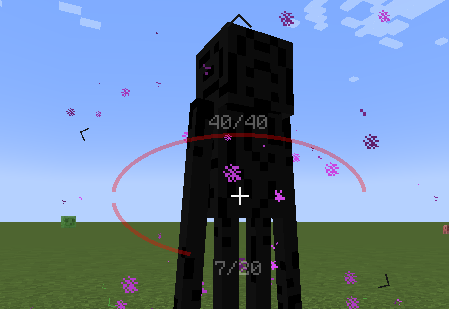
> With JavaScript code, you can draw custom UI elements on the screen, such as two elliptical health bars. > > Example: (https://github.com/An-Mao/NekoUI/wiki/js-example#center-health-bar) > > !(https://cdn.modrinth.com/data/cached_images/23d857ad050f74f2fc95be48668c0a0f8514b785.png)
## Interface Preview
> Here are some interface previews of Neko UI, showcasing its features and customization options.
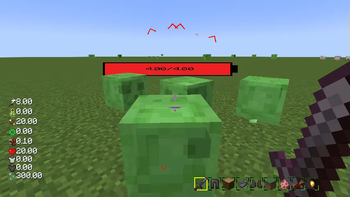
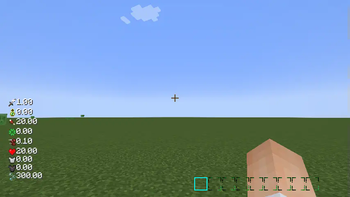
> Custom HUD: The health bar, hunger bar, experience bar, and hotbar have been redesigned and can be enabled or disabled individually. > > !(https://cdn.modrinth.com/data/9yP76gQL/images/1e5a39d331fff83e20eb5e9eac19eeba233112fd.png)
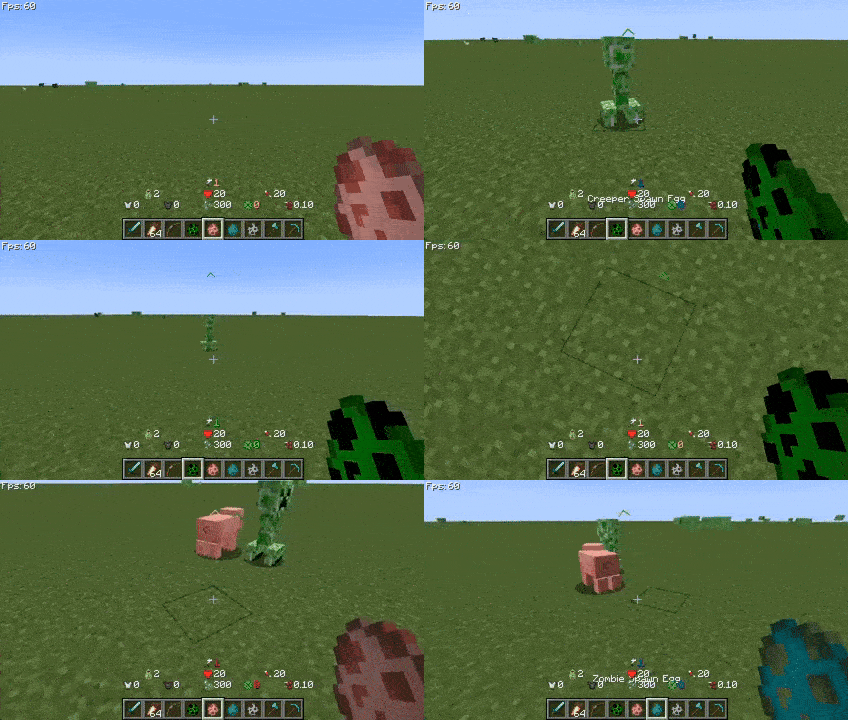
> Creature Direction Indicator: Real-time display of creatures relative to your position, with dynamic scaling of icons based on distance for easy tracking. > > !(https://cdn.modrinth.com/data/9yP76gQL/images/7b80a50de8153a4f8fd762a01be9e80ac500fa47.gif)
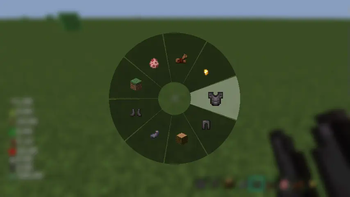
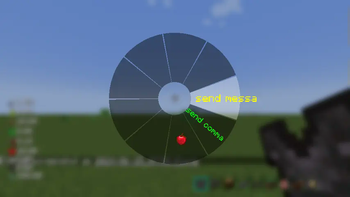
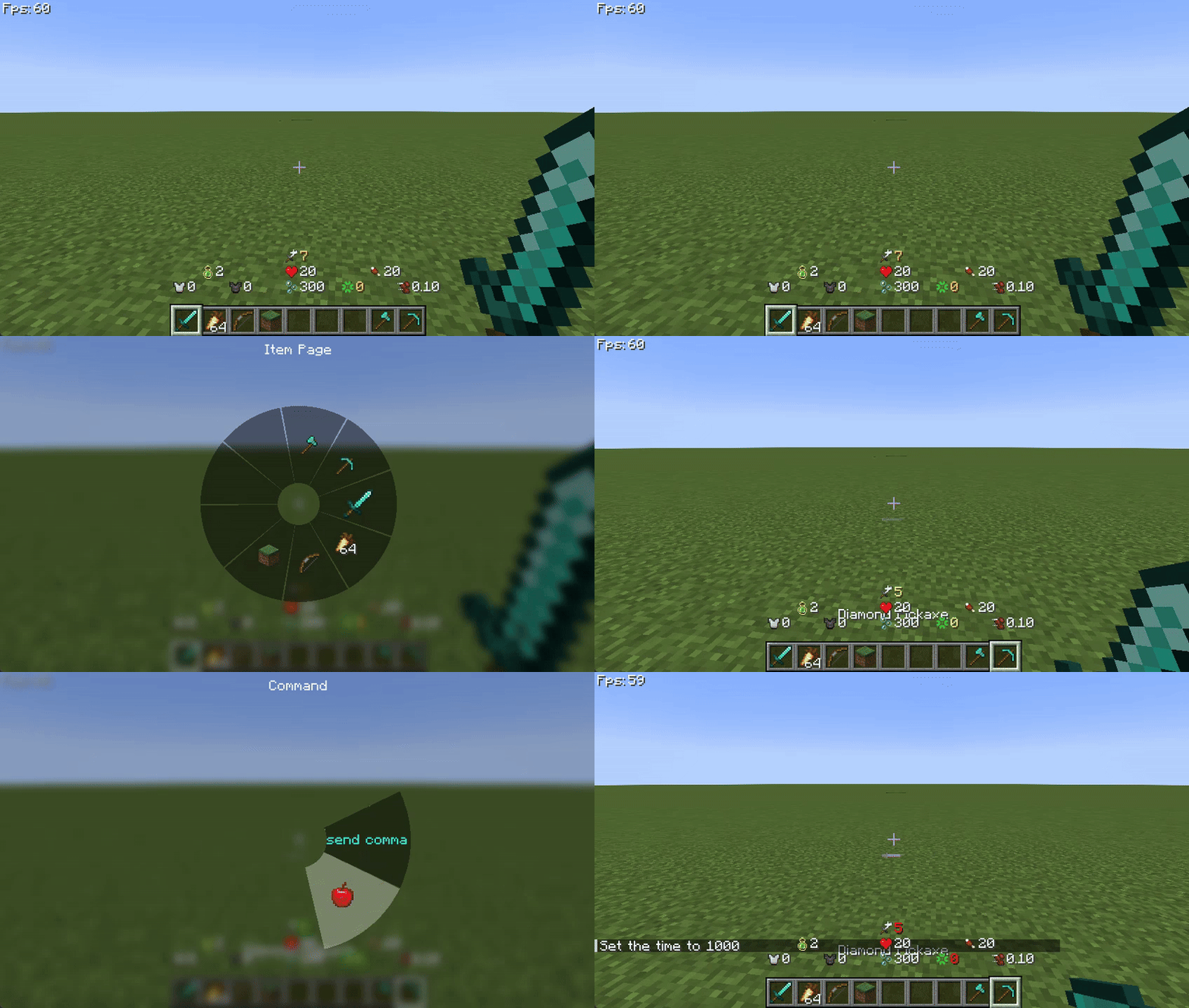
> Quick Menu:* Hold down the `TAB` key to open the quick menu, switch interfaces with the left and right mouse buttons, slide to the desired option, and release `TAB` to trigger. > > !(https://cdn.modrinth.com/data/9yP76gQL/images/e16080ae0297c6adb97b30aaec63cfbc8082e4e8.gif)
## More Information
If you have any questions, suggestions, or feedback, please feel free to contact me through the following methods.
Happy gaming!
## Contact Information
- (https://url.anye.dev/tg)
- (https://url.anye.dev/discord)
📊 Mod Details
- Game
- Minecraft Mods
- Author
- anmao
- Version
- 1.20.1-2.0.0-26072400
- Downloads
- 29,551
- Endorsements
- 24
- Category
- forge
- Created
- 7/2/2024
- Updated
- 7/24/2026
- Game Versions
- 1.20.1
- Tags
- optimization
🔧 How to Install Minecraft Mods Mods
Download from Modrinth. Use Prism Launcher or drop into your mods folder.
📖 Full step-by-step install guide for Minecraft Mods →
Visit the official mod page for specific installation instructions for this mod.
🎮 Need cheat codes or console commands? Check ur gaming wiki for Minecraft Mods commands, item IDs, and more.
❓ Frequently Asked Questions
Which Minecraft Mods versions does Neko UI support?
The author lists 1.20.1. Other versions may work but are untested by the author.
What is the latest version of Neko UI?
Version 1.20.1-2.0.0-26072400, published 2026-07-24 with 29,551 downloads recorded at the source.
Keep browsing — more Minecraft Mods mods await